HackTheBox Sherlock - Unit42 (DFIR)
HackTheBox Sherlock Unit42 walkthrough: reconstructing a malware infection from a single Sysmon event log — malicious double-extension binary, time stomping, connectivity check, C2 reachout, and a backdoored UltraVNC implant.
Scenario
Unit42 is a Very Easy HackTheBox Sherlock (defensive / DFIR challenge). Instead of exploiting a box, you are handed forensic artifacts from a compromised Windows host and must reconstruct what the attacker did.
“This is the first installment in a thematic series of DFIR challenges. The artifacts provided will familiarise you with Sysmon logs and Windows event analysis. An employee reported suspicious activity; you are given the Sysmon log to investigate the infection chain.”
| Field | Value |
|---|---|
| Platform | HackTheBox — Sherlock |
| Category | DFIR / Endpoint log analysis |
| Difficulty | Very Easy |
| Artifact | Microsoft-Windows-Sysmon-Operational.evtx |
| Skills | Sysmon event IDs, process tree, defense-evasion spotting, C2 identification |
Artifacts
A single file is provided:
Microsoft-Windows-Sysmon-Operational.evtx— the System Monitor (Sysmon) operational log exported from the victim host.
Everything we need to tell the story lives inside this one log. The whole challenge is an exercise in reading Sysmon correctly.
Toolkit
Any of the following can parse the .evtx; pick one:
- EvtxECmd (Eric Zimmerman) → convert to CSV, then open in Timeline Explorer
- Windows Event Viewer (native) with custom XPath filters per Event ID
- Chainsaw or Hayabusa for rule-based Sysmon hunting at scale
1
2
# Eric Zimmerman's EvtxECmd: evtx -> CSV for triage in Timeline Explorer
EvtxECmd.exe -f Microsoft-Windows-Sysmon-Operational.evtx --csv . --csvf unit42.csv
Analysis — Sysmon enriches the raw Windows event stream with the fields a responder actually needs — full command line, image hashes, parent process, and network tuples. Normalising the .evtx into a timeline first means every later question becomes a filter, not a hunt.
Background: the Sysmon Event IDs you need
Most of the investigation is “filter by the right Event ID, then read the fields.” The relevant ones:
| Event ID | Meaning | Why it matters here |
|---|---|---|
| 1 | Process creation | command line, hashes, parent → spot the malicious binary |
| 2 | A process changed a file creation time | the canonical time-stomping signal |
| 3 | Network connection | source/destination IP and port → C2 reachout |
| 5 | Process terminated | bounds the dropper’s active window (self-termination) |
| 11 | File created | files written to disk by the dropper |
| 22 | DNS query | domains the malware resolved |
Investigation
Q1. How many event logs are there with Event ID 11?
Filter the log on EventID = 11 (FileCreate) and count the results.
Answer
1
56
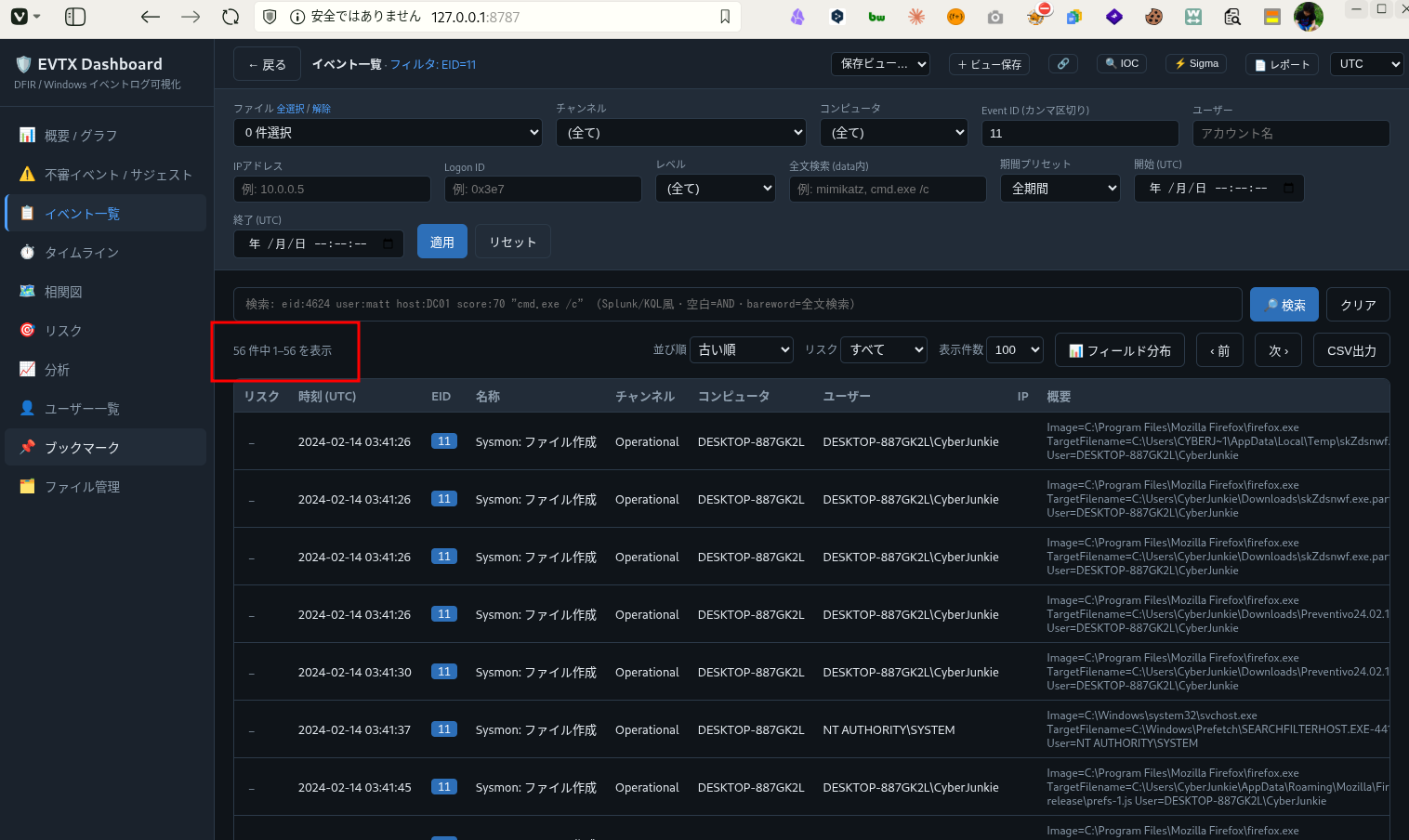
Analysis — Counting FileCreate events first gives a quick sense of how “noisy” the dropper was on disk — a single click that writes dozens of files is already a strong infection indicator before you have even named the malware.
Q2. What is the malicious process that infected the victim's system?
Pivot to EventID = 1 (process creation) and scan the Image / CommandLine fields. One entry stands out immediately because of a double file extension — a classic attempt to disguise an executable as a document.
Answer
1
C:\Users\CyberJunkie\Downloads\Preventivo24.02.14.exe.exe
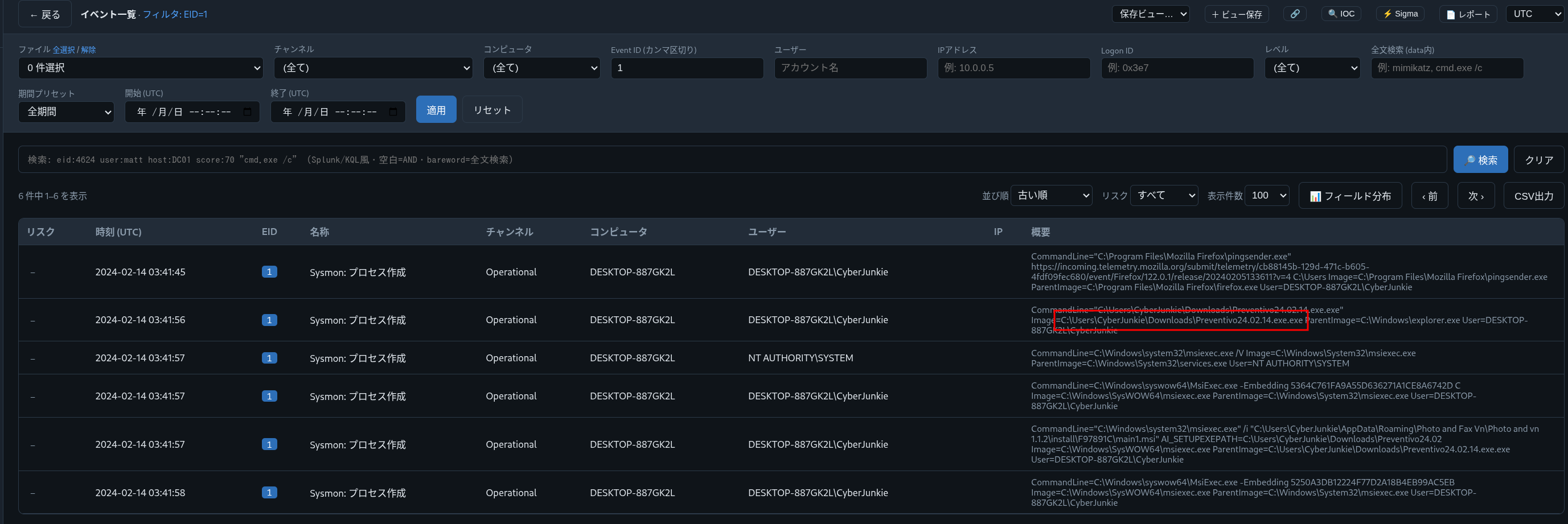
Analysis — *.exe.exe is a glaring red flag: Windows hides known extensions by default, so the victim only saw Preventivo24.02.14.exe and assumed it was a normal file. Running from \Downloads\ plus an Italian lure name (preventivo = “quote/estimate”) screams social-engineering delivery. (MITRE ATT&CK T1036.007 — Masquerading: Double File Extension.)
Q3. Which cloud drive was used to distribute the malware?
The lure was delivered from a legitimate file-hosting service to slip past reputation-based controls.
Answer
1
Dropbox
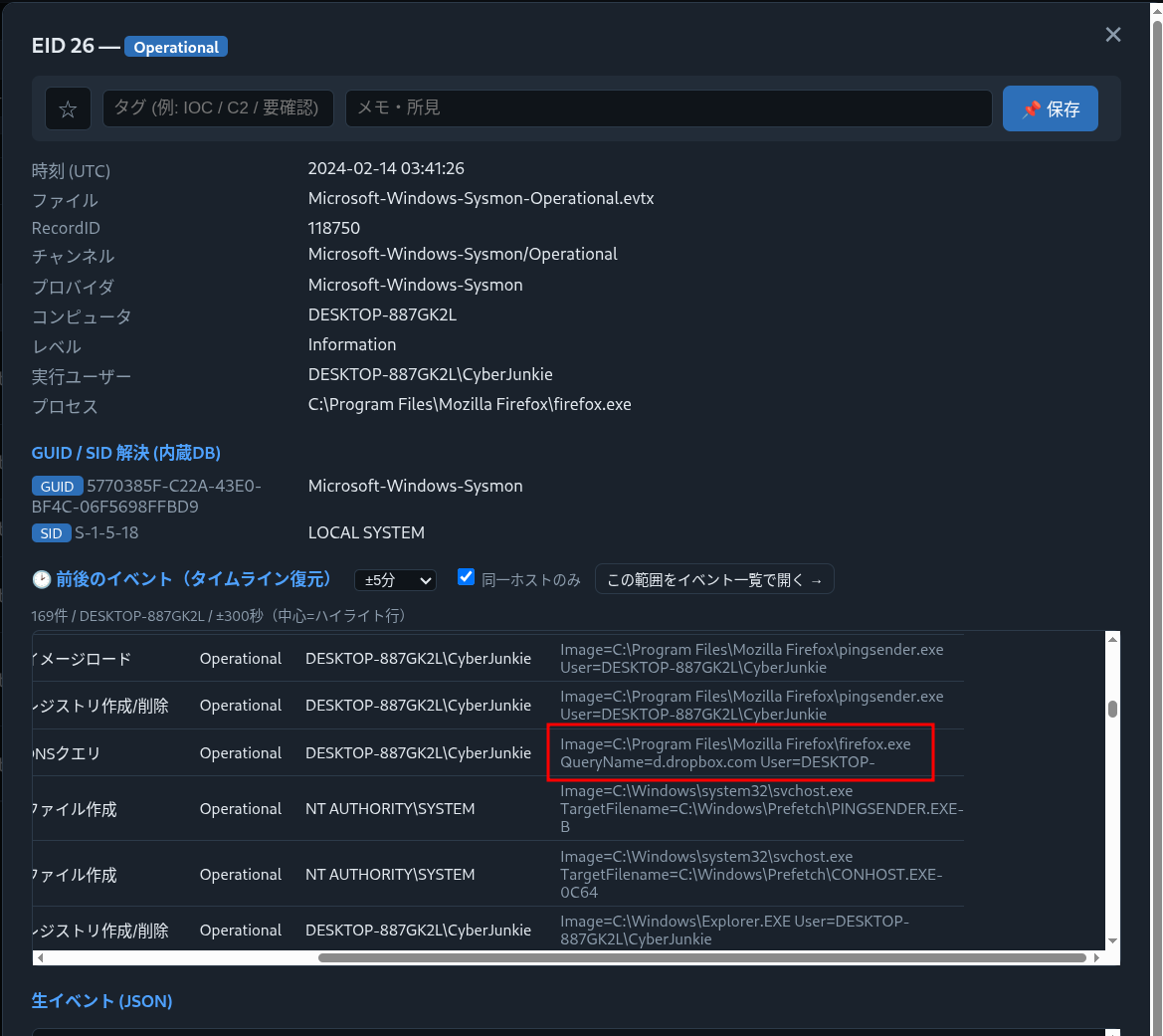
Analysis — Attackers abuse trusted SaaS storage (Dropbox, Google Drive, OneDrive) so the download originates from a high-reputation domain that proxies and URL filters rarely block. (MITRE ATT&CK T1105 — Ingress Tool Transfer via a trusted web service.)
Q4. The malware used time stomping on a PDF. What was the timestamp changed to?
Time stomping rewrites a file’s creation time so the artifact blends in with older, legitimate files. Sysmon records this specifically as Event ID 2 (“A process changed a file creation time”). Filter on it and read the new value applied to the PDF.
Answer
1
2024-01-14 08:10:06
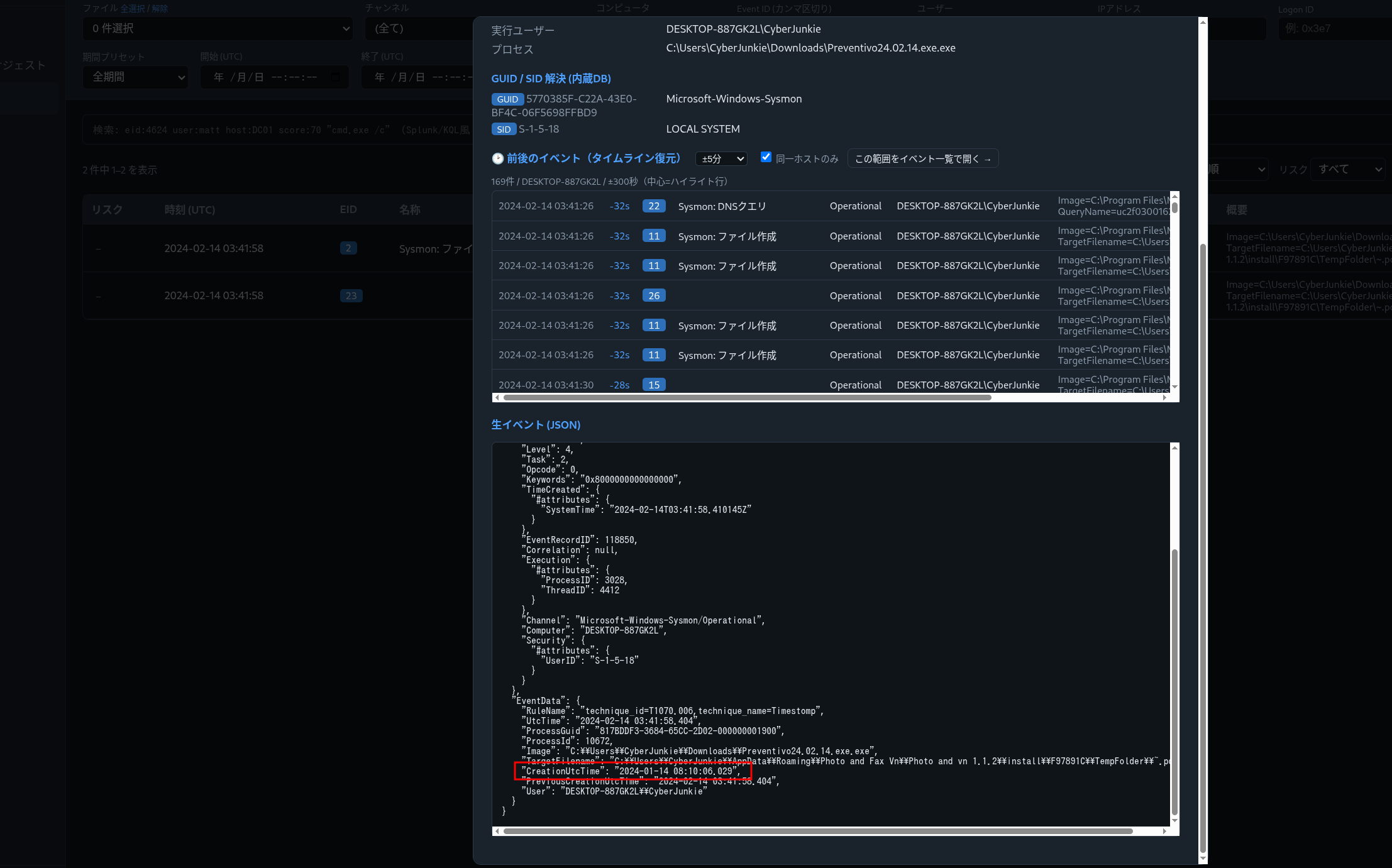
Analysis — Event ID 2 is one of the few places an analyst gets direct evidence of anti-forensics. The dropper backdates the file so a responder sorting by creation time scrolls right past it. The presence of EID 2 at all is itself suspicious — legitimate software almost never rewrites creation timestamps. (MITRE ATT&CK T1070.006 — Timestomp.)
Q5. Where was once.cmd created on disk? (full path)
Filter EventID = 11 for once.cmd in the TargetFilename field.
Answer
1
C:\Users\CyberJunkie\AppData\Roaming\Photo and Fax Vn\Photo and vn 1.1.2\install\F97891C\WindowsVolume\Games\once.cmd
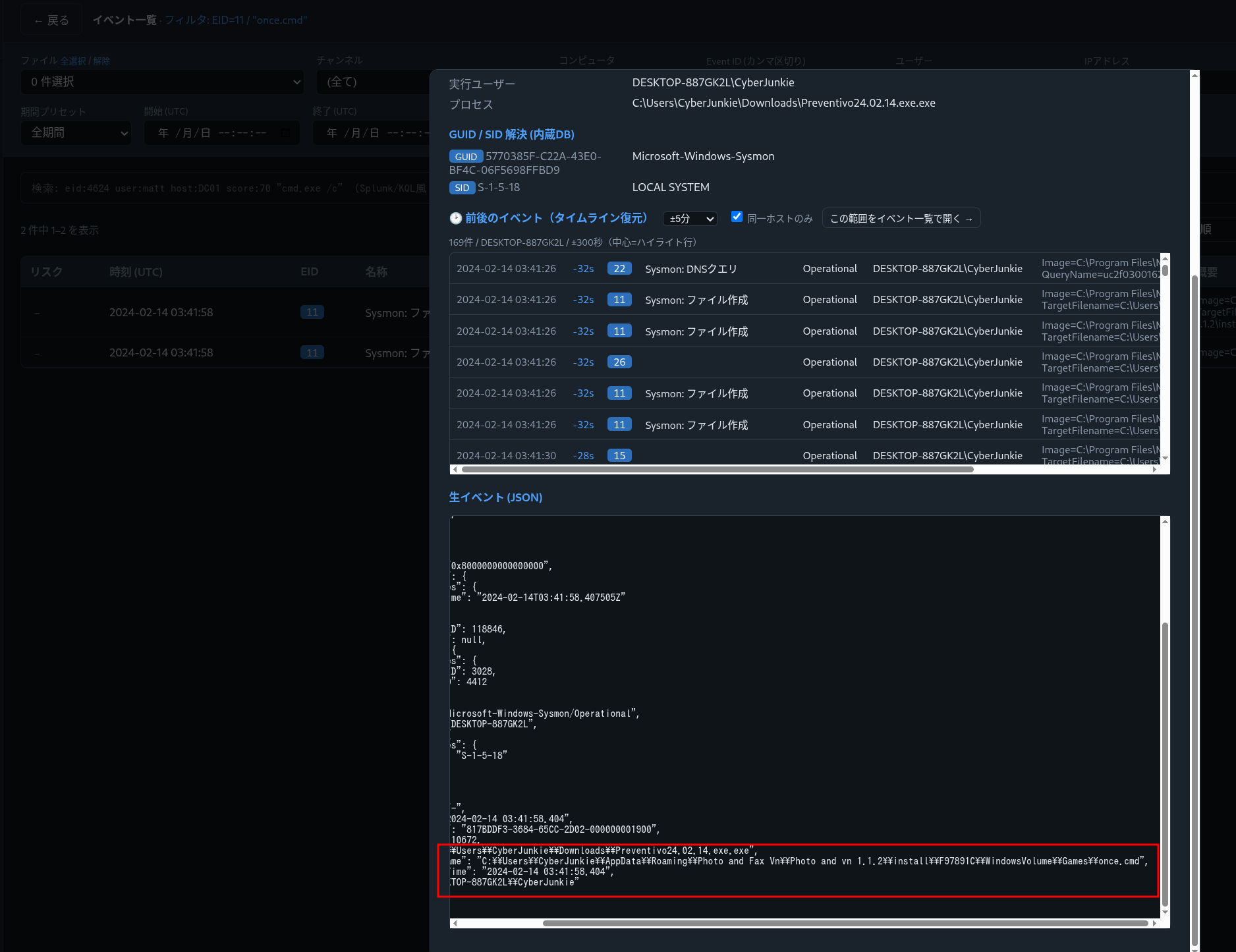
Analysis — The deeply nested, plausible-looking AppData\Roaming\... path is meant to look like a benign installed app. Dropping batch/scripts under AppData\Roaming is a common persistence/staging location that survives reboots and rarely draws attention.
Q6. The malware tried to reach a dummy domain to check internet connectivity. Which domain?
Filter EventID = 22 (DNS query) for queries made by the malicious process.
Answer
1
www.example.com
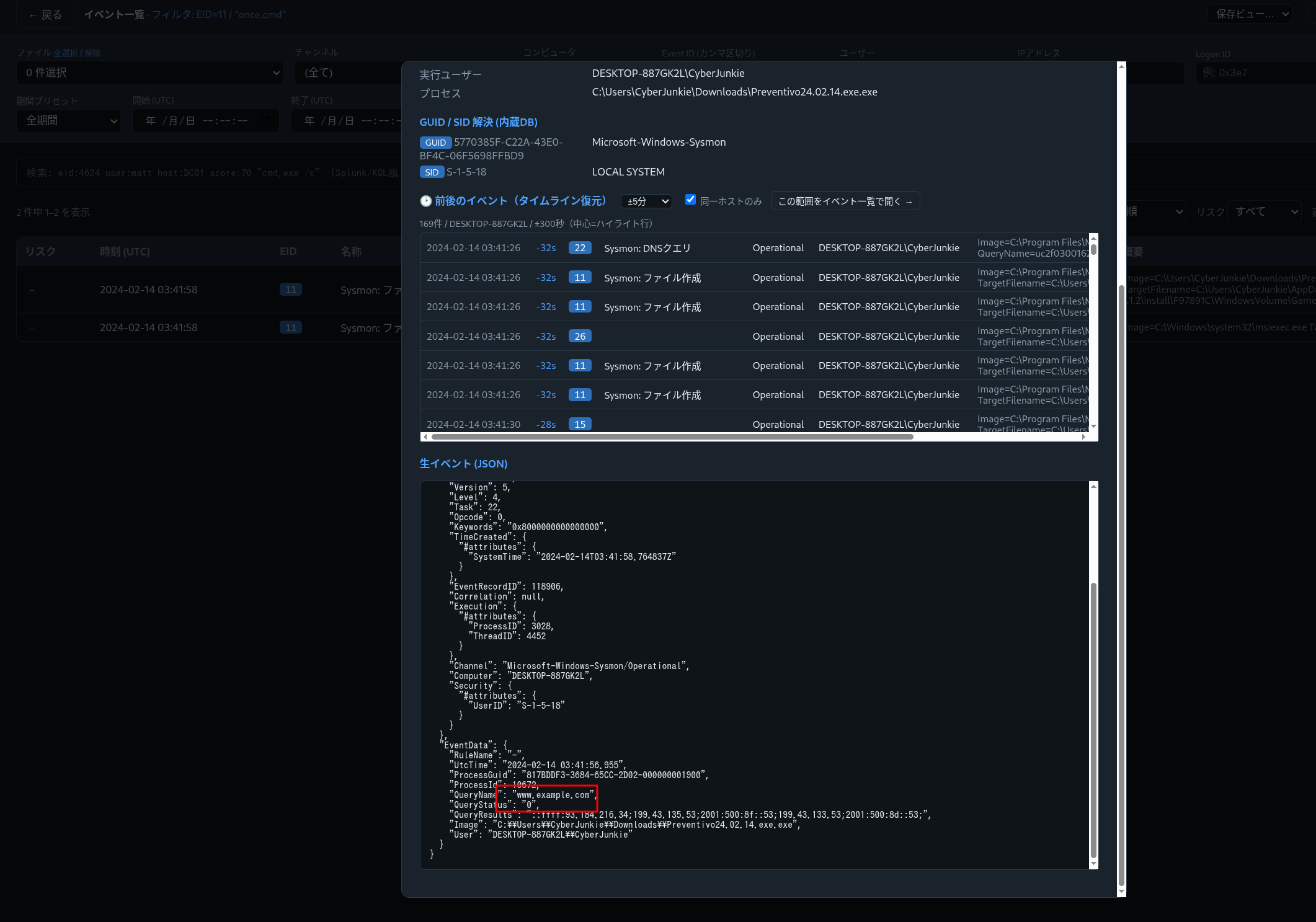
Analysis — Malware frequently resolves a guaranteed-up “canary” domain first to confirm it has internet before contacting real infrastructure — a cheap sandbox/airgap check. www.example.com is an IANA-reserved domain, perfect as a connectivity probe.
Q7. Which IP address did the malicious process try to reach out to?
Pivot to EventID = 3 (network connection) for the malicious process.
Answer
1
93.184.216.34
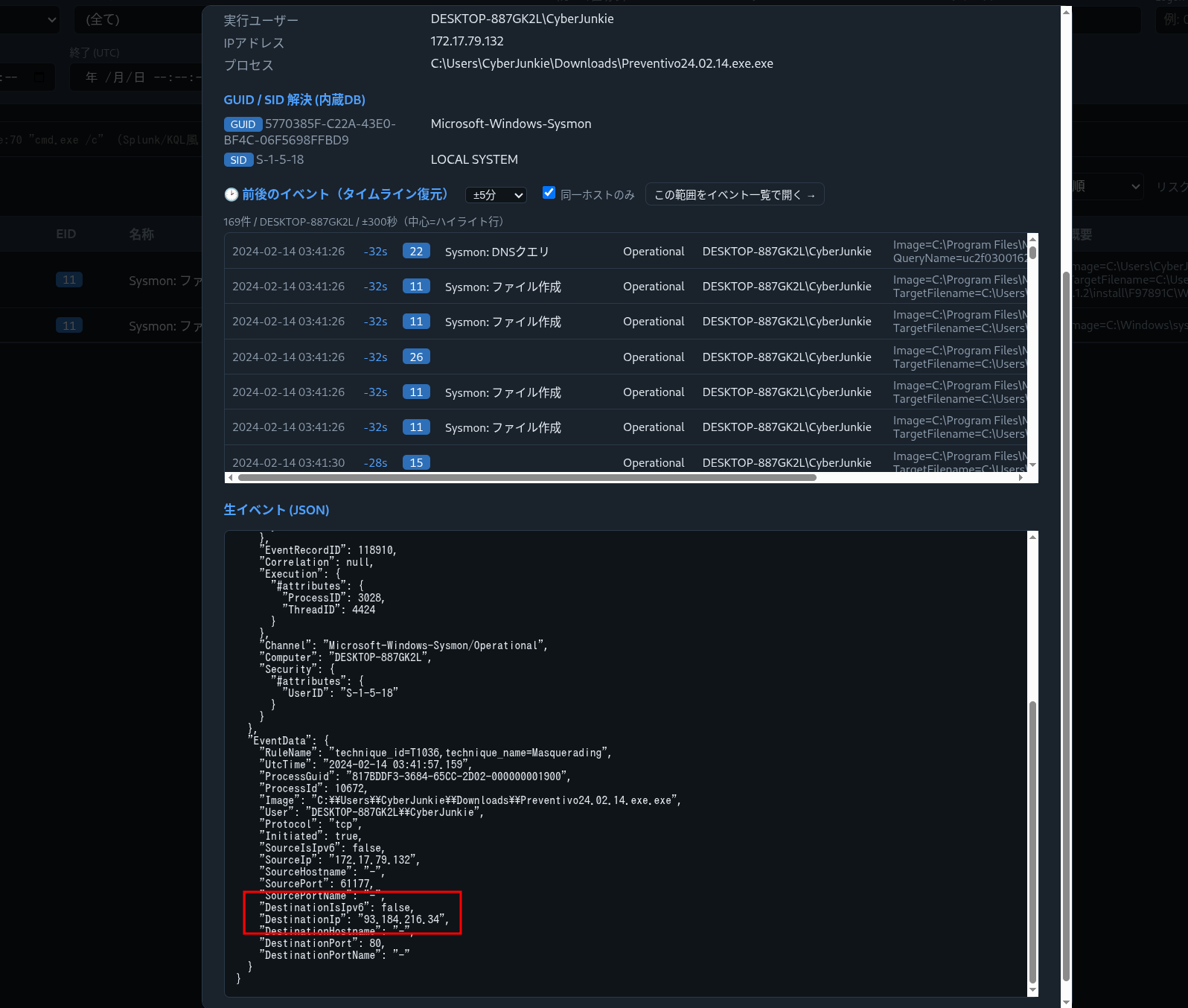
Analysis — 93.184.216.34 was the long-standing public IP of example.com — confirming the DNS query above resolved and the host actually egressed. Pairing EID 22 (intent to resolve) with EID 3 (actual connection) is how you prove the beacon left the building rather than just attempted DNS.
Q8. When did the process terminate itself?
The dropper cleans up after planting its payload — a backdoored variant of UltraVNC. Filter EventID = 5 (process terminated) for the malicious image.
Answer
1
2024-02-14 03:41:58
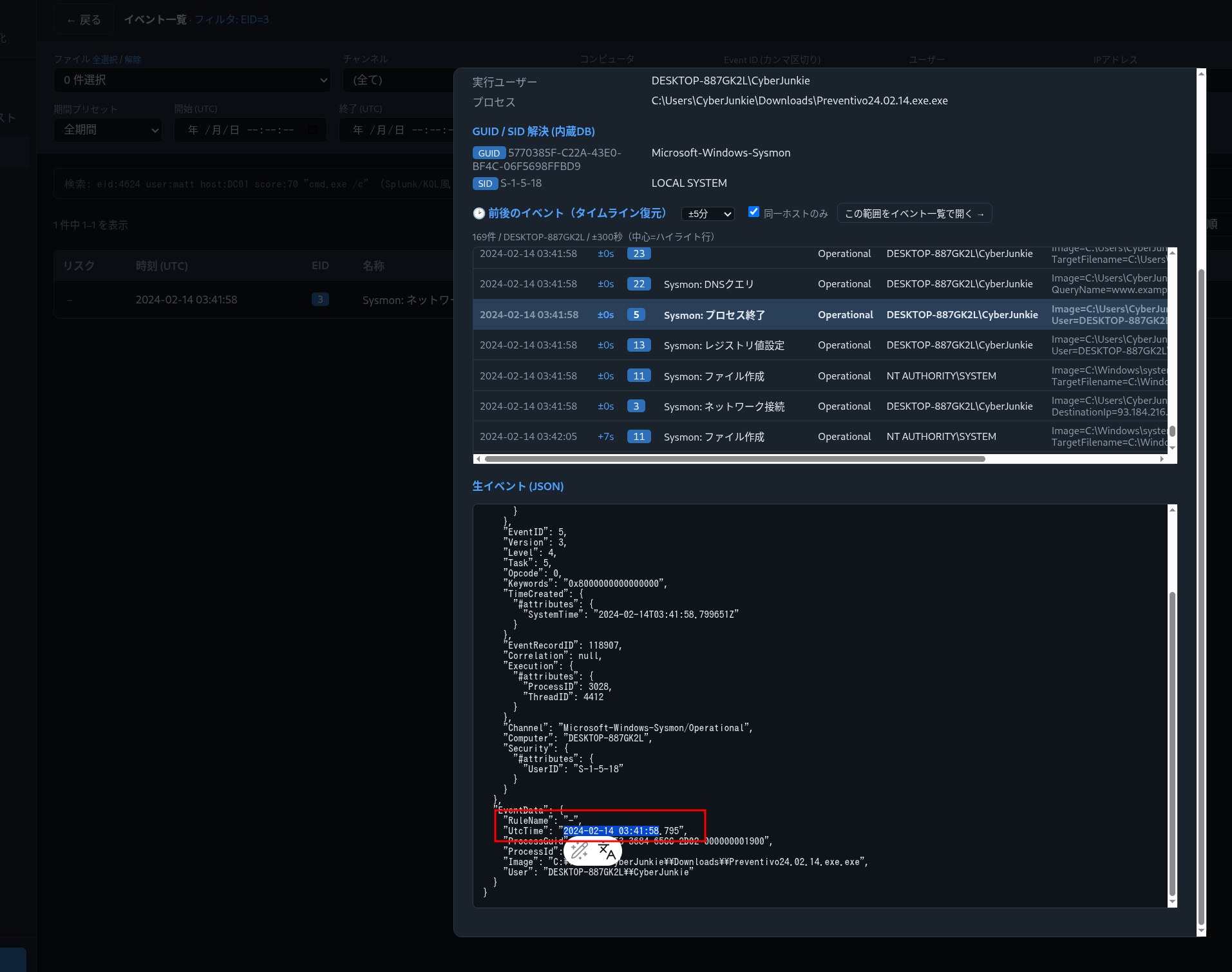
Analysis — Self-termination after dropping the real implant is deliberate: the loud, short-lived dropper exits, leaving only the quiet, legitimate-looking UltraVNC service for remote access. Catching the EID 5 lets you bound the dropper’s active window precisely.
Attack Timeline
| Time (UTC) | Stage | Evidence |
|---|---|---|
| — | Delivery | Preventivo24.02.14.exe.exe downloaded from Dropbox into \Downloads\ |
| (on click) | Execution | Sysmon EID 1 — double-extension binary runs as CyberJunkie |
| 2024-01-14 08:10:06 | Defense evasion | Sysmon EID 2 — PDF creation time backdated (time stomp) |
| (drop) | Staging | Sysmon EID 11 — 56 files written incl. once.cmd under AppData\Roaming |
| (beacon) | Connectivity check | Sysmon EID 22 — DNS www.example.com |
| (beacon) | C2 reachout | Sysmon EID 3 — connection to 93.184.216.34 |
| — | Implant | Backdoored UltraVNC installed for remote access |
| 2024-02-14 03:41:58 | Cleanup | Sysmon EID 5 — dropper self-terminates |
flowchart LR
    DELIVERY --> EXEC --> BEACON --> IMPLANT

    subgraph DELIVERY["Delivery"]
        direction TB
        D1["Dropbox download"]
        D2["Preventivo24.02.14.exe.exe (double extension)"]
        D1 --> D2
    end

    subgraph EXEC["Execution / Evasion"]
        direction TB
        E1["User runs the EXE (Sysmon EID 1)"]
        E2["Drops 56 files incl once.cmd (EID 11)"]
        E3["Time-stomps PDF → 2024-01-14 08:10:06 (EID 2)"]
        E1 --> E2 --> E3
    end

    subgraph BEACON["Connectivity / C2"]
        direction TB
        B1["DNS www.example.com (EID 22)"]
        B2["Connect 93.184.216.34 (EID 3)"]
        B1 --> B2
    end

    subgraph IMPLANT["Implant / Cleanup"]
        direction TB
        I1["Backdoored UltraVNC installed"]
        I2["Dropper self-terminates 2024-02-14 03:41:58 (EID 5)"]
        I1 --> I2
    end
Evidence → IOC → ATT&CK Map
flowchart TB

    subgraph EVID["Sysmon Evidence"]
        direction LR
        V1["① EID 1 — Preventivo24.02.14.exe.exe (double extension)"]
        V2["② EID 11 — 56 files written, incl once.cmd"]
        V3["③ EID 2 — PDF creation time → 2024-01-14 08:10:06"]
        V4["④ EID 22 / EID 3 — www.example.com → 93.184.216.34"]
        V5["⑤ EID 5 — dropper self-terminates 2024-02-14 03:41:58"]
    end

    subgraph IOCS["IOCs"]
        direction LR
        O1["Dropbox-delivered Preventivo24.02.14.exe.exe"]
        O2["C:\\Users\\CyberJunkie\\AppData\\Roaming\\Photo and Fax Vn\\<br/>Photo and vn 1.1.2\\install\\F97891C\\WindowsVolume\\Games\\once.cmd"]
        O3["Connectivity check: www.example.com → 93.184.216.34"]
        O4["Backdoored UltraVNC (remote access)"]
    end

    subgraph ATTACK["MITRE ATT&CK"]
        direction LR
        T1["T1036.007 Double Extension"]
        T2["T1105 Ingress Tool Transfer (Dropbox)"]
        T3["T1070.006 Timestomp"]
        T4["T1071 C2"]
    end

    V1 ==> O1
    V2 ==> O2
    V3 -.-> T3
    V4 ==> O3
    V5 ==> O4
    O1 -.-> T1
    O1 -.-> T2
    O3 -.-> T4
Detection & Hardening (Blue Team)
What would have caught this earlier:
- Alert on double extensions (
*.exe.exe,*.pdf.exe) in\Downloads\and\AppData\execution paths. - Treat Sysmon Event ID 2 as high-signal. Legitimate software rarely rewrites file creation times; a SIEM rule on EID 2 surfaces time-stomping with very low noise.
- Baseline egress. A workstation resolving
www.example.comthen connecting straight out is anomalous; canary-domain lookups are a cheap hunting pivot. - Watch trusted-SaaS delivery. Downloads of executables originating from Dropbox/Drive/OneDrive deserve content inspection, not a reputation free pass.
- Deploy a strong Sysmon config (e.g. SwiftOnSecurity / Olaf Hartong
sysmon-modular) so EID 1/2/3/11/22 are all captured with command line and hashes.
Key Takeaways
- A single well-configured Sysmon log can reconstruct an entire infection chain — delivery, execution, evasion, C2, and cleanup.
- Double file extensions and Event ID 2 (time stomping) are two of the highest-signal, lowest-noise indicators a defender has.
- Always corroborate DNS (EID 22) with the actual connection (EID 3) before calling something “C2.”
- Map findings to MITRE ATT&CK as you go — it turns scattered artifacts into a defensible narrative.
References
- HackTheBox Sherlock: Unit42 — https://app.hackthebox.com/sherlocks
- Sysmon (Sysinternals) — https://learn.microsoft.com/sysinternals/downloads/sysmon
- Eric Zimmerman’s Tools (EvtxECmd / Timeline Explorer) — https://ericzimmerman.github.io/
- SwiftOnSecurity sysmon-config — https://github.com/SwiftOnSecurity/sysmon-config
- MITRE ATT&CK: T1036.007 (Double Extension), T1070.006 (Timestomp), T1071 (C2)